
Mass Effect: Andromeda Collector's Edition Guide Multiplayer Multiplayer Basics
The HUD
The HUD quickly feeds you information while you move around any map.
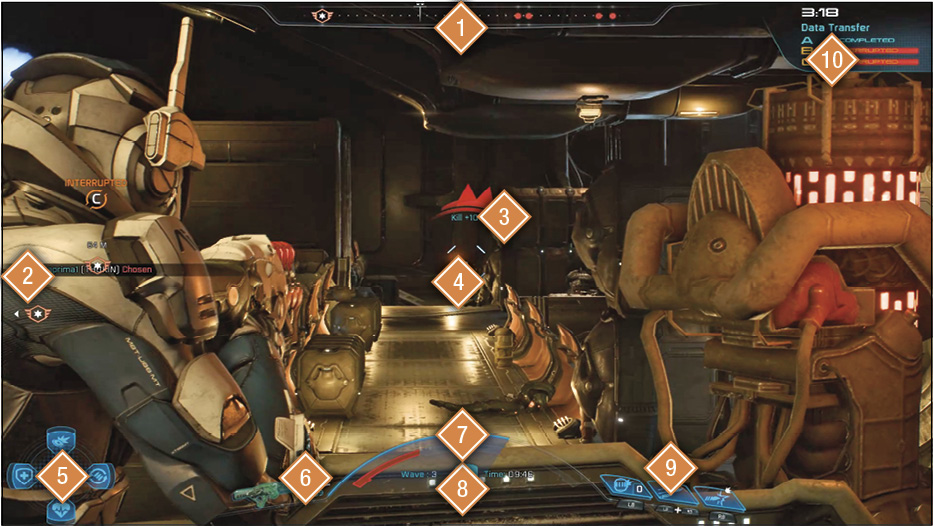
- Compass:The compass not only tells you the direction you are currently facing, but displays the direction of enemies and objectives around you. Enemies above or below you are displayed as small arrows next to red dots that inform you to look up or down. These arrows are extremely useful when you take cover on high ground. For example, most enemies should appear as arrows pointing down when you’re at the highest point of the map. An enemy with no arrow is on your level and needs to be dealt with immediately!
- Kill Feed: The kill feed reveals your strike team’s actions when you don’t have line of sight on them. Via kill feed, you can see how a player kills an enemy and with what weapon. The kill feed also shows you when you’ve gained a medal.
- XP: Just above the crosshair, XP gained from each kill or assist quickly appears and disappears. XP for kills and assists gained from turrets or other placed objects shows up here as well. This is a great way to check whether your grenades or other area-of-effect-based weapons have killed any enemies inside a room or other area you cannot see directly.
- Crosshair: The crosshair shows where you’re aiming, as well as whether you’ve hit a target in a standard or weak point. As you fire your weapon, hit markers show up around the reticle in the form of orange or white Xs. An orange X means you’ve scored a hit on an enemy’s weak point; a white X dictates a standard hit. A larger red X appears when you land a killing blow on an enemy. When moving or firing from the hip, accuracy decreases. When you aim down the sights, the crosshair initially shrinks before expanding from rapid fire. The expanded crosshair is a visual indicator of your lowered accuracy, but it shrinks back down when you’re not firing. If you have a skill recharging, a small bar appears on the respective side (left, right, or center) of the crosshair, showing you the amount of time left before it disappears upon recharge completion.
- Consumables: There are four different consumables in Multiplayer. Consumables can be gained from packs and are available for one-time use. The amount of each available consumable is attached to the corresponding icon.
- (D-Pad Up) Cobra RPG: The Cobra RPG is a one-shot missile launcher, useful for taking out tight groups of enemies or hardened targets.
- (D-Pad Left) First Aid Pack: Immediately restores full health and shields.
- (D-Pad Right) Ammo Pack: Immediately refills the ammunition of all your weapons, including your current clip. Also refills your power cells and eliminates any recharges in progress.
- (D-Pad Down) Revive Pack: Allows you to revive yourself from the man-down state, but not death.
- Current Weapon and Ammo: Your current weapon appears here, along with the amount of ammunition in your clip (the top number to the right). The bottom number represents the ammo you have available to reload the weapon.
- Health and Shields: The large arc in the bottom center of the screen between your gun and skills shows your current armor and shield values. Damage is first absorbed by the shield, which decays from right to left until it’s destroyed. Further damage is applied to your health—when the health bar empties, you’re put into a “man-down” state. After a short period during which you don’t take damage, your shield regenerates to its full value.>
- Wave and Current Time: Under your health and armor status, the current wave of your mission and total amount of time played are displayed.
- Skills: Your three currently equipped skills appear to the right of the health and armor bars. Skills with recharge speeds change to a lighter color that slowly scrolls down while the skill is unavailable. Skills like mines and grenades feature a number indicating how many uses you have until you need to visit an ammo stockpile for reloads.
- Objective Wave Timer and Progress: When playing an objective wave, the current objective, amount of time remaining, and the time to complete the objective are displayed.