
Borderlands 2 Game of the Year Guide Claptrap's Guide to Minioning
Getting Your Bearings
It’s cold, and you’re groggy and close to expiring, but it’s not so bad… there are gadgets to both distract you and to remind you of your dire situation! You have a heads-up display designed to keep you apprised of your situation on Pandora at all times, thoughtfully provided to you by your robot savior Claptrap at the outset. Actually generated by separate components, together the health display, experience point display, weapon display, and digital map display modules power your HUD.
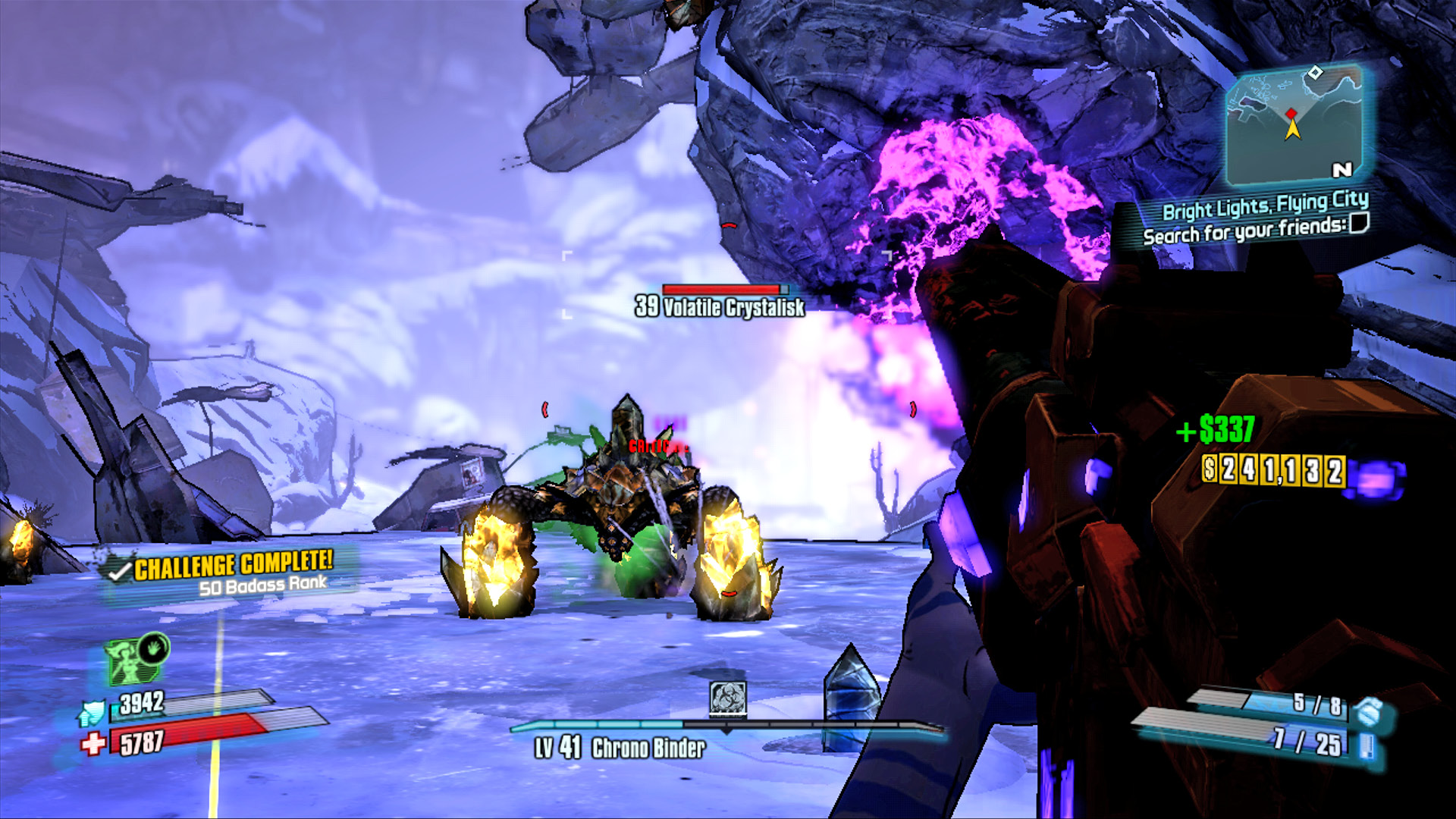
- Challenge progress. Here, you’ll be updated when you complete optional objectives that build your Badass Rank. Building Badass Rank leads to getting Badass Tokens, which allow you to buy profile-wide stat perks! You’ll also see important system messages here, such as online connection status changes.
- Action Skill readiness, shields, and health. Your Action Skill is the raison d’être of your character’s class. Shields are the first of three lines of defense against death; health is the second line of defense. The third and final line of defense is Fight For Your Life, a state that occurs when your shields and health are both fully depleted.
- Your targeting reticle shows up midscreen, and it indicates the relative accuracy of your weapon. Zooming in tightens the reticle and focuses aim at the cost of movement speed and field of vision.
- The experience point module at the bottom of the HUD displays your current level, a visual aid showing progress to the next level, the cooldown of skills like Scorn and Fistful of Hurt, and any temporary bonuses enabled, such as those granted by kill skills.
- The digital map display in the top-right shows a minimap of the nearby area, as well as current mission objectives. Incoming ECHO Recorder transmissions are also displayed in this space.
- Money. This makes Pandora go ‘round. This will pop up to show your increased liquidity anytime you acquire new funds.
- Current reserves and carrying capacity. An equipped firearm or grenade enables these displays, but any longer than a few minutes into your quest, and your possession of both is a forgone conclusion. Carrying capacity can be increased for lots of things; check out the Marcus Munitions Monthly chapter for more information.