
Watch Dogs 2 Guide Training Part 4: Mission And Progression
Dedsec App
When you’ve met Sitara, Wrench, Josh, and Horatio at the Hackerspace in San Francisco, you’re given an app that Blume hasn’t officially approved. It’s the DedSec app and is used to track the progress of operations.
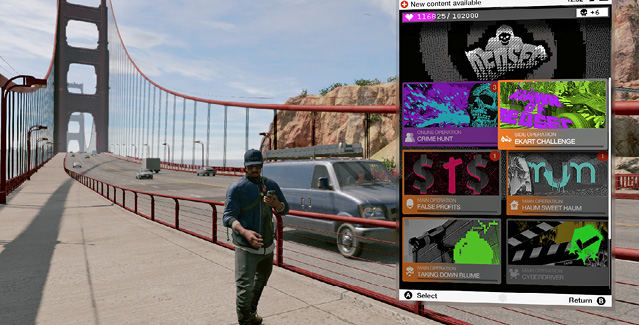
Main Screen: Select an operation and track it directly from the app. There are three types of operations: Main (mandatory missions), Side (optional missions), and Online (Co-op Operations). The six most-recently played or unlocked operations are listed first. Scroll down for more operations, and finally operations you’ve completed, which have a large green “check” on them.
Note the unique icon; the type, name, and artwork of the operation; and progress bar, which indicates how much of the operation you’ve completed for each mission.
Operation Screen: Select an operation (in this example, the Main Operation CyberDriver), and you have the following information: There are checks and crosses for each part of the operation you’ve finished or still have to complete. Then you have the name of the operation section you’re playing or have played, along with the rewards you receive and a brief.
Map Screen: Operations can also be tracked from Nudle Maps. For example, if Main Operation: CyberDriver is accessible, the waypoint to start and track the mission is shown by the same unique icon. This allows you to instantly track (and gain a GPS route to) the operation waypoint, which is helpful. New operations are revealed when you gain Followers or complete operations. Remember to look back over past operations if you need to know the rewards you received (i.e., Followers and collectibles, usually outfits).