
Watch Dogs 2 Guide Training Part 1: Navigation And Driving
Smartphone
Using the DedSec smartphone is the key to accessing operations, missions, and all important content to your continuing well-being. It has a great deal of functionality.
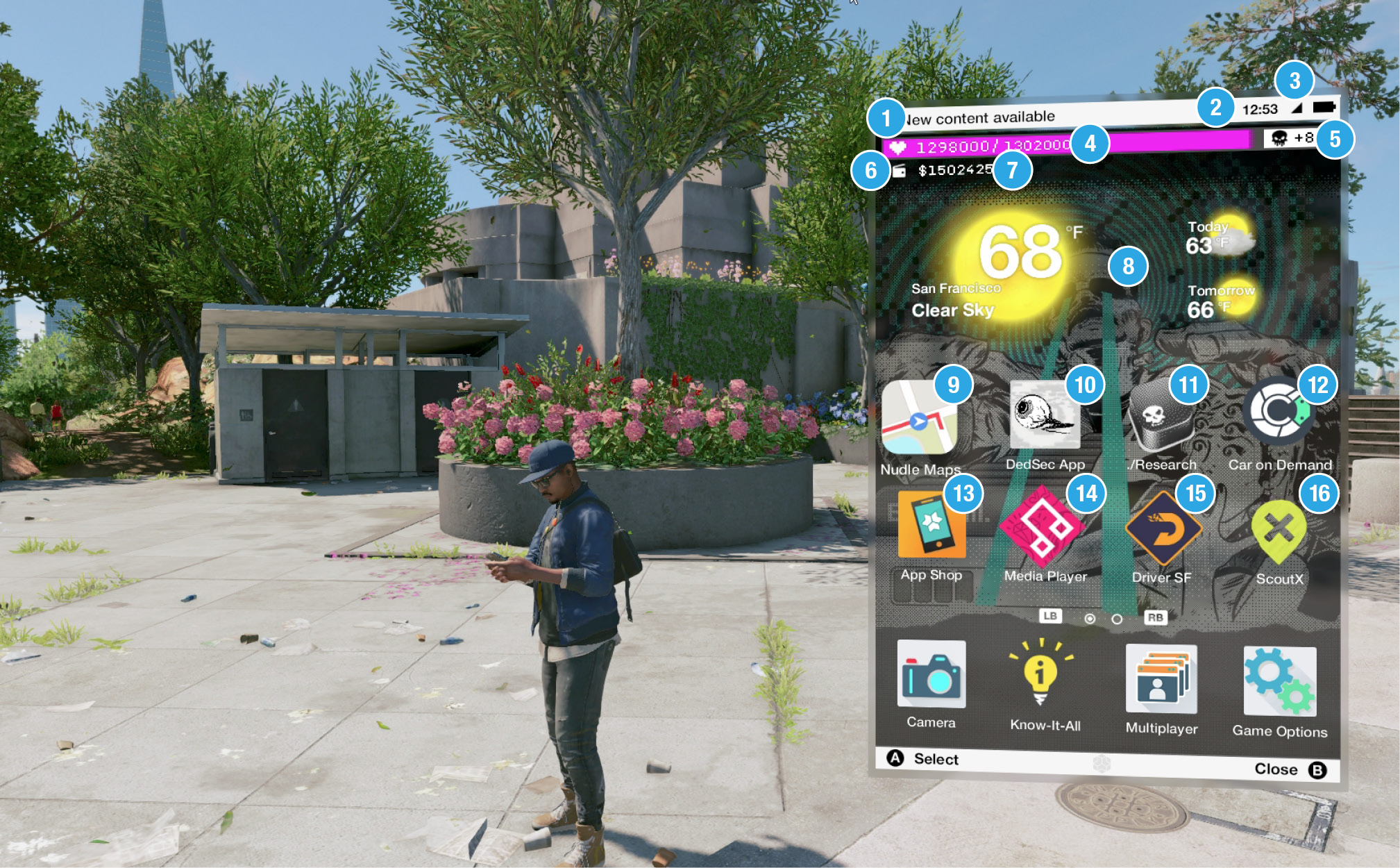
 New Content Available: This appears every time new content (a red dot) appears on on any of your apps.
 Music Icon: This shows you’re playing music. Switch music off and on using the Media Player app.
 Time and Battery: This shows the current time, along with your signal strength and battery. The latter two icons aren’t relevant to your needs.
 Followers: Gaining Followers to DedSec is of paramount importance, especially as you need over 4 million of them on the last Main Operation! Check here to see how many you have at a glance.
 Research Points: This shows how many Research Points you’ll acquire when your Follower count reaches the next level indicated. Spend them to unlock abilities in the ./Research App.
 Wallet Icon: Need to check your cash? Look here!
 Money: This shows your available cash. Use cash to purchase clothes, weapons, and drones.
 Current Weather: This shows the current climate for one of the four Bay Area locations you’re in—Marin, Oakland, San Francisco, or Silicon Valley—along with today and tomorrow’s forecast.
 Nudle Maps: An App Shop download, this accesses your main map function, allowing you to more accurately and swiftly maneuver about the Bay Area.
 DedSec App: Given to you during your first Hackerspace meeting with DedSec, this tracks your available operations (Main, Side, and Online), including those you’ve completed. The red circle number indicates newly available operations you haven’t tried yet.
 ./Research App: Given to you during your first Hackerspace meeting with DedSec, this allows you to spend Research Points to unlock an increasing number of spectacular research abilities.
 Car on Demand App: An App Shop download, this allows you to order vehicles you purchased from a car dealership, and unique vehicles you found in the world or received as an ULC.
 App Shop: The Blume App Shop is the place to purchase all the non-DedSec apps listed here. Each app costs very little money, so it’s worth purchasing all of them as early as possible in one fell swoop.
 Media Player: An App Shop download, this allows you to sort and play all your music and listen to local radio stations.
 Driver SF: An App Shop download, this provides a good source of extra income as you drive clients to different destinations around the Bay Area.
 ScoutX: This App Shop download lets you explore the Bay Area landmarks by visiting each one and taking a selfie when you get there.
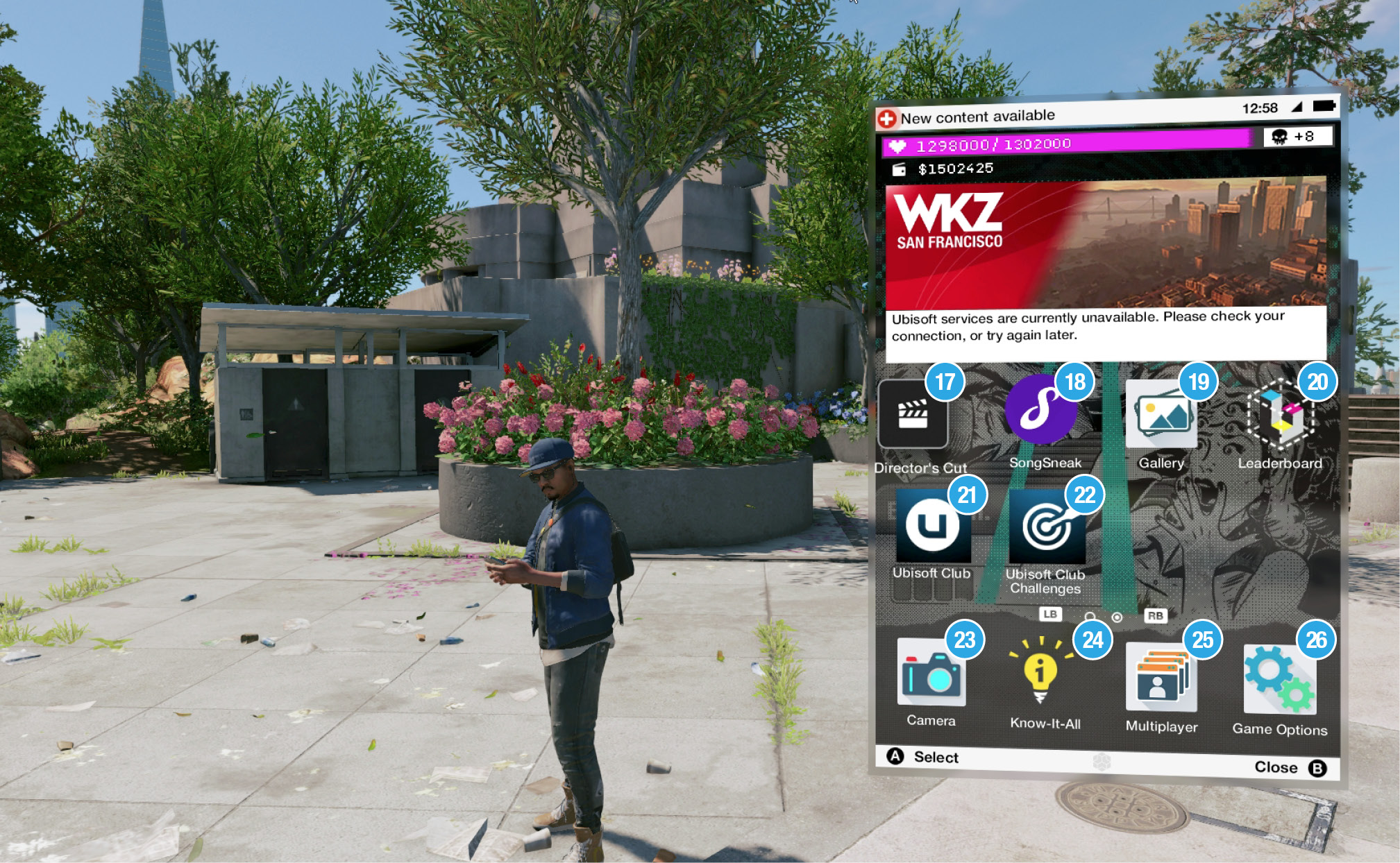
 Director’s Cut: This App Shop download lets you change the filter you see the world in, and removes the HUD if you want to take better screen captures.
 SongSneak: This App Shop download lets you pilfer nearby songs and add them to your Media Player collection.
 Gallery: View all of the photographs you’ve taken at various times during your adventure.
 Leaderboard: View the statistical data for you, your friends, and online opponents regarding online activities. You can also compete for rewards based on your rank.
 Ubisoft Club: Join the Ubisoft Club to receive exclusive presents and Follower additions.
 Ubisoft Club Challenge: Join the Ubisoft Club to receive exclusive challenges with great rewards to claim.
 Camera: Access this to take photographs and selfies to add to your gallery or as part of a Side Operation, or when you’re using the ScoutX landmark app.
 Know-It-All: This offers tutorial and tips on all aspects of your game.
 Multiplayer: Locate your online buddies, and access all three online multiplayer modes from this app.
 Game Options: Tweak, fiddle, and generally change all aspects of the game.