
Watch Dogs 2 Guide Training Part 2: Hacking
Nethack
The first picture shows your normal vision. The second shows your vision in NetHack view. It has advantages as cameras and RCs (drones) become visible through walls. It’s initially useful when cycling through remote security cameras, as you can view cameras through walls and access them (which isn’t possible in normal vision). When switching between normal and NetHack view, it’s important to understand the benefits you receive:
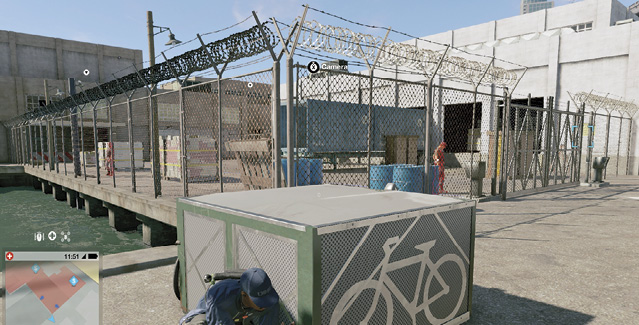
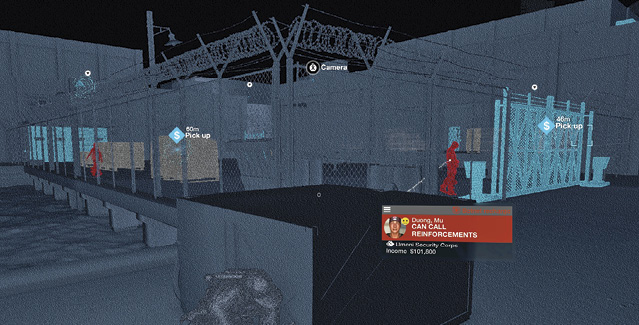
Blue Entities: Anything collectible or hackable either emanates a blue “spark” or is colored blue. Unlocked dataflow, key data, rewards, hackable objects (including doors, RC Jumper vents, and scenery you can hack as proximity traps), cameras, and RC devices (drones) are all this color.
Red Entities: Locked dataflow, locked objects (such as doors and CCTs), and enemies are colored red. This is important for picking out foes from citizens, scouting and tagging enemies, and providing an overview of threats within a restricted area.
Orange Entities: Objectives, intel (laptops, tablets, and phones provide optional information within an operation), and operation starters (mainly for Side Operations) are all colored orange or have an orange “spark” emanating from them.
Gray Entities: Movable objects, such as doors, vehicles, explodable scenery, and open RC vents are this color. This is helpful, as you can learn which scenery will blow apart when an explosive detonates nearby and which vents your RC Jumper can enter.