
Watch Dogs 2 Guide Training Part 11: Car On Demand And Vehicles
Overview
Car On Demand App
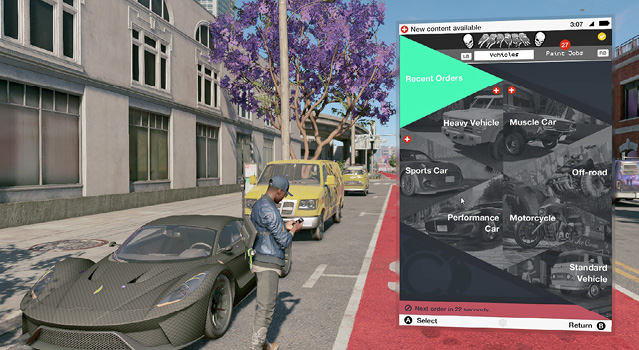
This fantastic tool enables you to call a vehicle to your location between operations but not during them; new cars will not be driven to the middle of a firefight. This allows you to choose from a list of vehicle types and summon any unlocked vehicle to a nearby location, once you’ve purchased the vehicle from a car showroom. Why? So you have your preferred vehicle to drive or ride on prior to an operation start, giving you the advantage of a vehicle you’re comfortable in or one tailored to a specific action. Compare statistics between vehicles on this app, and paint your vehicle in a variety of colors and decals.
“Unlocking” A Vehicle
Here’s how you can unlock vehicles:
- Stealing: Before you have the Hijacker ability, you unlock vehicles manually. This usually results in a citizen calling the police and is dangerously slow if enemies are engaging you at the same time.
- Hack Unlocked (Hijack): With this ability, simply highlight the vehicle you want to drive and hack it. The alarm and locks are automatically disengaged. You’ll unlock most vehicles with this method.
- Auto Dealerships: Stop by a branch of Auto Elite or Total Motors and purchase a vehicle from them. This appears at the dealership garage and is also added to your Car on Demand app. Note that Auto Elite and Total Motors sell completely different vehicles of each type.
- Collecting: There are seven unique vehicles hidden as collectibles around the Bay Area.