
Assassin's Creed Origins Guide The Essentials
Senu
Senu is Bayek’s pet and is an incredibly helpful asset for most aspects of the game. Press up on the D-pad to send your ally into the air. Hold the Heavy Attack button for faster flight, and hold the Aim button to enter hover mode, which allows Senu to mark enemies, animals, ballistae, underground entrances, and brazier alarms.
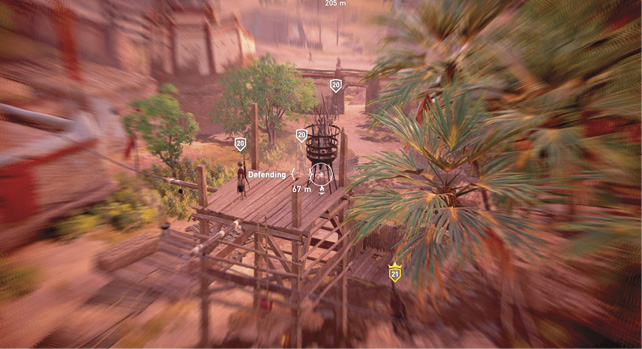
When tracking a quest, send Senu into the air when you near the next objective. A yellow arc points in that objective’s direction. As the reticle gets closer, it becomes a circle and shrinks in size until the location is pinpointed and marked on the HUD. A similar white circle helps pinpoint the locations of enemies, ballistae, brazier alarms, and more.
Senu is unavailable when you are in a conflict, so survey a location before getting too close to hostiles. He also can’t fly in a sandstorm, so wait it out if necessary.
A reward for completing each Viewpoint (synchronize at each location) is an increase in Senu’s Perception. With a total of 58 Viewpoints, you can greatly improve the distance that your flying friend can sense objectives.
Hunt Assistance
Use Senu’s hover mode to spot resources in the wild, whether on the animal or being transported by a military convoy. Mark the resource to create a custom waypoint for easier navigation. When the player hunts a prey animal (flamingo, gazelle, heron, ibex, ibis) in the world, Senu automatically starts attacking nearby prey and kills one of them.
Survey and Find Treasure
Use Senu to survey locations. Enter hover mode by holding the Aim button and then look around the area. Hostiles are automatically tagged as the reticle gets close. The NPC’s level is displayed above their head. Senu can also mark treasure, ballistae, brazier alarms, and underground entrances—making your feathered friend invaluable when infiltrating enemy strongholds.
Distance Finder
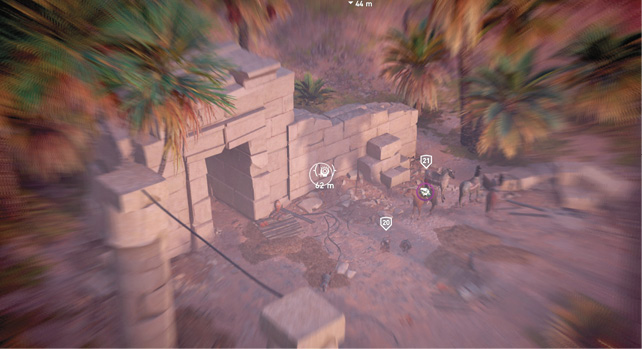
Senu’s hover mode is also useful for finding distance to a location that appears on your HUD. Place the reticle on an icon to display the distance (in meters) to that site. By pressing the Parkour Interaction button, you can set a custom marker, just as with the map.