
Halo 5: Guardians Guide Multiplayer Progression and Customization
Spartan Hub
Throughout the course of your multiplayer career you earn experience points (or XP) while playing in both Warzone and Arena matches. As you accrue XP, you also achieve new Spartan Ranks. With each rank earned you’re rewarded with a Spartan Rank REQ Pack. As we’ll discuss later, REQ Packs contain REQ Cards you can use to customize your Spartan in various ways. In addition to racking up XP, you can also complete specific tasks to earn medals and commendations. For more information on Spartan Ranks and medals, flip to the appendix at the back of the guide. Details on commendations are available in the eGuide.
Want to customize your Spartan or browse the REQ Cards in your collection? Then look no further than the Spartan Hub. While in the game’s main menu, press the controller’s menu button to access the Spartan Hub. Here you have several options:
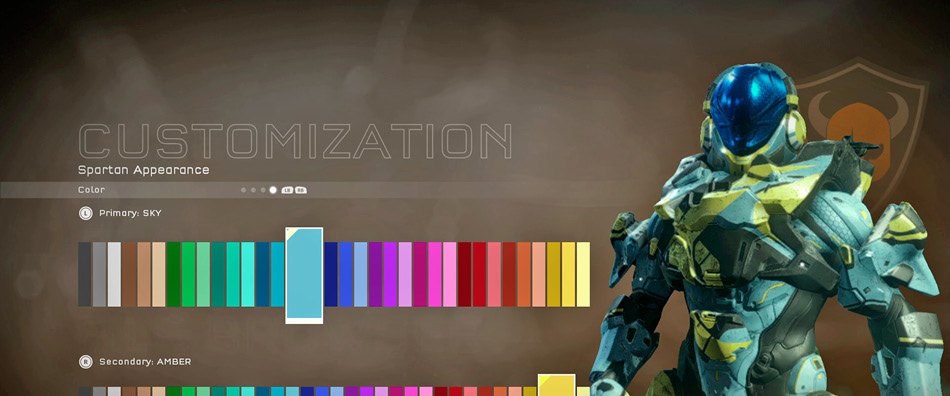
Visit the Spartan Hub to customize your Spartan, including the color of your armor.
Career: Review your service record, commendations, and mission intel.
Customization: Alter your Spartan’s appearance, choosing from different armor, helmets, and visors. Under Spartan ID you can customize your emblem, stance, death effect, assassination, gender, and service tag. Or apply new weapon skins to your loadout weapons.
Requisitions: Here you can access the Store to purchase more REQ Packs. You can also open REQ Packs and browse the cards in your collection.
Settings: Customize your controller settings, adjusting button and thumbstick layouts as well as settings for sensitivity, inversion, crouch, and sprint. There are also audio/video settings you can adjust.