
Halo 5: Guardians Guide Multiplayer Getting Started
Controls
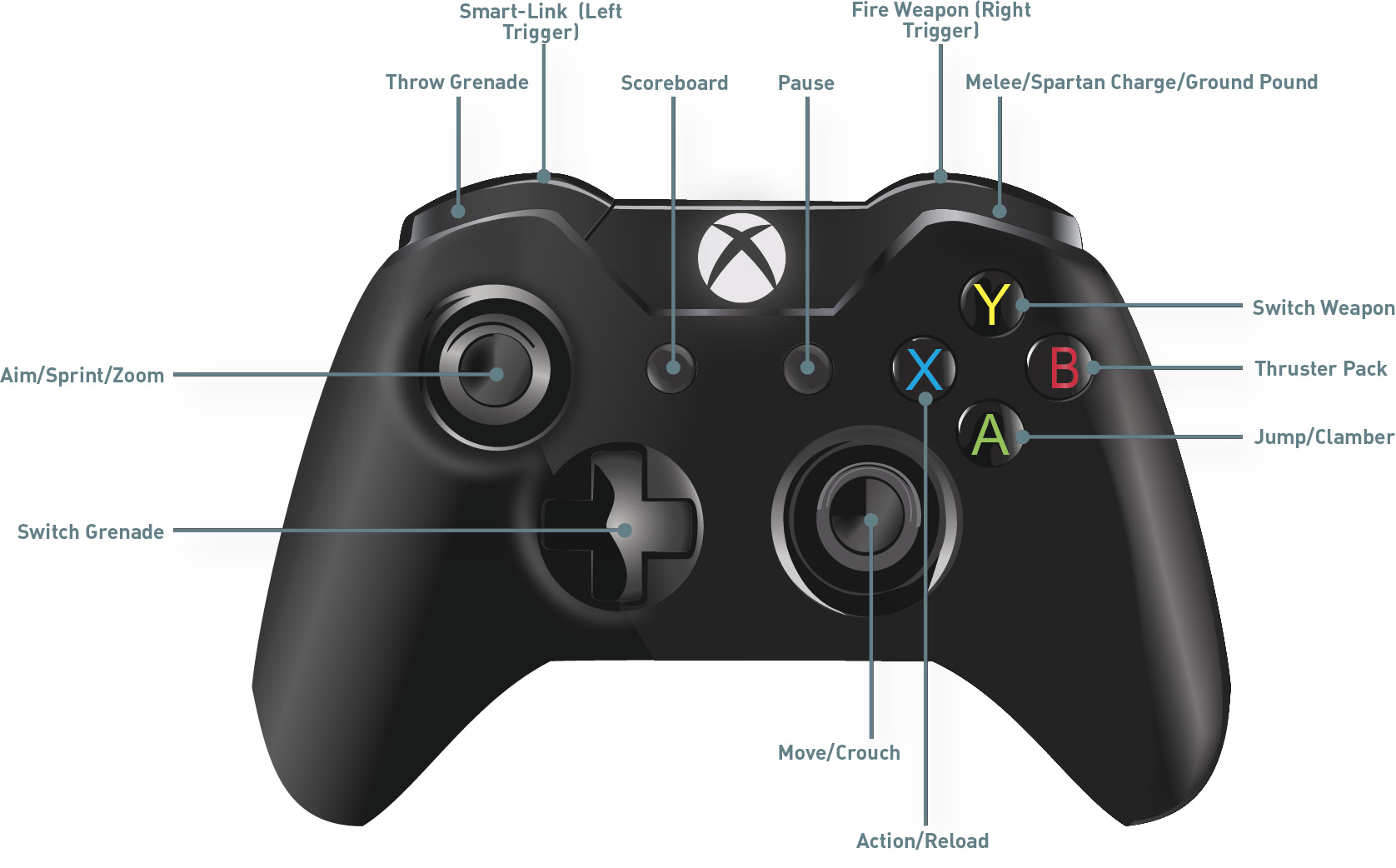
This is the default button layout, utilizing a familiar layout for players migrating from other shooters. Crouch is toggled by clicking down on the right thumbstick, and the Thruster Pack is activated with B. Melee is your right bumper, and Action/Reload is on X. New players will have no problem with this layout, but players with past Halo experience might have an issue with this configuration. Fortunately, there are plenty of button layouts to choose from.
Alternative Button Layouts
Southpaw: Southpaw is made for left-handed players, and compared to the default setting, it simply switches the Fire Weapon and Melee to the left side and the Throw Grenade and Thruster Pack ability to the right side. If you’re a leftie, you owe it to yourself to try this setup.
Boxer: This is the layout for players who want to concentrate and hone their melee combat talents. Melee is now your left trigger, while Throw Grenade is your right bumper. Sprint is now B, while Crouch is the left thumbstick button. Switching to this layout can improve some players’ melees since you can quickly pull the left trigger and aim melees a little more quickly and accurately.
Green Thumb: This switches the Zoom to your right bumper and Melee to your right joystick button. This is a very unorthodox button layout, with the intention of making it a little easier to scope in and shoot and allowing you to more easily use your melees. Having the Melee button on your right joystick button allows you to aim your melee and lunge without moving your thumb.
Bumper Jumper: This was an extremely popular layout in both Halo 3 and Halo: Reach. The layout enables some players to jump and melee a little more easily. Jump and clamber are your left bumper, while melee is your right bumper. This allows you to have more of a “clawlike” style of play, making it easier to jump and aim. Your Thruster Pack is now X, and sprint is A. Previous bumper jumper users are likely to gravitate to this setup.
Recon: Recon was introduced in Halo: Reach to mimic the default button layout of Halo 3. Recon in Halo 5: Guardians is almost identical to the layout in Halo: Reach as well, but with the addition of X being Sprint and the left bumper controlling the Thruster Pack. Players who used the Recon configuration in
Halo: Reach should be just as proficient using this during Halo 5: Guardians.
Fishstick: Introduced in Halo 4, Fishstick is recommended if you prefer to zoom with your left trigger and melee with your right thumbstick. Give this control setup a try, although pressing in thumbsticks isn’t usually as accurate as button or trigger presses.
Halo 4: This is the default button layout from Halo 4, with zooming activated by clicking down on the right thumbstick and crouch controlled with B. The Thruster Pack is activated with the left bumper, and grenades are thrown with the left trigger.
Pashooter: This is an all-new layout, with many similarities to Green Thumb. The main difference is that crouch and sprint have been swapped—click down on the left thumbstick to crouch and hold down B to sprint.
Helljumper: Go feet first! This new layout is a tribute to the 105th ODST Division of UNSC Marine Shock Troopers from the comic series of the same name; jump is mapped to the left bumper, while sprint is mapped to A.
Advanced Controller-Holding Techniques
If you want to take your game to the next level, reconsider the way you hold your controller. Pro gamers utilize a variety of holding techniques to give them split-second advantages during high-stakes tournaments. For instance, some players prefer shooting with their middle finger instead of their index finger, claiming it offers better control when aiming weapons.
Perhaps the most common pro technique is the Claw. With this technique, you never take your right thumb off the right thumbstick. So how do you push the face buttons? Form a claw-like hook with your index finger to press A,B,X, and Y—use your middle finger to press the right trigger and bumper. Mastering this technique takes a lot of practice, but it provides a huge advantage over players who don’t use the Claw technique. By keeping your right thumb planted on the right thumbstick, you can expect better accuracy and responsiveness while jumping, thrusting, and performing melees.