
Halo 5: Guardians Guide Multiplayer Getting Started
Interface
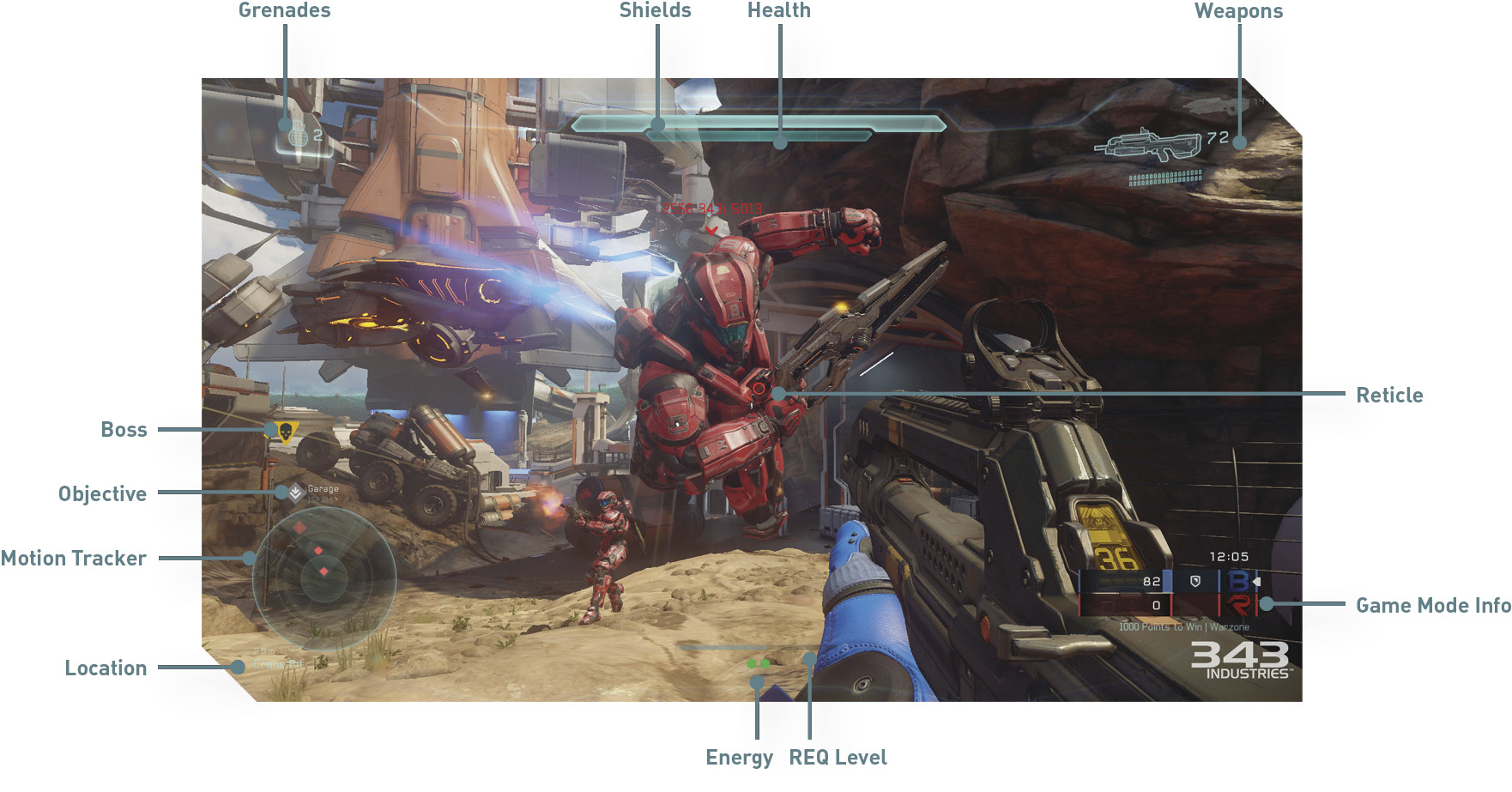
Before you jump into your first Warzone battle or Arena match, take a moment to get familiar with the game’s interface, controls, and gameplay mechanics. Even if you’re a long-time fan, there have been some changes in Halo 5: Guardians you should be familiar with.
Shields: This bar indicates the status of your Spartan’s shields. While active, shields absorb incoming damage. Once shields are depleted, damage is dealt to your Spartan’s health. If you seek cover and avoid subsequent damage, the shields will regenerate as long as you don’t sprint.
Health: This bar represents your Spartan’s health—if depleted, your Spartan dies and you must respawn. Like shields, health regenerates over time as long as your Spartan stays out of danger.
Reticle: The reticle shows where your weapon is aiming—place the reticle over targets before firing to score a hit. Striking targets with your weapon triggers a bloom animation around the reticle. These hit markers come in handy when engaging opponents at long range. The size and shape of reticle may differ based on the weapon equipped.
Weapons: These images show the weapons in your loadout. The larger image represents the weapon currently equipped. The numbers to the right of each weapon indicate their ammo count.
Grenades: This shows the type and number of grenades in your inventory. You can carry up to six grenades at a time—two Fragmentation Grenades, two Plasma Grenades, and two Splinter Grenades.
Motion Tracker: This device functions like radar, reporting the positions of nearby enemies. Threats are represented by red diamond-shaped icons. Moving or firing opponents within 25 meters are shown on the Motion Tracker. However, opponents equipped with suppressed weapons will not appear when firing.
Location: All maps have several defined locations, indicated by this line of text beneath the Motion Tracker. Use this information to immediately get your bearings while spawning or moving around. When speaking with teammates, use these location names to report enemy movement or request assistance.
Game Mode Info: This box shows the current standings of the match, including the score, timer, and victory conditions.
Objective: These diamond-shaped icons show the locations of and distance to objectives. When an objective is neutral, the icons are gray—they change to red or blue when occupied by the corresponding team.
Boss: In Warzone matches, the inverted triangle icons (with skulls) show the locations of Bosses. Regular Bosses are represented by gray icons, while Legendary Bosses are represented by yellow icons.
REQ Level: In Warzone, this status bar shows your progress to attaining the next REQ Level. The number on the left side of the bar represents your current REQ Level, and the number on the right shows the next REQ Level. New REQ Levels are acquired by scoring kills, earning medals, defeating Bosses, and capturing objectives.
Energy: In Warzone, these green, hexagonal icons beneath the REQ Level status bar are your Energy, rewarded for reaching new REQ Levels—your Energy correlates to your current REQ Level. Energy can be spent like currency to activate REQ Cards; interact with a REQ Station to select a REQ Card and activate it using Energy. All REQ Cards have specific REQ Level that must be met before they can be activated.