
Call of Duty: Infinite Warfare Guide Single-Player Campaign Boot Camp
For First-Time Players
If this is your first Call of Duty game or the first time playing a first-person shooter, then this chapter has everything you need to get started. We’ll cover all the gameplay basics, and the basic strategies we’ve developed after playing 14 Call of Duty games!
Infinite Warfare’s campaign mode literally has you diving straight into the action. If you want to learn about new gameplay elements in Infinite Warfare, skip ahead to the For Call of Duty Veterans section.
Combat
Firearms
Almost all of the gameplay of Infinite Warfare involves slinging a firearm and charging into battle against the SDF and their drone army. To wield a weapon effectively, there are some basic concepts to understand.
- Aim Down Sight (ADS): The Aim Down Sight button is the key to firing your weapon accurately. When you press and hold this button, your view changes to look down your weapon’s sight (in most cases). Looking down a sight increases accuracy significantly, but it decreases your ability to move around just as much.
- Hipfire: When aiming and firing without Aim Down Sight, you are engaging in what is called “hipfire.” When firing with hipfire, you rely on the on-screen crosshairs to determine where you are firing. Weapons are less accurate, and will less reliably hit an enemy in this mode. Some weapons, like the sniper rifle, are almost impossible to use effectively with hipfire.
Melee
In most of the campaign, engaging in melee is exceedingly rare. In fact, the only missions where melee is an important factor are the stealth missions (see the Stealth section later).
However, knowing where your Melee button is is important for both Quick Time Events and emergencies.
During some Quick Time Events, you will be called on to quickly hit the Melee button to pass the cinematic event. This is usually when rodeoing the C12 tanks (more on that in the walkthrough).
Emergencies entail any time an enemy sneaks up on you (or you accidentally sprint too close to an enemy). If you suddenly see an enemy one or two steps away from you, melee may be the best way out of the situation. However, this comes with a caveat: melee in Infinite Warfare is significantly less powerful than in previous iterations of Call of Duty, and it can take two or three hits to bring down an enemy.
When you play through the game, you will earn the knife perks that significantly increase your melee damage. This makes game replays easier, and melee a more effective tactic.
Equipment
There are two categories of equipment:
- Lethal: These Grenades are designed to kill the enemy. The Lethals in Infinite Warfare are the most lethal grenades ever seen in the franchise.
- Tactical: These devices make engaging with the enemy easier. They provide a variety of benefits, including the ability to hack robots, a super-effective shield, and drone tech.
For more information on both types of equipment, check out the Armory section.
You aren’t the only one with the ability to use grenades. SDF are constantly tossing Frag Grenades at your position (particularly on the harder difficulties).
Keep an eye on the HUD for the Grenade Throwback symbol. When you see it, you need to make a split-second decision. Either run away from the grenade, or run toward it. The easier choice here is to run away, and unless the grenade is very close, it is the recommended action.
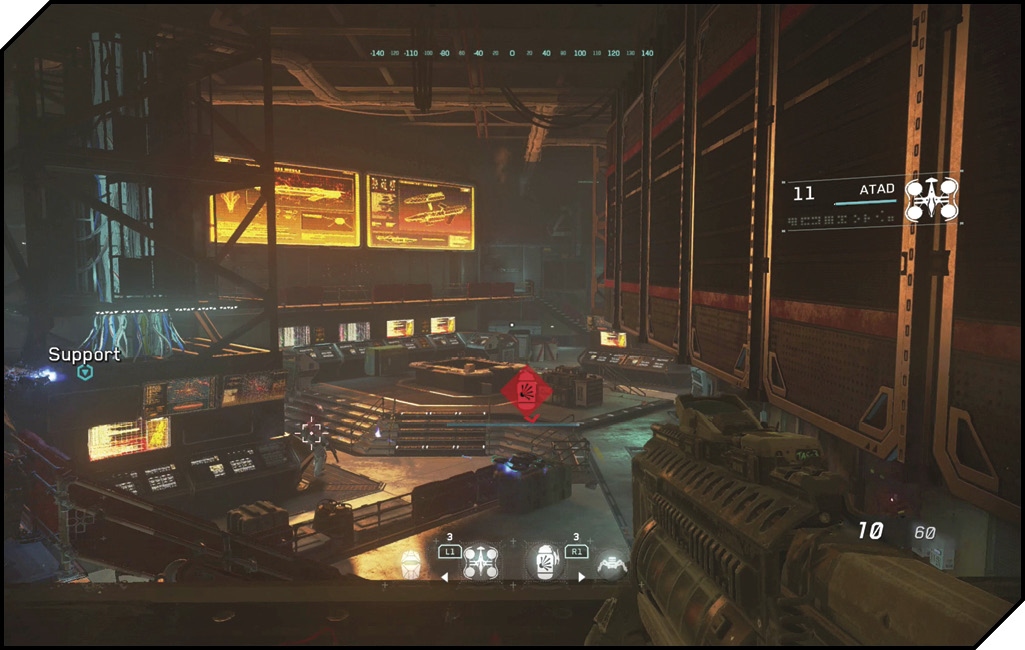
If a grenade happens to land very close to you (the grenade icon will be relatively large on your screen), you should attempt to throw it back. Move toward the grenade indicator, and when you are on top of the grenade, hit the Lethal button to throw it back. You only have about three seconds to do this, otherwise the grenade might blow up in your hands.
Navigating the Battlefield
In most cases, you will be navigating the battlefield on your own with the movement stick. If this is the first time you’ve ever played a first person game, this may take a while to get used to. Look around with the left stick and move with the right stick. You must use both together to smoothly navigate through the battlefield.
If the up/down directions on the movement stick seem off to you, you can invert the direction in the game’s settings menu.
If you are ever confused about where to go next, look around for a white or blue Nav icon that appears on the screen. This is the next object you need to interact with to proceed in the campaign. Generally, you need to hit the Activate button (see Interacting later) to progress.
Sprinting
Sprinting is an extremely useful technique to master for evading combat or diving into cover. It can also make long runs more tolerable. Your character can sprint for several seconds, but then must take a rest by walking at normal speed for a few seconds before they can begin sprinting again.
The trick to sprinting is remembering you can’t fire or reload while sprinting. So if you start sprinting in the middle of a weapon’s reload, you automatically cancel the reload when you start the sprint.
However, you can unlock a perk later in the game that allows you to fire and reload while sprinting.
Stances
There are three stances in all Call of Duty games:
- Standing: The standard stance. This is the best for quick movement, but the least accurate. You must be standing to sprint.
- Crouched: This stance increases accuracy and also makes it harder for enemies to hit you. The drawback is you will move significantly slower than when you are standing. However, this is a happy medium between standing and prone, increasing accuracy but not inhibiting movement so much you can’t evade a grenade.
- Prone: Prone sprawls you out on the ground. This is best when you come under heavy fire with no cover in the area. While prone, it is very difficult to move. This is a great position from which to fire light machine guns or sniper rifles, as it significantly improves weapon accuracy.
Tapping the Stance button toggles between standing and crouched. Holding the Stance button enters and exits prone.
Zero-G Navigation
If you played Call of Duty: Ghosts, you may remember the space levels where you had to engage in combat in low- or no-gravity conditions. Since much of Infinite Warfare takes place in space, there are several space-walking Zero-G gameplay sections.
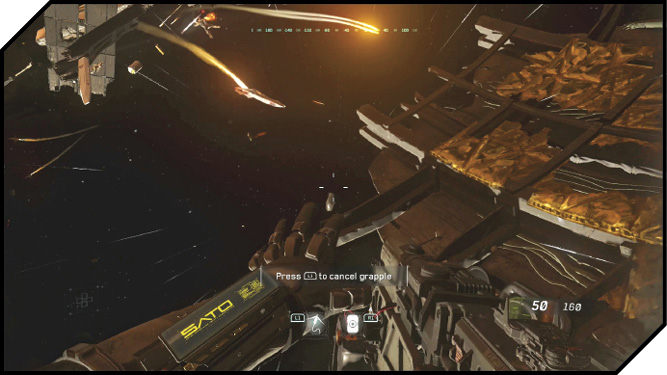
The trick to fighting in space is realizing there is truly no “up” direction. You can use the D-Pad to rotate your character around 360 degrees. You can also press Up on the D-Pad to realign yourself upright in relation to the battlefield. This makes finding cover in tricky spots much easier.
While free-floating in space, your character uses micro rockets to move around. This is less responsive than when you are in an Earth-gravity environment. If you are near a ship or other large metal surface, you can hit the Crouch button to align your feet with the metal to “lock on” to the surface with your magnet boots. Once locked in with magnet boots, you can freely move around like you are in regular gravity. If you hit the Jump button, you release from the hull and are once again in Zero-G.
Interacting
Interacting covers everything from pulling debris off of fallen soldiers, to opening a door, to hacking a computer. Most actions happen automatically, but some, like the Proximity Hack, will take some time to complete. If there is a timer involved for completion, you can see it at the top of your HUD.
Checkpoints
As you progress through the game, you will trigger Checkpoints. Infinite Warfare uses an algorithm to determine if your character is in danger. If you are out of danger, and have progressed past a milestone in the level, you will be rewarded a Checkpoint. When you die, you will return to your most recent Checkpoint.
Additionally, if you quit the game before completing a level, when you select “Resume Game” from the campaign menu, it will return you to the last saved Checkpoint.
Active Suit Upgrades
Completing most levels grants you an Active Suit Upgrade. These can be viewed in the pause menu.
| Perk | Description | Unlocked |
|---|---|---|
| Blast Shield | Reduced damage from explosions. | Operation Burn Water |
| Extra Equipment | Equip more Tactical and Lethal equipment. | Operation Port Armor(one in Civilian Terminal and one in Boarding Party) |
| Focus | Reduced flinch and sway. | Operation Sudden Death |
| Quick Swap | Switch weapons faster. | Operation Dark Quarry |
| Steady Aim | Increased hipfire accuracy. | Operation Black Sky |
| Fast Reload | Faster reloading. | Operation Taken Dagger |
| Quick Draw | ADS faster. | Operation D-Con |
| Agility | Boost to agility. | Operation Black Flag |
| Fast Regen | Faster health regeneration. | Operation Deep Execute |
| Knife | Melee replaced with knife (more damage). | Operation Dark Quarry |
| Electro-Knife | Melee replaced with Electro-Knife (even more damage). | Operation Trace Kill |
HUD
Your HUD gives you vital information about what you currently have equipped, your ammo count, your next objective, and what direction enemies are attacking from.
In addition to the basics, the HUD also indicates when you have damaged or killed an enemy. When you fire on an enemy and kill them, the crosshairs will briefly turn into a red X. Alternately, if your shots only wounded an enemy, the X will be white.
Additionally, all Lethal Grenades send a damage report to your HUD. Enemies injured or killed by the blast are indicated there.
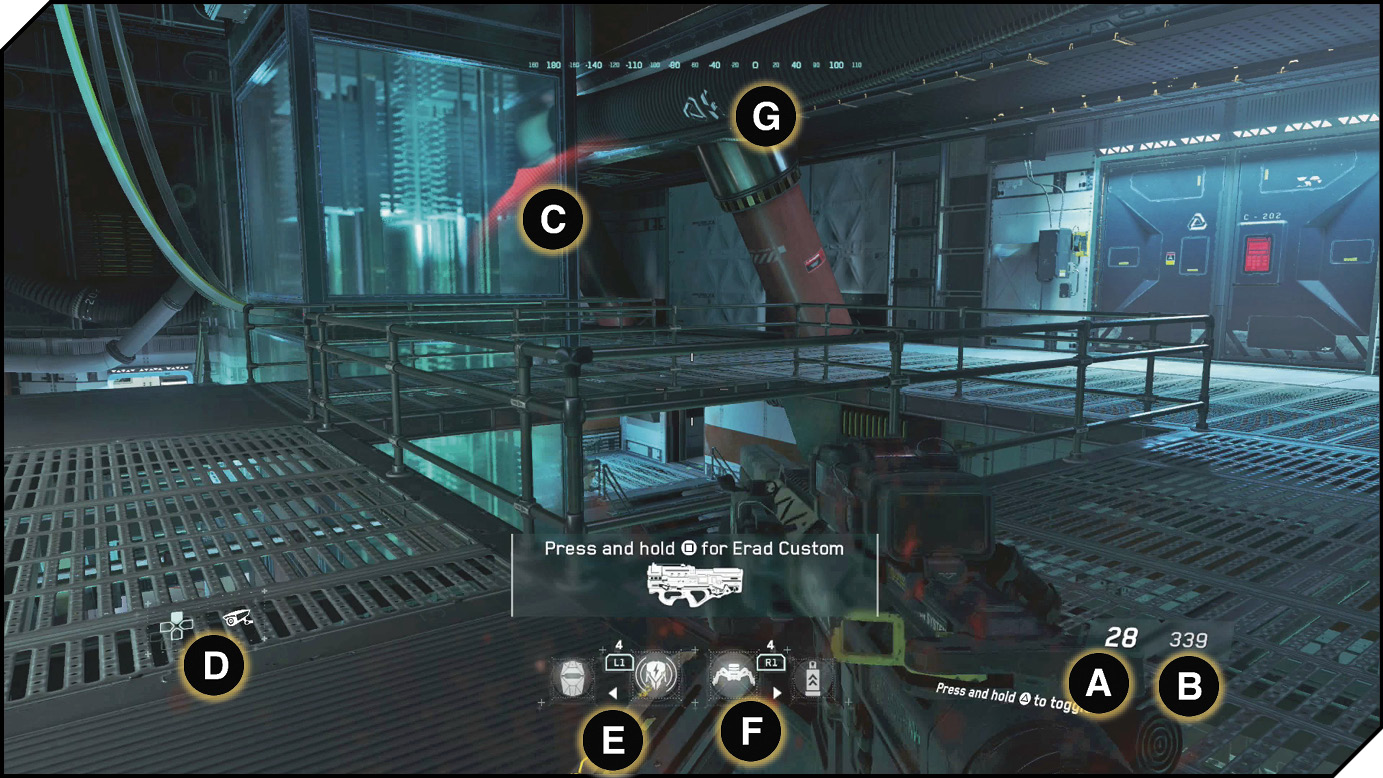
Legend
 Current Clip Ammo
 Total Ammo
 Incoming Damage Direction
 Inventory

 Lethal Grenade
 Compass
Ammo Crates
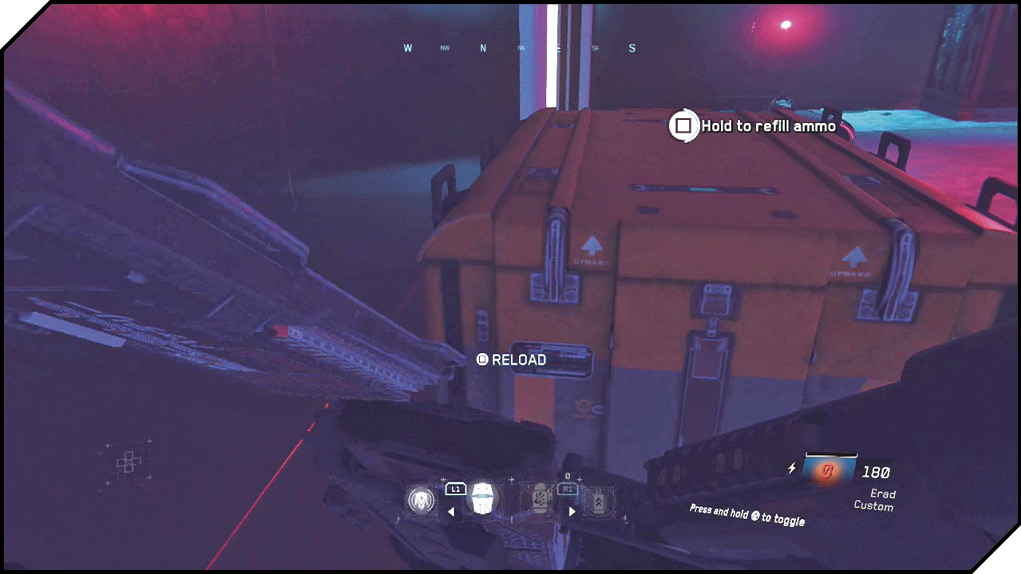
While playing through the campaign, keep an eye out for large mechanical-looking boxes. These are ammo crates and can be used to resupply your ammunition.
Using an ammo crate will refill your supply for each weapon you are carrying, but it won’t refill your current clip. When you are using a heavy, large-clip weapon, like an LMG, it’s always a good idea to reload the weapon before using an ammo crate. This ensures you have maximum ammunition before moving on.
Ammo crates do not work for the heavies class of weapon.
Taking Damage
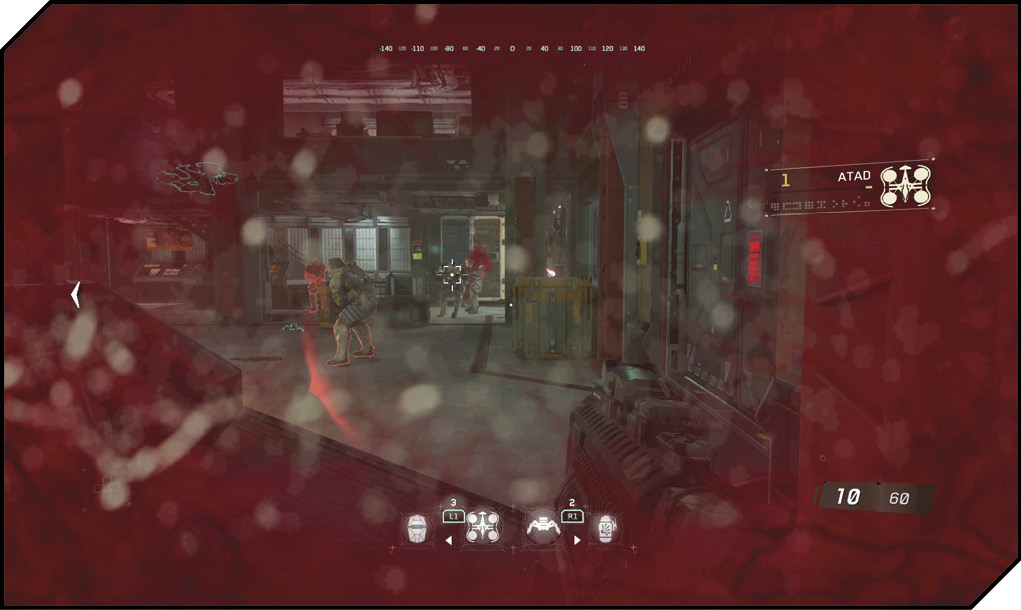
Infinite Warfare uses the standard Call of Duty damage system (it’s been in since Call of Duty 2). When you take damage from an enemy, several things happen at once.
First, your screen goes red. The darkness of the red indicates how much damage you have taken, and how close you are to dying.
Second, your accuracy and ability to move are hindered. If you are firing a weapon, it will become impossible to aim accurately for a few seconds, and you may get kicked out of Aim Down Sight mode. It will also be momentarily hard to move.
Third, you will see a red direction indicator that shows you the general direction the damage came from. This helps you figure out where you are exposed and get ready to return fire on the enemy.
After you take damage, you must wait several seconds to heal. To heal, you must avoid taking further damage until your HUD starts to lighten in color. It’s always a good idea to dive into cover when you take damage. Never leave cover when you are damaged. It’s the easiest way to get killed.
Basic Strategy
Now that you are familiar with the gameplay basics, it’s time to extend that knowledge into basic strategy. If you’ve played a military FPS game before, many of these concepts will be familiar.
Rule Number One: Patience!
The absolute top tip for any new player in Call of Duty is patience. Never sprint into a situation you aren’t aware of. Always wait to heal before reenganging with the enemy. There are always going to be challenging parts of your playthrough (even on the easiest difficulties), so don’t get frustrated if you continually die. Instead, pause the game, take a moment to think about what you’re doing, and try to come up with a new way to approach the situation. Trust us; even if a section seems impossible, it’s doable!
Use Cover
Cover is an absolute key to surviving in the game. Use crouch and prone around battlefield objects to block the enemy’s vision. Shoot with Aim Down Sight from behind cover to pick off enemies. Like real life, if the enemy can only see a small part of your body, you are much less likely to be hit by them.
Even more experienced players who prefer a “run and gun” approach will immediately dive into cover when they take damage. Being outside of cover when you are damaged is a bad situation, and will generally lead to a respawn at the last Checkpoint.
Fire in Bursts
Most weapons in Infinite Warfare are fully automatic. This means if you hold the trigger down, they will continually fire. The problem is, the longer you hold the trigger down, the more the gun will recoil and the less accurately it will behave.
To increase your accuracy, fire all weapons in short bursts. The exact number of rounds will vary per weapon and player, but you should soon get a feel for how many shots you can fire and avoid excessive recoil.
Watch your Ammo
Be aware of your weapon’s clip size. You need to always be ready to duck behind cover and retreat from combat when your weapon is out of ammo. Most guns take several seconds to reload, even with reload speed attachments equipped.
If you find yourself exposed with no ammo in your primary weapon, remember you can quickly switch to your secondary weapon. Hopefully you remembered to reload that one!