
Left 4 Dead 2 Guide Essentials Display
The Screen
These four pictures show the following information: The HUD during Campaign, Realism, Versus, and Survival Modes; the HUD when playing as a Special Infected during Versus and Scavenge Modes; the HUD during Scavenge Mode; the HUD during Survival Mode. Here’s what all those icons mean:
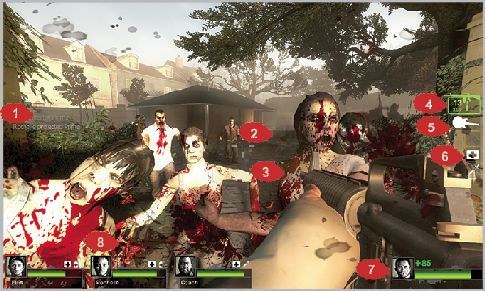
This shows a sample campaign match from a Survivor’s-eye view.
1. Information: Whenever a major occurrence happens, it is listed here. Keep track of who has rescued who, those who startled the Witch, and who is being attacked by Special Infected.
2. Aiming Reticle: This crosshair icon is superimposed on your HUD. Place the icon over your target to shoot it. The size of the reticle differs depending on the weapon type. The reticle expands during movement and recoil, and shrinks when you are walking or crouching.
3. Death and Dismemberment: A particularly unpleasant zombie takedown is occurring. Prepare for many of these.
4. Primary Weapon: This shows a silhouette of your chosen ranged weapon, how many bullets/shells you have in the clip/chamber, and the total ammunition you are carrying for that weapon.
5. Secondary Weapon: This shows a silhouette of your chosen secondary weapon, whether it is a Pistol variant or a Melee Weapon. These weapons have infinite “capacity.”
6. Inventory: (PC version shown) This shows the projectile you have equipped on your belt (top), the Backpack Item (middle), and the health-related Belt Item (bottom) you have stored on you. Select and use them at any time. The Xbox 360 version shows this in a cross pattern with a Flashlight icon, allowing you to turn the Flashlight on and off.
7. Avatar Information: A portrait of the Survivor you’re playing as, along with your current Health.
8. Teammate Information: Portraits of your teammates, along with their general health and the Inventory they are currently carrying. The inventory is particularly useful, as you can request Health and know who has a spare First Aid Kit or Pain Pills to use.
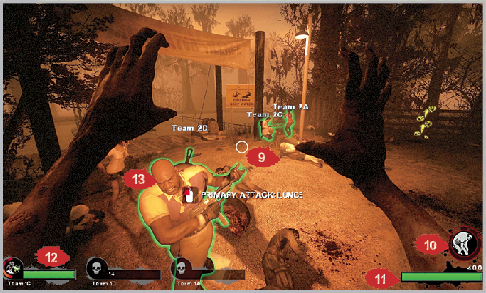
This shows a sample Versus match from an Infected’s-eye view.
9. Aiming Reticle: This shows where your Special Infected’s Primary attack will strike.
10. Attack Power: The red circle shows the power, which quickly depletes when used and slowly regenerates if you haven’t been killed.
11. Health: Your Health, which is likely to be depleted very quickly.
12. Infected Teammates: The type of Infected your brethren have spawned as, and their general Health.
13. Intended victim: This is a Survivor you’ve picked on to die, and ideally you have a second Special Infected to help you. As you can see, the Survivors have a glow around them, which indicates one of the following conditions:
Green: Healthy
Orange: Wounded
Red: Near death (usually the preferred Survivor to attack)
Purple: Puked on by a Boomer
Blue Outline: Behind a wall (you are unable to accurately see either teammate’s condition)
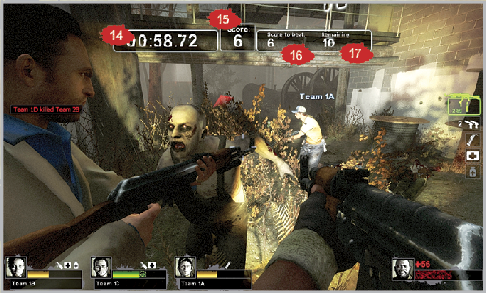
This shows a sample Scavenge match from a Survivor’s-eye view.
14. Time: This shows the remaining time in a round; extra time is added after each successful pour.
15. Score: This shows how many Fuel Cans have been successfully poured into a generator or car.
16. Score to Beat: This shows the total Fuel Cans the rival team managed during a previous match.
17. Remaining: This shows the number of Fuel Cans remaining in the stage you are playing in.
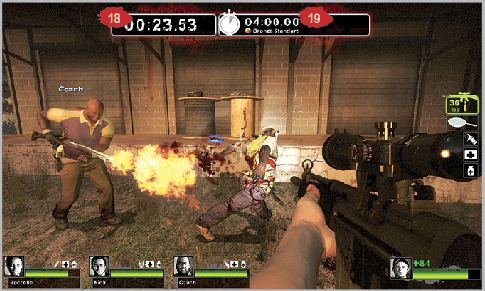
This shows a sample Survival match.
18. Time: This shows how long your team has lasted during a Survival game; the higher this number is, the better!
19. Time to Beat: This shows the time to beat for a medal, or your team’s best time, so you know the time to aim for.