
Tom Clancy's Ghost Recon Future Soldier Guide Essentials Introduction
Interface: The Ghost HUD
Interface: The Ghost HUD
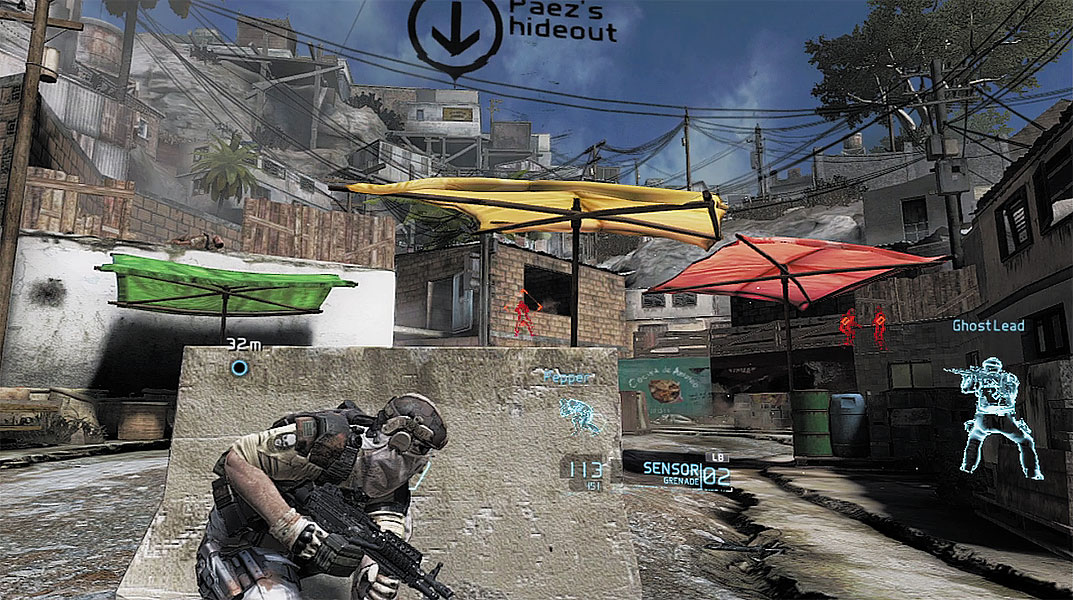
- Magazine Ammo: This number represents how much ammo is remaining in your selected weapon’s magazine. Reloading automatically occurs when a magazine is empty.
- Reserve Ammo: This number indicates the total number of rounds you’re carrying around in spare magazines.
- Selected Item/Drone: The name of the currently selected item or drone appears here. Items include a variety of grenades and Sensors. Available drones include the UAV or the Warhound.
- Item Count: When an item is selected, the quantity of each item is shown here.
- Enemy Contacts: Detected enemies appear on the HUD marked with orange diamond icons. Detected enemies obscured by cover show up on the HUD as colored silhouettes. The color of each silhouette represents the alertness of each enemy. If the silhouette is yellow, the enemy is at ease and unaware of the Ghosts’ presence. A red silhouette represents an alert enemy who will actively engage the Ghosts. When an enemy is killed, the silhouette turns white.
- Key Location: Some key locations are marked on the HUD through augmented reality, highlighting objectives and other points of interest within the area of operations.
- Teammates: Like the enemies, all teammates within your field of view also appear on the HUD marked with blue diamond icons. If a teammate is obscured by cover, the man’s position is shown by a blue silhouette.
- Waypoint Marker: This icon represents the current waypoint, along with the distance to the waypoint, measured in meters. Follow waypoints to navigate the area of operations, moving from one objective to the next.