
Tom Clancy's Ghost Recon Future Soldier Guide Essentials Introduction
Controls
Controls
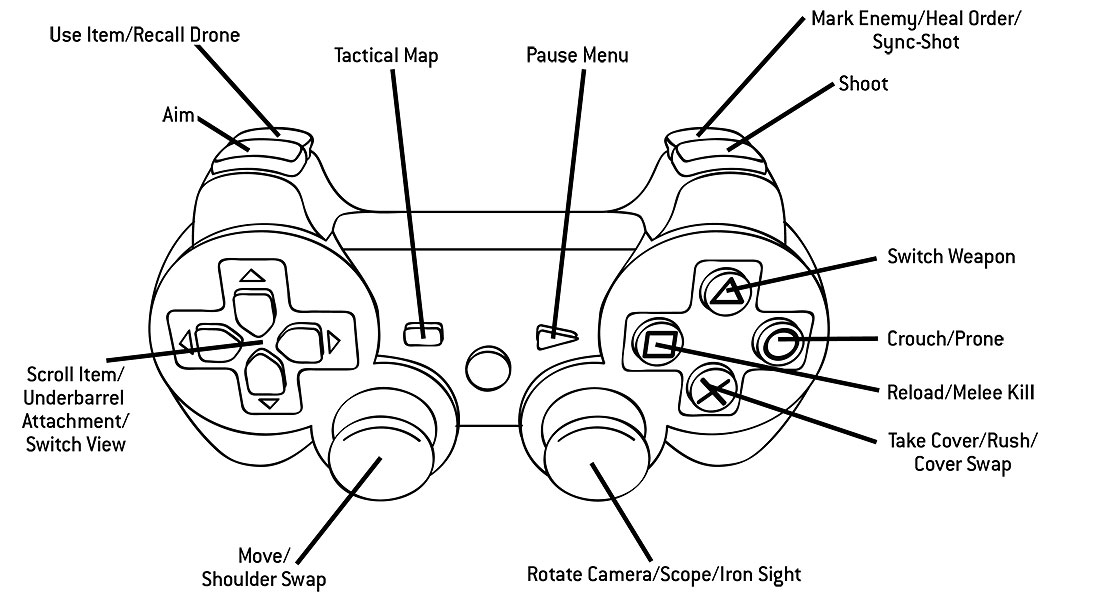
PlayStation 3 Controls
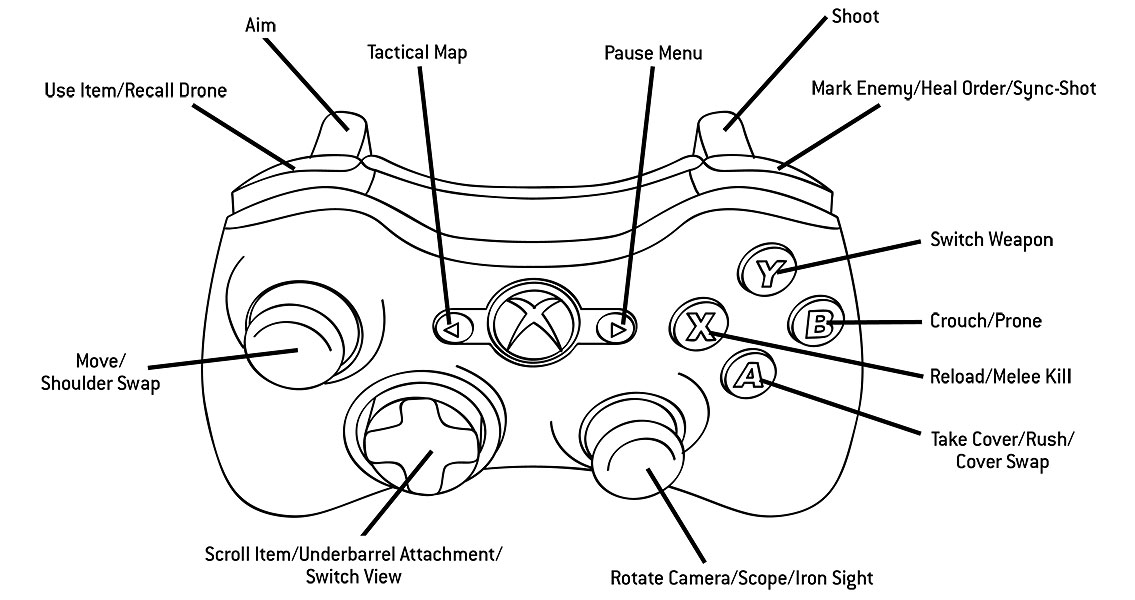
Xbox 360 Controls
Kinect Controls
Kinect functionality is exclusive to the Xbox 360 version, allowing for a controller-free experience while in the Gunsmith interface. Use hand motions to rotate each weapon and apply different attachments. Kinect also recognizes voice commands, allowing you to select weapon modification points by saying words like “Optics” or “Magazine.” You can also optimize weapons entirely with your voice by saying phrases, such as, “Optimize for Range.” Once you’ve created a weapon, take it onto the Firing Range and try it out, using only your hands to aim and fire the weapon.
PC Controls
| Action | Keystroke |
|---|---|
| Forward | w |
| Back | s |
| Left | a |
| Right | d |
| Reload | r |
| Sprint | Shift |
| Take cover | Sprint or Space |
| Jump over | Space (near object) |
| Crouch | Ctrl |
| Prone | Alt |
| Interact / Melee | e |
| Shoot | Left Mouse Button |
| Aim | Right Mouse Button |
| Iron Sight | Click Mouse Wheel |
| Primary Weapon | 1 |
| Secondary Weapon | 2 |
| Underbarrel Attachment | 3 |
| Inventory Item 1 | 4 |
| Inventory Item 2 | 5 |
| Launch Drone / Switch to Drone | 6 |
| Use Selected Item | f |
| Camera swap | c |
| Mark Enemy / Coordination / Wave Streaks Menu | q |
| Night / Magnetic Vision | v |
| Drone Up | Mouse Wheel up or Up Arrow |
| Drone Down | Mouse Wheel down or Down Arrow |
| Land Drone(when using drone) | Ctrl |
| Call for Help | h |
| Tactical Map / Skip inter Wave | Tab |
| Scoreboard | ˜ |
| Next Spectator Camera Target | Right Mouse Button |
| Previous Spectator Camera Target | Left Mouse Button |
| Pause Menu | Esc |