
Hyrule Warriors Legends Guide Twilight Map
Item Cards
 Compass
Use this while on the Search screen to identify where an Item Card can be used.

 Jar
Jar
Use this on switches to reveal hidden staircases.

 Spinner
Use this on cog-shaped holes to reveal hidden staircases.

 Ooccoo
Use this on a green portal to warp to another location.

 Lantern
Use this on torches to reveal hidden enemies

 Fishing Rod
Use this to catch fish in bodies of water.

 Water Bombs
Use this on submerged rocks to destroy them.

 Tears of Light
Use these to clear away areas covered in Twilight.

 Bombs
Bombs
Use this on boulders to reveal hidden staircases.

 Clawshot
Use this to pull yourself to a distant object.

 Digging Mitts
Use these on soft earth to uncover hidden staircases.
Twilight Challenges
The Twilight Map doesn’t have any particularly devastating challenges, but it does throw a few things your way that you should know about. Read on to learn about them.
Twilight Areas
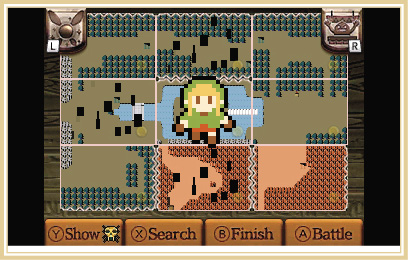
You can see the odd, square-peppered Twilight areas scattered all over the map. Any square that has a Twilight area also comes with a Twilight Rule. The rules aren’t anything you haven’t experienced before and they are easily removed, just like in the Great Sea Map. If you don’t remove them, you can expect not only to have to deal with the Twilight Rule, but all enemy movements and units disappear from the map during the actual battle. We highly suggest you remove the Twilight areas whenever you have the chance and the way to do that is to use a Tears of Light Item Card on the Search Screen.
Twilight Portals
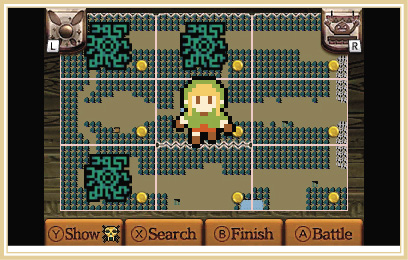
These start out as red until the stage has been cleared. Then green portals litter the Twilight Map and they can be used to hop around the map and explore in a different fashion than you’ve experienced up to this point. To use a portal, you must first complete the stage it is on, then use an Ooccoo Item Card on the portal in the Search Screen. Each portal is directly linked to another portal on the map. You can see which portals are connected to each other by looking up the square they are on in this guide.