
The Witcher 3: Wild Hunt Guide Getting Started Witcher Training
In Game HUD
The HUD imparts critical information, particularly during combat, that will help keep you alive if you pay attention. There are many elements that appear during special occasions, such as Boss Health meters, but the following items are both the most consistently displayed pieces of information, and also rank among the most important.
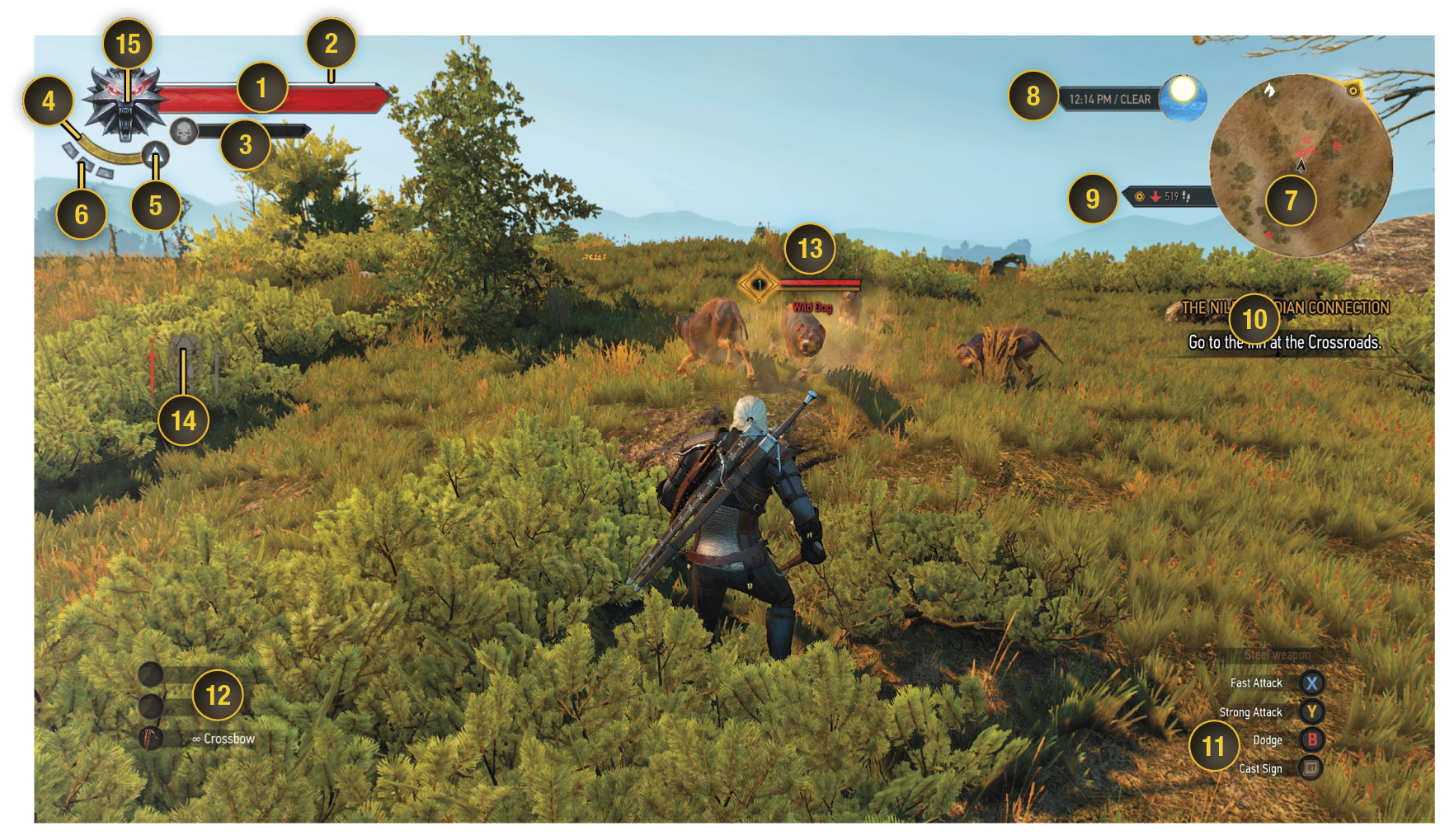
- Vitality: This measure of Geralt’s health is possibly the single most important HUD element, other than the enemy’s health bar. If it empties, Geralt is a dead man.
- Experience Bar: As you kill monsters or men within a certain number of levels of Geralt’s current level, or complete quests, you gain experience indicated by this white meter. If the meter has been filled, it resets and you gain a level. A small indicator appears next to the bar to show that you have an ability point that you can assign to your character trees.
- Toxicity: Consuming potions before or during combat raises your Toxicity Bar level. Initially, this can be fairly harmless, even beneficial if the proper abilities are developed. However, at excessively high levels of toxicity, you can start to suffer Vitality loss.
- Stamina: The Stamina Bar regulates your ability to sprint, and use Signs in combat. Usually a single Sign consumes the entirety of the Stamina Bar. This regenerates over time, and can be boosted by potions, armor attributes, or character abilities.
- Chosen Sign: Next to the Stamina Bar is a symbol that shows which Sign you have selected in your Quick Access menu. Make sure you have the right Sign chosen for your situation!
- Adrenaline: Adrenaline builds during combat, indicated by the gray marks turning red. Having Adrenaline can lead to very beneficial effects during combat, which we discuss in greater detail later.
- Minimap: An invaluable tool for navigation, this shows you Geralt’s current position in relation to his surroundings. Hostile contacts are marked by red dots. If these dots are crossed out, it indicates a fallen foe that can be looted. Additionally, Signposts for fast travel, cave entrances, stairwells, herbs for alchemy, navigation paths leading to waypoints, and search zones indicated by Quests are all identified on this map.
- Current Time: Displays the time of day, where the sun or moon are in relation to that time, and even the current weather conditions. You may be asked to go to a location at a certain time of day, which requires you to meditate to pass the time. Many merchants are not available at all hours, so if you need the services of a blacksmith or ingredients merchant, come back when they’re actually open for business.
- Distance to Objective: Shows how far Geralt is from a waypoint, while indicating if the objective is above or below, relative to his position.
- Current Quest and Objectives: Reveals the name of the currently tracked quest, and a corresponding list of objectives.
- Controls: Based on Geralt’s current state, whether on foot, horseback, or in combat, a series of control prompts appears in this corner of the screen. If in combat, this display also shows you which sword is currently unsheathed. There may be situations where you’re forced to fight humans and monsters simultaneously, and this helps you keep track of what you’re using mid-fight.
- Quick Access Items: Geralt can have one quickly accessed weapon or tool, such as the crossbow, and two consumables, set up from the Quick Access menu and your Inventory screen.
- Enemy Vitality Bar: Enemies that have engaged in combat with Geralt have their current Vitality and Stamina displayed over their head, as well as their current level. If it’s an enemy vulnerable to Silver Swords, their Vitality is displayed in silver; otherwise, it is red. Important to note is the color of the enemy’s level. If it’s red, or displayed as a skull, you’re in for a very tough fight. White levels indicate a near-inconsequential threat, while Green is an enemy closer to your level.
- Item Condition: As Geralt uses his weapons or sustains damage in combat, his equipment sustains damage. Should they become dangerously low on durability, an indicator appears on your HUD. Don’t let your gear fall into disrepair!
- Wolf Medallion: This medallion indicates when Geralt is in danger, or is near a powerful source of magic. If you’re playing with a force-feedback enabled controller, the controller will also shake!