
World of Warcraft: Warlords of Draenor Signature Series Strategy Guide Introduction
Interacting With Other Characters
If you’re in the same place as another player (meaning a character with a blue target portrait), there are several ways to directly interact with them. Target them and then right-click on their player portrait. You get a short list of ways to communicate. You also see the name of the player’s guild in their tooltip. Underneath their name, you also see a guild identifier.
|
Interaction Method |
Result |
|---|---|
| Target Marker Icon | Set an icon for your party or raid group above this player. |
| Set Focus | Sets a player portrait in your interface, so you can keep tabs on their status. |
| Add Friend | Adds the character, or the player’s BattleTag, to your Friends List. |
| Invite | Invite the player to join a group. |
| Whisper | Another way to whisper to a player. |
| Inspect | Opens the player’s Character window, so you can see their armor, PvP status, and Talents. |
| Compare Achievements | Used to see who has done more in-game activities. |
| Trade | Opens the Trade window, so two players can buy, sell, trade, enchant, or unlock items for each other. |
| Follow | Causes your character to follow behind the other person, as long as you can keep up. |
| Duel | Invite another player to fight to the almost-death (no permanent damage is incurred by either party). |
| Pet Battle Duel | If both characters have trained Pet Battles, you can challenge that character to a Pet Battle Duel. |
| Move Frame | With this option, you can move their portrait and raid frame to a position you prefer. |
| Report Player for | If the player has an offensive name or is violating the terms of service to cheat, you can report them to Blizzard. Check Blizzard’s Harassment Policy before you use this. |
Trading With Other Players
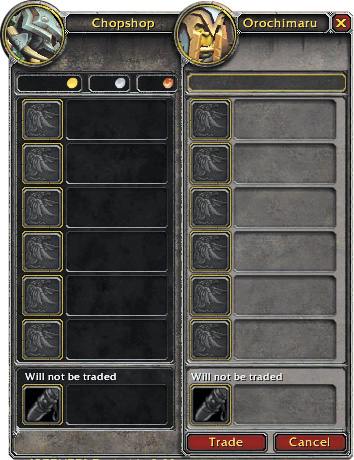
Before initiating a trade, you and another player should agree on the item to be sold and the price to be paid. To trade with another player, you must be in the same room. Either party can initiate the trade by right-clicking on the other player’s portrait and clicking on Trade. You can also drag an item over a person to open this window.
The left window shows what you wish to trade; the right window shows what your comrade wishes to trade. There are three different areas for money, items, and items that you do not actually wish to trade. To make a trade, type in the amount of money you want to pay or you can right-click on any item in your backpack to send it to the Trade window. When your side of the transaction is accurate, press Trade; your window turns green. When your comrade does the same, the trade completes.
The “Will not be traded” section is for items that will be modified by another player. This includes equipment that someone will enhance or locked boxes that will be opened. To complete this transaction, place your item in the bottom box, and your comrade goes to work. It is customary to “tip” a player that performs this service for you.
Be careful about making trades of large sums of money or valuable materials if you don’t know the other person. Most players are honest, but you should always be wise about who you do business with.
More Information About Players
If you are chatting with someone from afar, or if you see them chatting on a channel, you can find out more about them or initiate a conversation by clicking on their name when you see it in the General chat log.
Click on the player name to whisper to them. Shift+click on the player name, and the game tells you their level, race, class, guild, and current location.
If you’re trying to find someone, use the /who command to search for players that match a name, level range, location, or class description. /who is quite useful in this way, but you can only search with it every few seconds. Type too quickly and the server will ignore some of your requests.