
World of Warcraft: Warlords of Draenor Signature Series Strategy Guide Introduction
Groups
Group Rules
A group consists of two to five players, with one of them being a leader. When in a group, use the /p command to chat only with players in your group.
To create a group, there are two sets of commands: those used if you are in the same room, and those used if the player is in another location.
Group Command Summary
|
Command |
Effect |
|---|---|
| Join | If you are asked to join a group, choose Accept or Decline. |
| Create/Invite | If you are creating a group, type: /invite <playername>; You can also right-click on the player portrait, and click Invite. You are now the Leader. Only the Leader can Invite. |
| Uninvite | To remove a player from your group, type: /kick <playername>. You can also right-click on the player portrait, and click Uninvite. Only the Leader can Uninvite. |
| Promote to Leader | If you are the Leader, you can designate someone else the Leader. Right-click the player portrait, and click Promote. |
| Leave | To leave your party, right-click your own portrait, and click Leave Party. |
| Party Chat | /p <Anything you want to say> |
| F1 | Target yourself. |
| F2, F3, F4, F5 | Target other party members. |
| F-key | Assist target; this targets anything that the currently selected person is targeting. |
Focusing Fire
Looting Options
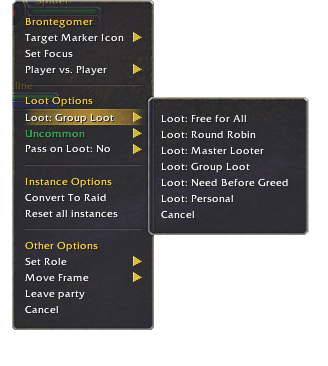
When playing in a group, there are several options for sharing the loot found on corpses. The default option is Group Loot, which is the most practical choice at beginning levels and for players who don’t know each other. Here is the full list.
| Free-For-All | Any player can loot any corpse. This is useful if one player is seeking a specific drop. However, this isn’t a good option for strangers on collection quests. Friends get the most out of this because it’s fast and easy. |
| Round Robin | Every player takes his turn in a specified order, just like a hand of cards. You know when it’s your turn to loot because the corpse “sparkles” for you. |
| Master Looter | The Leader takes all the loot and doles it out at the end. This is primarily used in specific guilds, where point systems are in place to figure out loot distribution. |
| Group Loot | Has the same rules as Round Robin, with an additional option. When an Uncommon (Green) or better item appears, the game offers an option for players to roll, as in rolling dice, for the item. This is a good default when dealing with strangers. |
| Need Before Greed | Similar to Group Loot except that players who cannot equip the valuable items automatically cannot roll for them. This is the automatic setting for groups created in the Dungeon Finder. While this option is engineered to be the most fair, not everyone who can equip an item needs it. And sometimes, people who can’t equip an item can use it for an alt, or a disenchant. Think carefully when choosing this option. |
| Personal | The Personal Loot option is for raids and won’t be a concern until you are higher level. |
More About Group Loot and Need Before Greed
Most parties tend to be in one of these two looting formats, so it’s important to be able to quickly decide which is the best option to choose. When an item of high enough quality appears in the loot pool (and the loot is set to Group Loot or Need Before Greed), every eligible player is prompted to roll on the item.
Need
If the item description shows that you can use the item, and it’s also an upgrade for the character you’re using in the group, select Need. Doing so generates a random number from 1-100. Your roll is compared against all other players who rolled Need. The item is awarded to the player with the highest roll.
However, be careful when picking Need. If you’re in a group with people you don’t know, it’s considered proper etiquette to ask in party chat if anyone minds that you “Need” an item. By asking politely and not abusing Need to hoard items, you’ll find yourself in many players’ good graces.
Greed
Assuming no one selected Need, everyone who chose the Greed option generates a number between 1-100. The player with the highest result is awarded the item. If you want the item for an alt, you should choose Greed. If you plan to sell the item, you should definitely click Greed, or Pass. You will earn the goodwill of everyone in the party.
Disenchant
If your party includes an Enchanter, all players get this option. Disenchant is considered a Greed roll. Meaning if anyone clicks Need, the results of the players who chose other options are disregarded. Disenchanting causes the item to be destroyed with the resultant materials placed in the inventory of the winner. Only choose this once you feel comfortable enough with the game that you know if loot will be more valuable as components rather than as an item.
Pass
If you simply don’t want the item, or if you don’t know if you have permission to roll on the item, choose Pass. There are many times when the benefit of stepping aside is more than the benefit of having an item. You can get another weapon, but being a polite party member could result in making new friends.
Group Etiquette
The following is a short list of guidelines for becoming a reliable group member.
These guidelines go both ways. All members in your party should be cooperative and fair. If they aren’t, feel free to tell them so and add them to your Ignore List. Occasionally, groups do go poorly. A good rule of thumb is to express your concern and give the group a chance to improve. If members don’t cooperate, you can feel justified in leaving mid-group. When you have a great group, say thank you. You can even add your new comrades to your Friends List, or consider joining their guild. If no guild exists, consider starting one.