
World of Warcraft: Warlords of Draenor Signature Series Strategy Guide BRAVING A SAVAGE WORLD
Interface Changes
Quest Interface

You can still track your quests via the quest interface, but the quest window has received some updates in Warlords of Draenor. The quest window now includes a small-scale map that allows you to more easily locate and keep track of objectives and quest NPCs. The map dynamically changes as you look through the quests you have yet to complete.
Keep a watchful eye around the world for vignettes. These dynamic scenarios occasionally appear in your quest tracker, offering additional objectives for you to complete while exploring and questing in Draenor. They disappear if you move out of the objective area, but you won’t lose your progress if you do—simply travel back to the area later to resume the vignette where you left off.
Bag Space
Several new changes have been made to help you keep track of your items and free up additional space for all the new gear, items, and other fun rewards found on Draenor.
Quest items no longer take up valuable space in your bags. Instead, they are simply tracked in your quest tracker, leaving more room for more important things—like loot!
You can now customize your inventory by bag slot. Clicking on a bag icon allows you to choose what types of items you would like to be automatically placed in the bag. In addition, both your inventory and your bank now include a button that automatically sorts your loot based on item type. Vendor trash is now clearly indicated with a gold coin icon, so you know which items are safe to sell and which might warrant a closer look before getting rid of them.
You’ll be gathering plenty of materials for professions as you travel Draenor. Reagents like ore and herbs now stack to 200, allowing you to carry more with less bag clutter. In addition, all personal banks now have a 98-slot reagent tab specifically for storing crafting ingredients. This tab includes a Deposit All Reagents button that automatically sorts the crafting materials from your bags and places them in your bank.
If you like to collect armor sets for transmogrification, Warlords of Draenor has introduced a second tab for Void Storage. While it still costs gold to deposit items into Void Storage, the transmogrification feature can now choose items that are in your bank or Void Storage – not just the items in your bags.

Toy Box
In addition to all the other space savers, Warlords of Draenor introduces the Toy Box, an account-wide tab used to learn and store “toys.” Toys are items that aren’t necessarily offering improvements to your character’s performance, but are in the game just for fun. This includes items that change your appearance, summon temporary illusions, offer cosmetic buffs, and more. Items that have been classified as a toy can be added to the Toy Box by right-clicking the item. Once a toy is learned, it can be used by any character on your account.
Mount Improvements
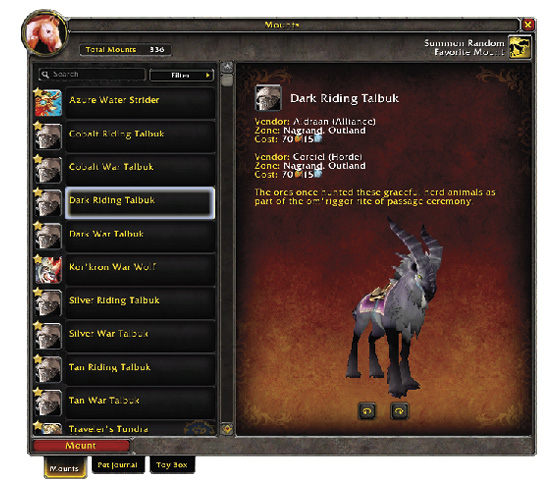
The world of Draenor has many new mounts to obtain and collect, and the Mount tab has been updated with new lore and information about every mount in the game. You can now sort your list to see what mounts you already have, what mounts you have left to collect, and where they can be obtained. Sort even further if you wish to see which mounts are rare drops, vendor purchased, available in the in-game store, and more.
Warlords of Draenor has also added the ability to create a list of favorite mounts. To mark a mount as a favorite, simply right-click the icon for the mount and choose “Set Favorite.” This will add a star to the mount icon and move it to the top of your list of collected mounts. To remove the mount from your favorites, right-click the icon again and select “Remove Favorite.”
If you have a long list of favorite mounts, a new Summon Random Favorite Mount button has been added to the mount tab—this button can be placed on your action bars as well. Pushing the button summons a random mount from the list of favorites you have marked.

Premade Groups
The Dungeon Finder isn’t just for dungeons anymore! Added to the Dungeon Finder tab is a new Premade Groups feature that allows players to assemble groups for quests, classic raids, dungeons, or anything else they can think of. You can also use the feature to search for groups that are being assembled for things you’d like to do.