Getting Started
Whether or not you’ve rescued the Great Zapfish, Ink Battles are always available in Inkopolis Square. Enter Deca Tower to get started. During these online competitive matches, your skills are put to the test; you need quick reflexes as well as a sharp mind. Before you jump into your first match, take a moment to review the fundamentals of Ink Battles.
When you enter Deca Tower, this screen greets you, detailing your status while prompting you to join a battle. There’s a wealth of information here, so let’s take a closer look:
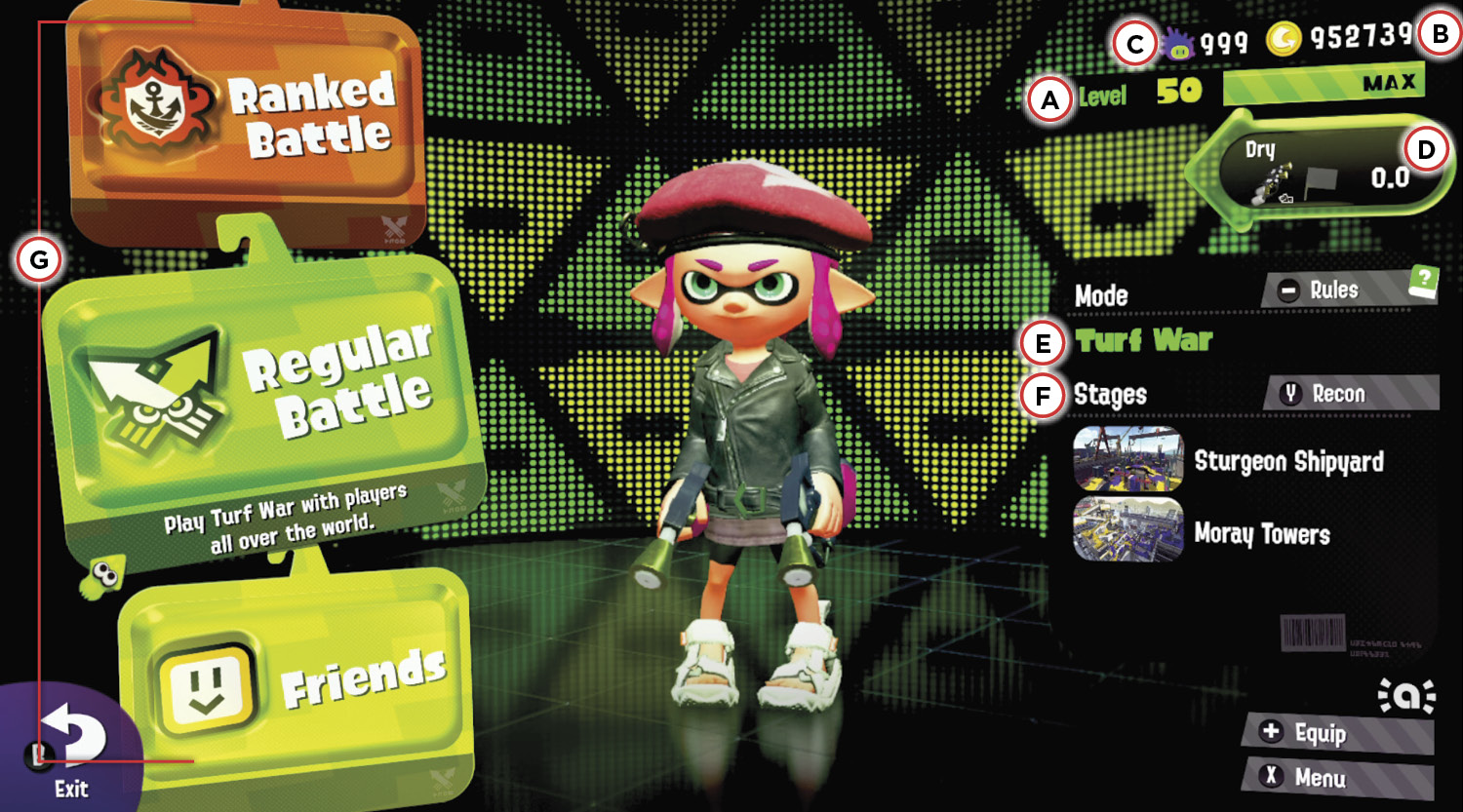
 Level: This is your current level. You level up by earning Battle Points, or BP. BP is awarded for participation in Ink Battles. The accompanying meter shows how much BP is required to reach your next rank. The level cap is 50.
 Gold: As you earn BP, you also earn gold. There is a 1:1 relationship between BP and gold earned. Score as much BP as possible in a match to walk away with the same amount in gold. Gold can be used to purchase new weapons, clothing, shoes, and headgear.
 Super Sea Snails: Super Sea Snails are awarded during Splatfest events, and for leveling up past Level 30. Visit Murch and use your Super Sea Snails to reroll the sub abilities on your clothing, shoes, or headgear.
 Fresh Meter: You gain and lose points based on how many matches you win with a specific weapon. Winning a match always awards one point; losing a match takes away points based on your current rank.
 Game Mode: Here you can see the current game mode: Turf War, Splat Zones, Rainmaker, or Tower Control. Press — for a quick summary of the game mode’s rules.
 Stages: Here’s a list of active stages. Press Y to enter one of the stages in Recon mode. This allows you to walk around the stage by yourself, ideal for exploring and strategizing before a battle.
 Battle Selection: Here you can choose to participate in one of five different battle types: a regular battle, a private battle, a Ranked Battle, a League Battle, or a regular battle with friends. To play Turf War, choose a regular battle or battle with friends. Note that joining friends in a regular battle only works if your friend is already in a regular battle lobby or match. You’re not guaranteed to be on your friend’s team. For Splat Zones, Rainmaker, or Tower Control, choose a Ranked Battle, which becomes available at Level 10. League Battles aren’t available until you obtain a B- or higher rank in Ranked Battles. Regardless of choice, you’re immediately sent to a matchmaking screen, where you’re joined by teammates and opponents.
Ink Battles Interface
Once you join a match, you’re thrust into an Ink Battle. Before you start inking territory and splatting opponents, take a moment to study these various on-screen elements.
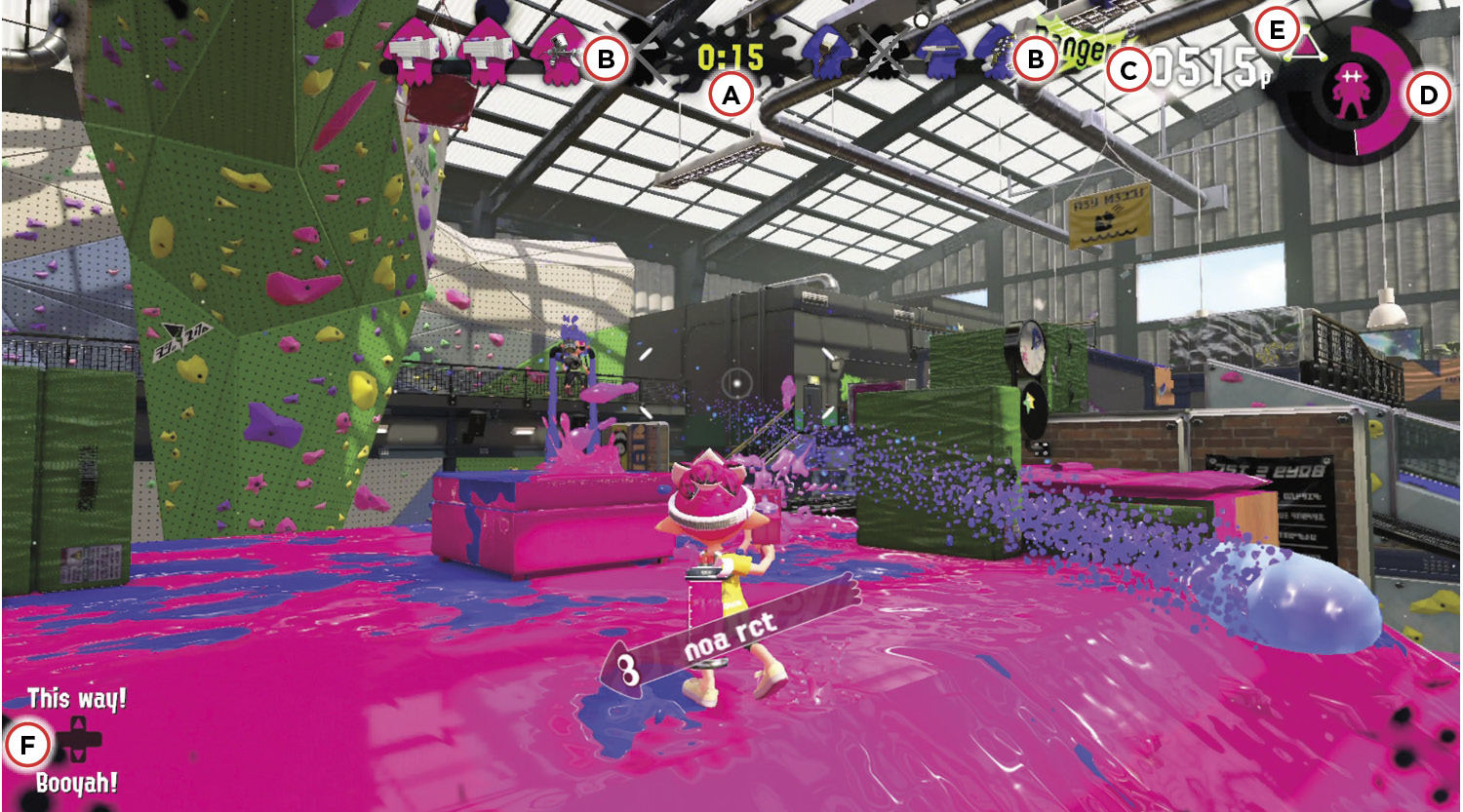
 Timer: The timer shows how much time remains in a match. Turf War battles last a full three minutes. Ranked and League matches of Splat Zones, Rainmaker, and Tower Control have a standard length of five minutes. They can end early if victory conditions are met, or they can last longer by going into overtime.
 Team Status: Each squid icon represents a different player. Colored icons represent active players on the stage, while grayed-out icons represent splatted players in the process of respawning. These icons change size based on a few factors:
- Turf War: If the match is close, both team’s squid icons are the same size. If one team is winning slightly, their team status icons become slightly larger. If one team is winning by a substantial margin, their team status icons get even larger, and a “Danger!” icon appears for the losing team.
- Ranked and League Battles: If no one controls the objective, all squid icons are the same size. If one team controls the objective but isn’t making progress toward a win, their team status icons become slightly larger. If one team controls the objective and is making progress toward a win, their team status icons become even larger, and a “Danger!” icon appears for the opposing team.
 Battle Points Counter: This counter only appears in Turf War and indicates how much ground you’ve personally covered in ink. At the end of the match, the amount of BP you earn is this number, plus a victory bonus of 600 if your team wins. For example, if you cover 400 BP’s worth of ground and your team wins, your earn 1,000 BP. If your team loses, you earn this number in BP, with no bonus.
 Special Gauge: The Special Gauge fills as you cover ground in your ink. Once full, the gauge starts sparkling and a “Click Right Stick” icon appears. Clicking the Right Stick activates your special. Once the special is activated, the gauge drains at a rapid pace, indicating how much time remains for your special. If you get splatted, you lose half the progress in your Special Gauge.
 Sub Weapon: This icon represents your current sub weapon. Like your main weapon, sub weapons like Splat Bombs, Burst Bombs, and Suction Bombs consume ink. Make sure you have enough ink in your Ink Tank before deploying one of these sub weapons.
 Emotes: Use emote options to communicate with teammates during a match. The “This way!” emote is helpful for indicating a direction or area you wish your teammates to go to. Send out a “Booyah!” at the beginning or end of a match to build team morale. After you get splatted, an “Ouch…” emote replaces “This way!”
Turf Map and Super Jumps
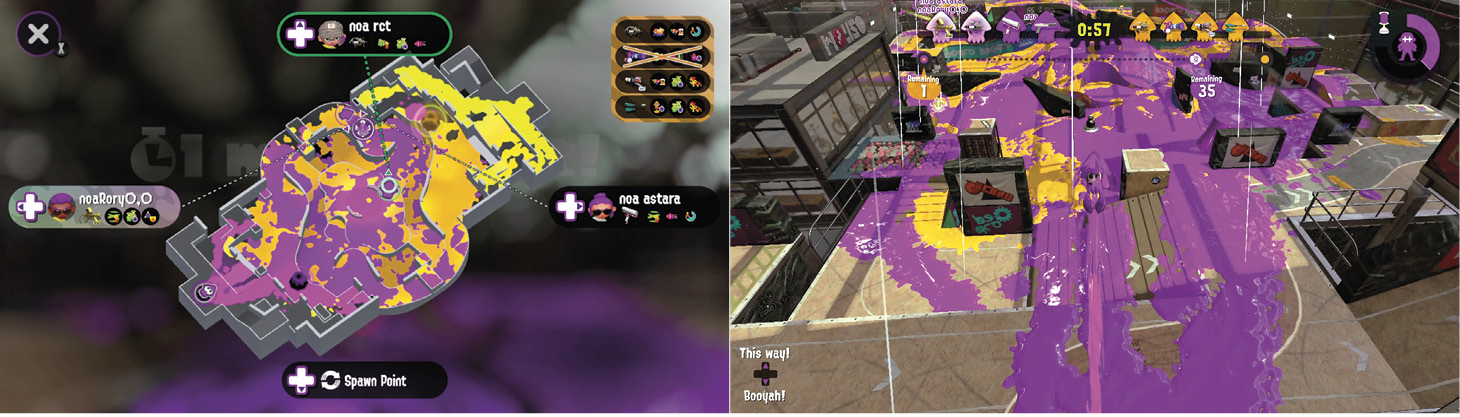
While competing in Ink Battles, don’t forget to press X to bring up the Turf Map. This map displays a live feed of ink coverage on the stage, allowing you to see where friendly and enemy ink is being spread. If you see a fresh patch of enemy ink appearing, you can determine where opponents are. The Turf Map is also necessary for Super Jumps. Immediately after spawning, select a teammate or friendly Squid Beakon on the Turf Map to perform a Super Jump. This launches your Inkling high into the air and lands you next to your teammate or Squid Beakon, ideal for applying pressure on hotly contested areas of a stage. Exercise caution when performing Super Jumps. Jumping to a teammate engaged in a heated battle can put you at a major disadvantage upon landing. Unless you have the Stealth Jump ability equipped, opponents can see where you’re going to land—a ring-shaped icon appears at your landing spot. Sneaky opponents can use this info to ambush you.
Weapons
Initially, your Inkling comes equipped with the Splattershot Jr. main weapon, which includes the Splat Bomb sub weapon and Ink Armor special. This versatile loadout is excellent for new players and veterans alike. As you level up, you can purchase new weapons from Sheldon at Ammo Knights. There are six classes of main weapons, each with its own strengths and weaknesses. Instead of purchasing every weapon that becomes available, focus on weapon types that best match your style of play. Here’s a glimpse at the different types of weapons. For more information on weapons, sub weapons, and specials, reference the Weapons & Gear chapter.
Weapon Types
| Type | Description | |
|---|---|---|
|
|
Rapid |
Rapid-firing weapons are the most well-rounded, suitable for spreading ink in Turf War or splatting opponents in any game mode. |
|
|
Charger |
These weapons must be charged before firing to reach their high-damage, long-range potential. They’re better suited for sniping opponents than for spreading ink. |
|
|
Roller |
Rollers are ideal for rapidly spreading ink along flat, horizontal surfaces. They can be swung to fling ink over wide areas or smack opponents. |
|
|
These slow-firing, high-damage weapons fire ink-filled projectiles that explode in midair or upon impact. Their lack of range can make them difficult to use, but there’s no denying their effectiveness in spreading ink. |
|
|
|
Sloshers are essentially buckets filled with ink, ideal for spreading ink and splatting opponents at close range. Arc ink over walls to engage opponents indirectly. |
|
|
|
Splatling |
Similar to the chargers, the Splatlings must be charged before firing a rapid barrage of ink. These weapons have impressive range and ink-coverage capability. |
|
|
Sub Weapon |
Each loadout comes equipped with a sub weapon, such as Splat Bombs. These weapons provide some welcome offensive benefits, but they also consume a lot of ink. |
|
|
Special |
Each loadout includes a special, like the new Inkjet. Fill the Special Gauge by covering the stage with ink. Once the gauge is filled, you can activate the special. |


Gear
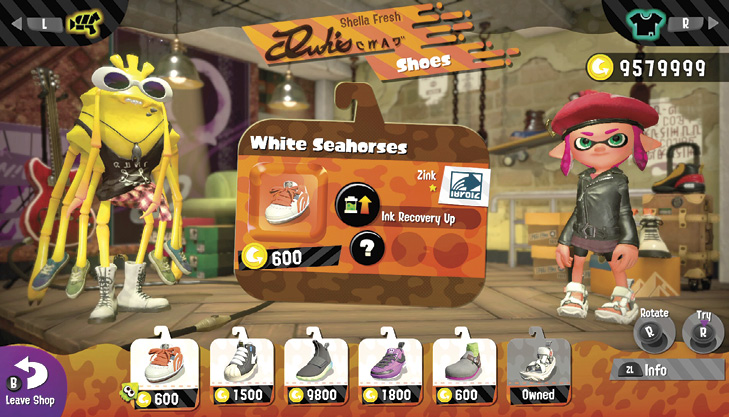
The clothing, shoes, and headgear worn by your Inkling function like armor. Each piece of gear has a fixed main ability that benefits your Inkling in various ways. For example, the Ink Saver (Main) ability reduces your weapon’s ink consumption, allowing you to fire longer before refilling your Ink Tank. Since you have to wear clothing, shoes, and headgear at all times, you always have three main abilities active. Each piece of gear can also include up to three sub abilities. These lesser abilities aren’t as effective, but since all abilities can be stacked, they work together to enhance the performance of your character during Ink Battles. New gear can be purchased with gold from Ye Olde Clothe Shoppe, Headspace, and Shella Fresh, located in the Square. Check back regularly, because stock changes daily. For more information on abilities and gear, reference the Weapons & Gear chapter.