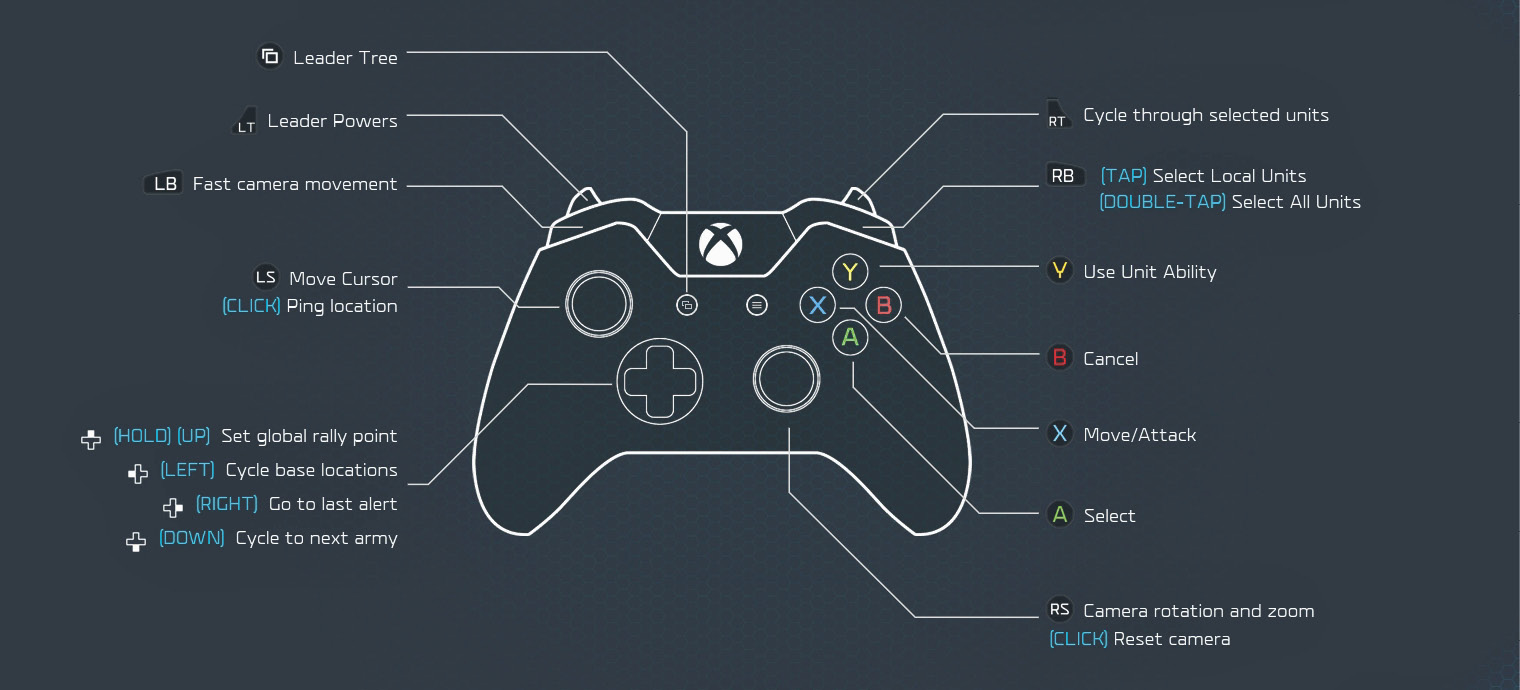
| Move camera |
Left stick |
W, A, S, D |
| Move camera alternate |
— |
Up arrow, Left arrow, Down arrow, Right arrow |
| Rotate camera |
Right stick |
Alt + move mouse left/right |
| Rotate camera alternate |
— |
Insert (left), Delete (right) |
| Zoom camera |
Right stick |
Alt + scroll wheel |
| Zoom camera alternate |
— |
Page Down (zoom in), Page Up (zoom out) |
| Select single unit |
 (tap) (tap) |
Left-click (tap) |
| Paint-selection |
(hold) |
Left-click and drag |
| Select multiple units of same type |
(double-tap) |
Left-click (double-tap) |
| Deselect current selection/Cancel |
 (tap) (tap) |
Escape |
| Unit orders (move, attack, etc.) |
 (tap) (tap) |
Right-click |
| Use single unit type’s ability |
 (tap) (tap) |
R |
| Use all abilities of all selected units |
(hold) |
— |
| Select local units |
 (tap) (tap) |
Q |
| Select all units |
(double-tap) |
E |
| Fast Camera movement |
 (hold) (hold) |
Shift |
| Cycle through unit types in current selection |
 (tap) (tap) |
Scroll wheel |
| Leader Power radial |
 (tap) (tap) |
F |
| Cycle between bases |
Left D-Pad |
Z |
| Cycle between armies |
Down D-Pad |
X |
| Cycle between recent alerts |
Right D-Pad |
Space |
| Go to Hero |
— |
V |
| Set global rally point |
Up D-Pad (hold) |
Y |
| Ping location |
Left stick (click) |
G |
| Reset camera orientation |
Right stick (click) |
Home |
| Add units to current selection |
+ |
Shift + left-click |
| Remove units from current selection |
+ |
Ctrl + left-click |
| Queue unit orders |
+ |
Shift + right-click |
| Create control group |
+ D-Pad direction (hold) |
Ctrl + 1 to 0 |
| Select control group |
+ D-Pad direction (tap) |
1 to 0 (tap) |
| Select and move camera to control group |
+ D-Pad direction (double-tap) |
1 to 0 (double-tap) |
| Add units to control group |
— |
Shift + 1 to 0 |
| Save location |
— |
Ctrl + F5 to F8 |
| Go to saved location |
— |
F5 to F8 |
| Base hotkeys: Onscreen HQ |
— |
` (to the left of the 1 key) |
| Base hotkeys: Select onscreen base plot 1 to 7 |
— |
1 to 7 |
| Radial menu slot 1-10 shortcuts, starting at the top and moving clockwise |
— |
E, R, F, V, C, Delete, Z, A, Q, W |
| Objective/Multiplayer status |
View button |
F9 |
| Game (Pause) menu |
Menu button |
F10 |
| Bring up in-game chat/Send message |
— |
Enter |