
Assassin's Creed III Guide Primer
Synchronization & 100% Completion
Synchronization

The Assassin’s Creed series storyline places its players in the role of Desmond, experiencing the lives of his ancestors through the remarkable virtual reality presented by the Animus. In a strict narrative sense, then, you do not actually control Haytham, for example, but instead direct Desmond as he relives events in the life of his forebear. Desmond’s objective is to experience significant moments in Haytham’s life with maximum authenticity, and this is where the concept of Synchronization comes into play.

Synchronization is both the measure by which Desmond succeeds in the Animus, and the means by which you can judge your performance in each main Memory and side quest – and, for that matter, the entire game as a whole. Essentially, it’s a representation of how much of the game you have completed, 100% Synchronization being the ultimate goal. Almost every mission or task you engage in has a Synchronization score, which is added to your cumulative Synchronization rating after you complete it.
You can view your current Synchronization for individual Memories and total progress via the DNA Tracker tab in the Pause menu.
Desynchronization
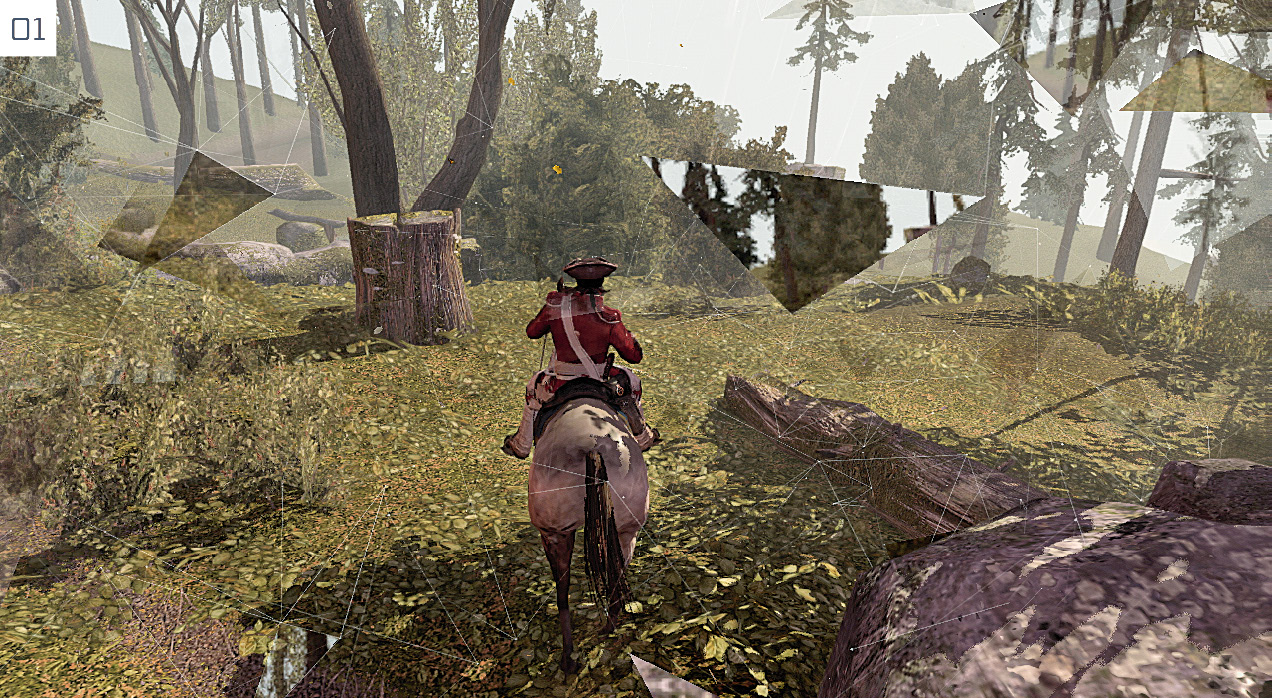
While Synchronization is a measure of success, Desynchronization is the consequence of failure. Desmond cannot change the lives of his ancestors, but must experience them with great fidelity. Diverging too radically from the “true” course of events causes Synchronization to be lost.
Desynchronization can occur under the following conditions:
- Death: This occurs whenever the Life Bar is reduced to zero. This happens most frequently in combat situations, but is also the result of falls from great heights.
- Failed objectives: Failing to comply with key mission parameters will lead to a return to a previous checkpoint.
- Moving out of bounds: Attempting to visit a specific locale before the appropriate time, or moving outside the confines of a current mission area can cause a loss of Synchronization. There is a clear visual cue that provides a strident visual warning whenever you approach such boundaries (
 01). Take heed, and move away swiftly.
 - Anomalous behavior: If you attack allies, civilians or domestic animals, Desynchronization will occur if you persist after ignoring an initial message of admonishment. There is, of course, a little leeway. Accidentally striking the wrong individual during a pitched street brawl won’t lead to serious repercussions.
In pure gaming terms, if Desynchronization occurs while you are engaged in a mission, you are returned to a previous checkpoint. These are actually plentiful, dividing individual Memories into manageable portions that call for little in the way of repetition.
While free roaming in the game world, with no active tasks, Desynchronization will restart Haytham in a nearby area with his cause of “death” scrubbed from the record.
Optional Objectives
In addition to mandatory objectives (such as avoiding detection, protecting allies or winning battles), main story missions and many side quests also feature Optional Objectives. Completing a mission might contribute 60% of the Full Synchronization total, but to gain the maximum value, you also need to fulfill the secondary criteria set out in the Optional Objectives.
On one level, these exist to encourage a certain style of play: to make players surrender the assassination abilities and attempt a bloodless infiltration of a heavily guarded area, for example. Others function as a more direct test of your prowess, such as a time limit for the completion of a specific task.
Optional Objectives are not revealed before you start a mission, and are usually introduced at very specific junctures via a pop-up message in the left-hand corner of the screen. Forewarned being forearmed, our Walkthrough and Side Quest chapters detail all of them – and, wherever possible, advice on how they can be beaten.
The main reason to complete Optional Objectives is to increase your Synchronization rating. If this isn’t important to you, or you would prefer to return to a challenge later, there is absolutely no penalty for failure. For those who will settle for no less than 100% completion, we would offer the following tips:
- Even if you are trying to play with a bare minimum of assistance, always check the Walkthrough and Side Quest chapters to learn about a Memory’s Optional Objectives before you begin. It could be that one condition might be much easier if Haytham has a full stock of Smoke Bombs, for instance, enabling you to prepare in advance.
- If you are poised to fail an Optional Objective, press
 /
/ and select the Reload Last Checkpoint option to rewind time. If you’re playing for perfection, this demands much less effort than replaying the entire mission at a later date.
DNA Tracker & Memory Replay
The DNA Tracker tab in the Pause menu enables you to study your progress in all main missions and side quests to date. In addition to your total Synchronization, you can also check individual Memories to find instances where you are missing an Optional Objective, and replay them if you so wish. The Replay option moves Haytham back in time and places him next to the appropriate Memory Start marker.
- You can leave the Replay at any moment by selecting Abort Memory in the Pause menu.
- Hold
 /
/ to jump to the end of cutscenes. Note that certain cinematic sequences (such as short establishing shots or transitions) cannot be skipped.
 - Once an Optional Objective has been completed, it cannot be “undone” by replaying a mission. You could conceivably complete one of four in your first attempt, and yet fail that Optional Objective but beat two others on a second playthrough – but it would still remain, along with your new successes.
- Optional Objectives that require you to complete all specified challenges in a single playthrough, however, can only be obtained with a flawless performance.
- You must complete an entire Memory and wait to be returned to the DNA Tracker menu for Optional Objectives to be recorded. Partial playthroughs do not count.