
The Legend of Zelda: A Link Between Worlds Guide How to Play
Understanding the Game Screens
The screen animations and icons for The Legend of Zelda: A Link Between Worlds are split among the Touch Screen and the 3D Screen. Regardless of whether you are in the overworld or in a dungeon, the Gear and Item screens remain the same.
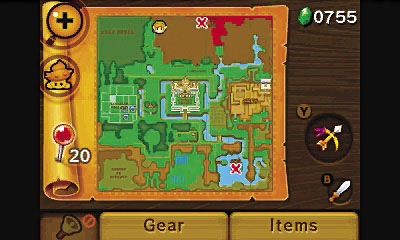
In The Legend of Zelda: A Link Between Worlds, Link can travel between Hyrule, the light world, and Lorule, the dark world. While the Touch Screen icons remain the same in the each world, some locations or features in the world are altered or completely changed.
Top Screen
Life Gauge
This is the number of heart containers Link currently has. These deplete whenever Link receives damage. If Link receives too much damage and his life gauge becomes completely empty (and you do not have a fairy in a bottle to revive him), he will faint, forcing you to the Game Over screen. Link’s heart containers deplete in quarter, half, or whole heart increments, but can be restored by fairies, potions, hearts, and other consumables. Link can increase his life gauge by finding pieces of heart, which are spread out across the overworld and dungeons.
Energy Gauge
The purple meter on the left side of the top screen shows Link’s remaining energy. This does not appear until a certain event unfolds in the beginning of the game. Your energy gauge depletes whenever Link uses a quest item. For instance if you fire your bow, the energy gauge depletes after each shot. Recover energy over time or recharge it completely with energy potions.
Action Icon
This icon appears as an action option when Link is next to objects or people that he can interact with. Use it to open a treasure chest, pick up a rock, push a switch, merge into a wall, and converse with townsfolk, along with many other actions.
Bottom Screen
Map
Whether you are roaming Lorule or Hyrule, or exploring the depths of a dungeon, this map is the key to navigating the area. Certain icons, such as weather vanes and fissures, appear on the map for a quick reference.

Floor Tabs (Inside a Dungeon)
While in a dungeon, tabs appear on the map’s left side. When touched, they switch the map to the floor selected. This helps you quickly see which doors are still locked and what rooms have not been entered. If Link found the compass, the map also shows any still-unopened treasure chests.
Zoom
Zoom in and out of the map for a clearer view, which helps clarify the details of the world’s terrain. Zoom close up to see what route to take, or zoom all the way out to get a general overview.
Lost Maiamai Icon (In the Overworld)
Selecting this indicates how many lost Maiamai are left in every region of the map. This is a great guide when you begin collecting the 100 lost Maiamai that are spread across Hyrule and Lorule.
Map Pin
Touch and hold to select the pin, and use it to mark an area on the map. Don’t ever forget that certain treasure chest that you cannot reach at the moment. Just put a pin in it! Tap your map pins to change their color to red, yellow, or blue.
Rupee Total
This shows the total number of Rupees you have. You can carry as many Rupees as you want from the very start of the game!
Equipped Quest Items
This shows which quest items are currently equipped to % and ^. Select the Item tab to open the Item menu to select the quest item you want to equip. At a certain point, you gain the quick equip ability, which lets you conveniently switch out items by pressing and holding either the  or
or  equipment boxes. This opens a vertical mini item list; scroll up or down through the available quest items to quickly swap out quest items on the fly.
Equipped Sword
This shows which sword Link has currently equipped. His sword is always stored to  . When Link gets a new sword, or upgrades the Master Sword, the image of the sword is updated here.
Light and Dark World Icon
Tap this to toggle between the Hyrule and Lorule overworld maps. Link must travel back and forth between worlds frequently, so use this tab as a quick reference for navigation.
Bell
Once Link meets the witch Irene, she gives him a bell that will summon Irene or her broomstick in an instant. You can then fly to any discovered weather vane throughout Hyrule or Lorule. How convenient!
Gear
Tap this icon to get a quick view of the gear that Link has equipped, from weapons to clothing. The better his gear, the more Link can endure, so be sure to obtain every piece to create the ultimate hero.
Items
Tap the Item tab to view your quest items. You can equip items to and , or simply organize your equipment however you want it. Organized weapons are happy weapons! Link can obtain a pouch to increase the number of items that he can equip.