
The Legend of Zelda: A Link Between Worlds Guide How to Play
Subscreens
Select the tabs on the bottom of Touch Screen to open up subscreens, allowing you to equip or sort quest items, or view gear that Link has obtained throughout his journey.
Gear Subscreen
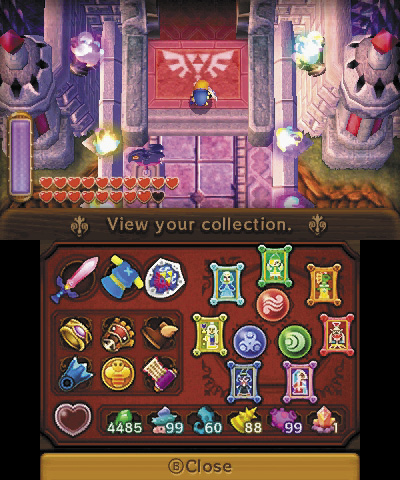
This screen shows the gear that Link can equip once he’s found it. This screen also shows key items that are needed to progress through the game, as well as special items that can be used for enhancement.
Equipment
Unlike the items that you must equip manually in the Item screen, these pieces of gear are equipped automatically when Link obtains them in the field. The first slot is for Link’s sword, the second slot is for his clothing, and the third is for his shield.
Key Items
This next six boxes, just below your equipment, contain the key items that Link obtains after succeeding at a certain task. These items equip themselves automatically once obtained, and will help you access new areas.
Pendants
At certain points in the game, Link collects the three Pendants of Courage, Wisdom, and Power. These appear in three circles on the right side of the Touch Screen. These cannot be equipped like gear or quest items, but they’re critical for obtaining the Master Sword.
Paintings of the Seven Sages
These seven oval slots hold the paintings of the Seven Sages after you have rescued them from dungeon quests. Link needs these to access Hyrule Castle in the latter part of the game.
Pieces of Heart
On the Touch Screen’s bottom left, this heart container becomes filled as Link obtains pieces of heart that are scattered throughout Hyrule and Lorule. Each piece of heart gained fills a quarter of the heart container, meaning Link needs four pieces of heart to fill the container once. Once the container is filled, an extra heart is added to Link’s life gauge.
Special Items
This last row holds any collectible items that Link discovers in the overworld, such as monster horns, monster guts, monster tails, and Maiamais. These items allow Link to gain upgrades or have potions made.
Item Subscreen
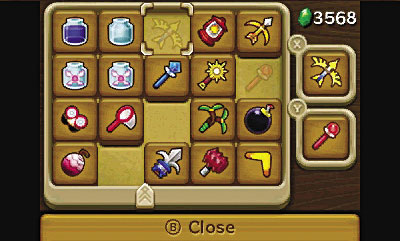
This screen holds all the quest items that Link has collected. These can be equipped to either  or
or  by scrolling over and selecting them or by touching them and dragging and dropping the item into the
  or boxes. Later in your journey, you gain a quick equip function that appears as a vertical menu when you press and hold either
  or equipment slots on the right side of the Touch Screen. Simultaneously, a new slider tab appears at the bottom of the Item screen. Sliding this helps arrange your equippable items, making the quick equip function even quicker!
Game Over
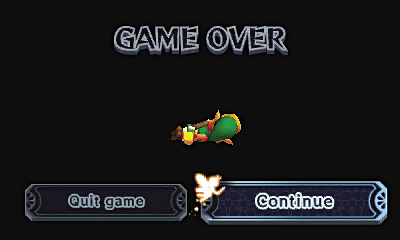
If Link falls in battle, the Game Over screen appears with two options. You may choose to retry and continue from where you fell, or quit and restart from a saved game. If you choose to retry, you lose any weapons that you were renting from Ravio. If you choose to quit, you are returned to the Title screen to reload your last save.