
Mass Effect (PC) Guide Essentials Spectre Orientation Department
Dialogue
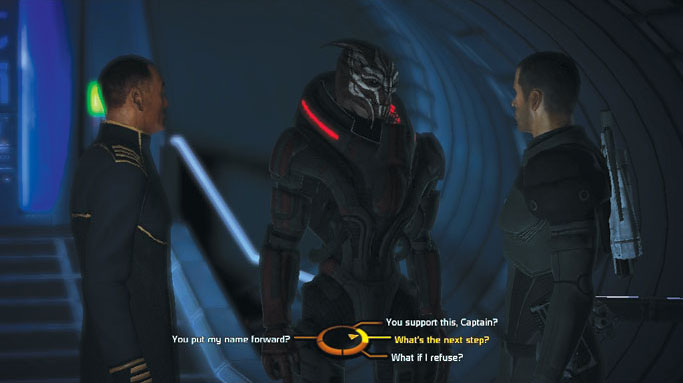
When Alliance agents engage personnel and civilians alike in conversation, the conversation is directed by efficient use of the dialogue wheel.
Verbal options (and sometimes actions speak louder than words!) are presented around the outside of the wheel. You choose one after you have weighed the options.
Dialogue choices on the right side of the dialogue wheel steer the conversation towards a quick conclusion. Dialogue options on the left side of the wheel draw out a conversation and possibly yield more information.
There is another relationship you must note if you want to make quick choices during conversations: top-left (Paragon Charm lines) and top-right dialogue options are friendly and positive, while bottom-left (Renegade Intimidate dialogue lines) and bottom-right dialogue options are usually dismissive, curt, or even openly hostile toward the person with whom you’re speaking.
In rare instances, an action (which speaks louder than words) replaces one of the dialogue options and makes the scene more intriguing and enjoyable for some.
For example; you could be talking to a demeaning Alliance Fleet Officer and have a dialogue option to respond in a polite and respectful manner or you could unholster your sidearm and shoot him in the knee.
He’d likely get the point without you having to utter a single syllable. Dramatic instances like the one above can readily be appraised by considering your immediate choices in a conversation and recognizing where the options are positioned around the middle of the dialogue wheel.