
Jagged Alliance: Back in Action Guide Essentials Bootcamp
Plan and Go System (Command Mode)
The game runs in real time, but you can switch from Real Time Mode to Command Mode at any time. Playing the game in real time is fast and furious, but the action can be become too intense very quickly.
To pause the action and plan your course of attack, you can press the spacebar to enter Command Mode. While in Command Mode, you can stop the flow of time and freely scan the entire map.
While in this mode, you will be able to see red vision cones that represent the viewing area of an enemy. Obviously it is important to avoid entering their field of vision if you don’t want to be detected.
Likewise, if you have mercs in Guard Mode, you can check their green field of vision to make sure they are facing and covering the right spots on the battlefield.
In Command Mode, you can only issue directives to each merc individually; there is no way to select or control multiple members of a squad.
Action Timeline
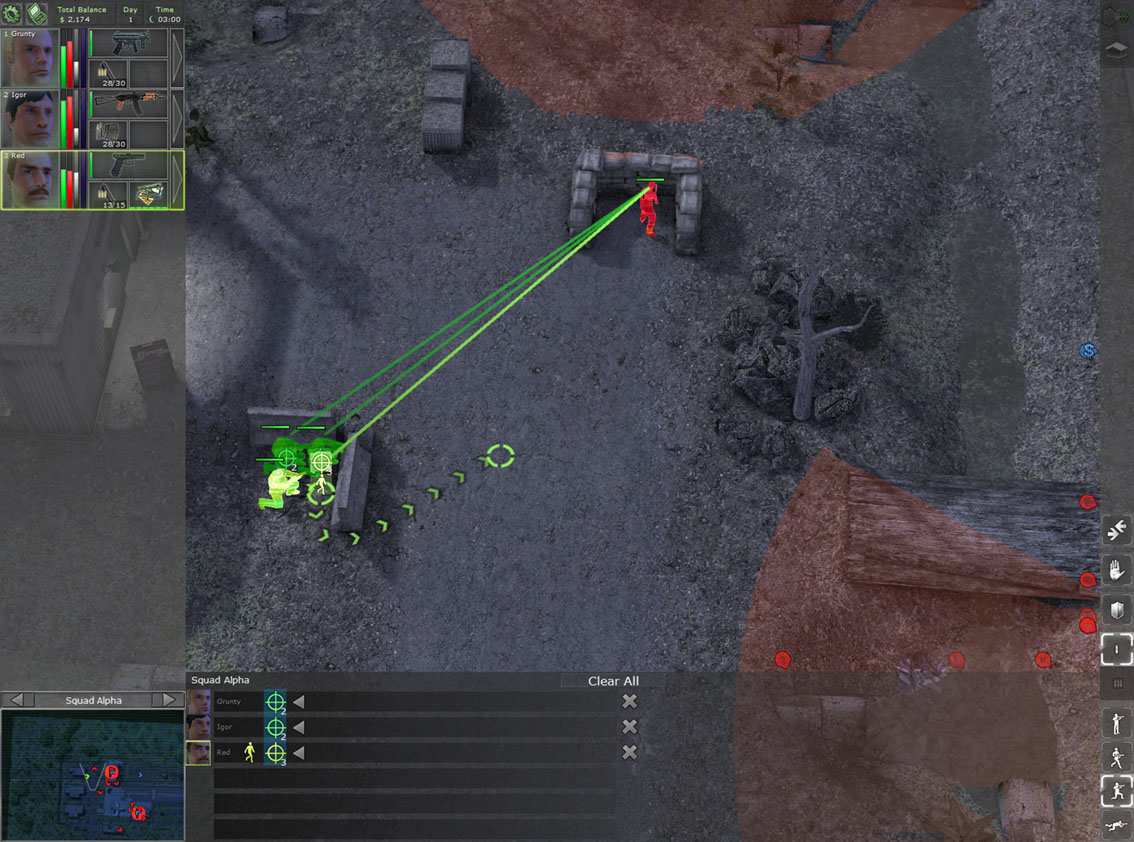
When you enter Command Mode, not only do you get to pause the action but you also gain access to the action timeline on the bottom of the screen. Any commands that you have issued and your mercs are carrying out will be displayed on the action timeline.
If you issue additional commands while in Command Mode, they will be added to the end of the queue and executed last. You can issue up to eight orders for each merc, and they will be performed sequentially from left to right.
Orders can be canceled separately, but they also can be completely cleared for one merc or the entire squad. One of the major advantages of the action timeline is the ability to synchronize commands.
This is a very important technique when assaulting an enemy from different directions. It can allow you to command mercs to move into position and sync their attacks and firing so the enemy will be hit with a barrage of bullets at once. Syncing is a simple process of dragging an order from one merc’s timeline to another merc.