
User Interface
Head-Up Display
The HUD conveys important information that assists the player in exploration and combat.
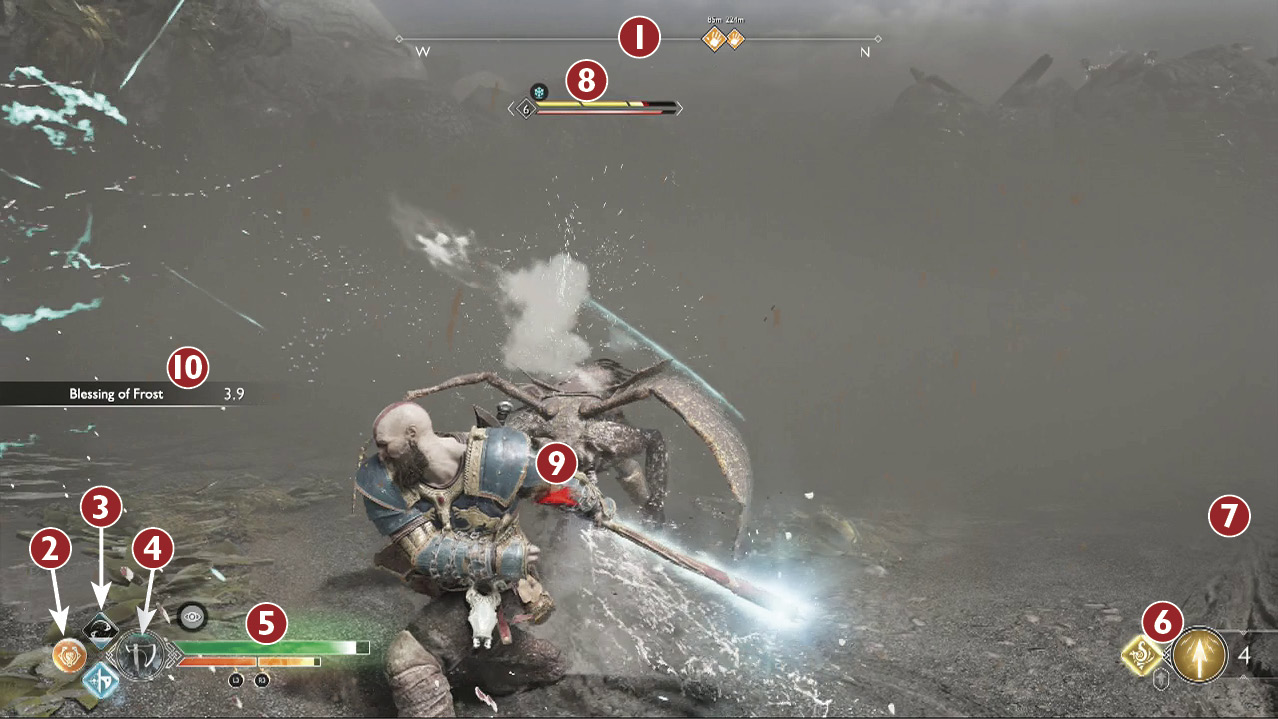
 Witch’s Compass: The compass shows the direction that Kratos is facing. The current objectives for the Journey and selected Favor are also shown, along with the distances to these destinations. Use this information to get your bearings when unsure of where to go next.
 Talisman Ability (L1 + Circle): If you have a Talisman equipped with a bonus ability, this icon lets you know when it’s available.
 Light/Heavy Runic Attack (L1 + R1 / R2): The upper icon represents your equipped Light Runic Attack, while the lower icon is the Heavy. After using an ability, you must wait for the icon to refill before it can be performed again.
 Leviathan Axe Permafrost / Blades of Chaos Immolation: In order to use Permafrost or Immolation, you must purchase the corresponding Skill. This meter builds as you attack with the appropriate weapon (successive hits without getting hit) until momentum is achieved. At that point, every hit is more powerful, with Frost/Burn damage applied on every hit. This icon itself represents the currently equipped weapon and does not require any Skills. The fill and flourish is related to the momentum abilities.
 Health, Rage, and Status Effect Meters: The green bar represents Kratos’ health, and orange is his Spartan Rage. Small circular meters appear above the health bar when you’re hit by status effects. The middle fills up each time the effect hits. Once it’s full, you’re inflicted, and a line around the outside of the icon indicates the time remaining until the infliction goes away. Get hit with more of the status effect before it drains, and the meter builds.
 Atreus’ Arrow Count and Runic Summon: In the bottom-right corner of the HUD, Atreus’ current attack setup is shown. The left icon represents his Runic Summon. As with the Runic Attacks, there’s a cooldown time between uses. On the right, the type of arrow currently equipped is displayed, along with the number of arrows remaining. His arrows constantly regenerate when below the maximum. If you’ve purchased a resurrection stone, you will also see it indicated here.
 Loot: XP, resources, and other items gained and lost are shown above Atreus’ arrow information.
 Enemy Level, Health, Status: Important information for each enemy is displayed above its head. Enemy level, health, Stun meter, and status effects are shown only when engaged with the enemy.
 Threat Indicator: These indicators point toward nearby off-screen threats. White signifies nearby enemies, flashing red points out an incoming attack, and flashing purple indicates an incoming projectile. Prepare accordingly.
 Perk Activations: Temporary perks triggered from Kratos’ gear are shown here along with their corresponding timer.
Other On-Screen Notifications
- Boss Health and Stun Meters:When facing a miniboss or boss, a segmented bar displays remaining health. As you damage the enemy, a portion of the bar turns red, representing the amount of health removed with the previous attack. Deplete the entire bar to defeat the enemy. Fill the thin meter displayed below the health to Stun the boss.
- Journey Updates:Each time you receive a new objective, it’s shown in the upper-left corner of the screen.
- Progress Updates:Updates to current objectives and Labors appear on the right side of the screen.
- New Locations:As you discover new locations, the region name appears below the compass. A small amount of XP is earned for each new region discovered.
- Button Prompts:Button prompts and other useful information appear above Kratos’ health bar.
The Pause Menu
Throughout the Journey, Atreus logs observations into his journal. Press the Options button to pause the game and access the journal, where you can view the following tabs. Tap the Touchpad at any time to display the map.
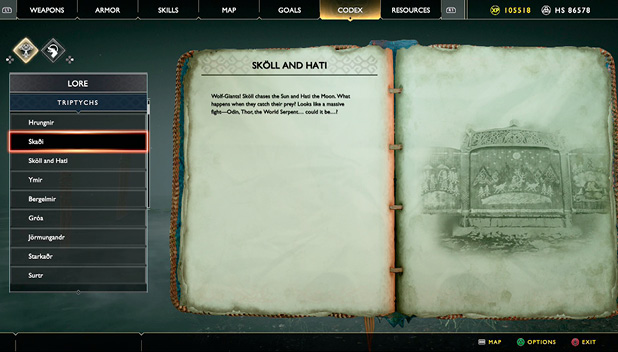
- Weapons: Change and upgrade Runic Attacks and pommels for the Leviathan Axe and Blades of Chaos. Select a Runic Summon for Atreus.
- Armor: Equip chest armor, wrist armor, waist armor, and a Talisman for Kratos. This is also where you insert Enchantments into the armor. Select armor for Atreus.
- Skills: Spend your hard-earned XP on Skills for the Leviathan, shield, Blades, and bow.
- Map: A map for each realm you’ve visited is available here. They’re not accurate representations of the environment, but they provide a good idea of where you are with respect to other regions.
- Current objectives for the Journey and selected Favor are displayed with matching icons on the map. Locations of Mystic Gateways, docks, shops, and more are displayed once you discover that region. A summary for the highlighted region lists everything you’ve found, along with the total number available.
- Goals: Current objectives for the Journey, Artifacts, Favors, and Labors are listed here. Also find the Treasure Maps currently in your possession.
- Codex: Lore (Jötnar Shrines, Lore Markers, Rune Reads, Scrolls, Mimir’s Tales, Lessons) that you discover along the way is logged under the Lore Tab. As you defeat enemies, entries are added to the Bestiary Tab. At first Atreus notes observations about each type of enemy, but eventually tips are added.
- Resources: All resources and special items you gather are listed here. Resources are used at the shops to craft and upgrade your gear. Special items are used during the Journey and while completing Favors and Labors.