
Atari Flashback: The Essential Companion Guide 1988-90
Super Football

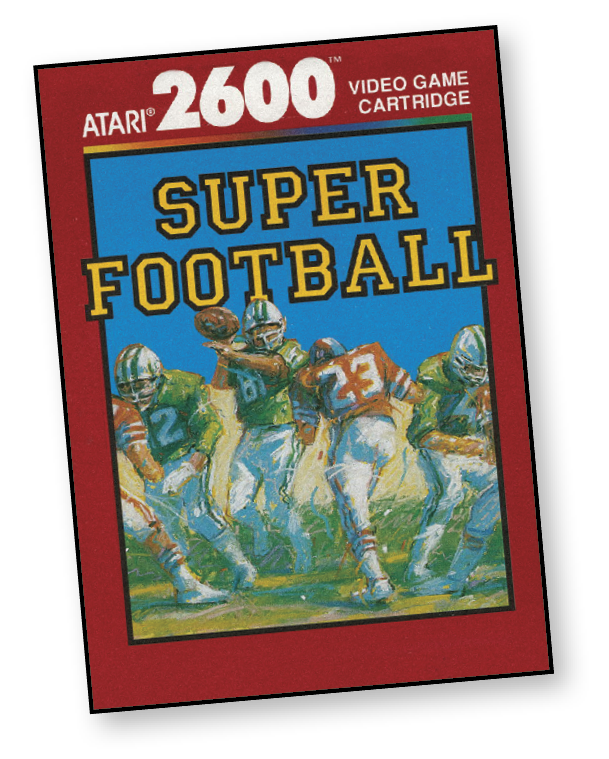
Super Football offers 3-D football action. On-screen, you get a full view of the field from above and behind the offensive team. And you control the action as the players line up, kick, run, pass, and score.
With Super Football, it’s nonstop gridiron action until the final whistle!
About the Game
Atari may seem like they had a little bit of hubris in the naming of Super Football, but the game is really pretty super. It’s a huge improvement over many of the sports-centric games released on the Atari 2600. The unfortunate part is that the game was released near the end of the 2600’s cycle, thus there were no further advancements on this version. This doesn’t mean that it didn’t influence future sports games, or more specifically football games. If you pay attention, you might note some of the same strategies you’d use in the Madden NFL franchise.
Super Football is the result of a promise Atari made several years before its release. During an effort to push sales of Atari 2600 units, Atari released a press article claiming to have a big package of new software coming from their company. When Super Football was released, it was clear that this was part of that promise, so needless to say it was welcomed with open arms, as it was highly anticipated.
Overall, Super Football made great leaps and bounds for the Atari 2600, even though the ideas and technology had to be passed on to the next console to be recognized. However, that doesn’t detract from the power that Super Football had on the world of gaming during its release. The game was well-received and liked by gamers all around.
Object of the Game
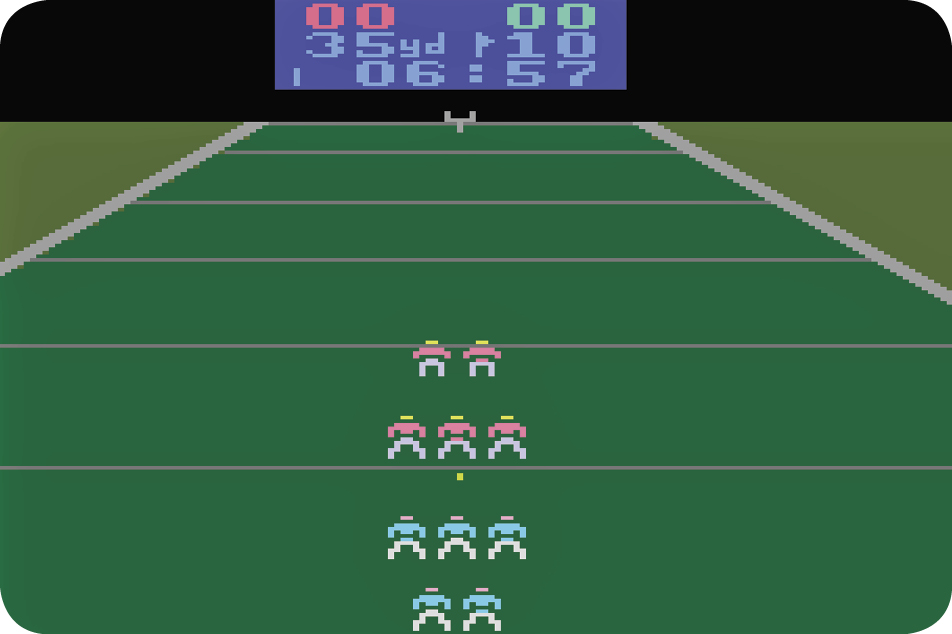
Use your skills and knowledge to be the best football player in the world. Your goal is to get the ball from one side of the field to the other by picking the right plays and moving forward as best as you can, all while scoring more points than your opponent. You will also have a chance to play defense against the opposing team and prevent them from scoring against you.
How to Play
Buckle Down and Score
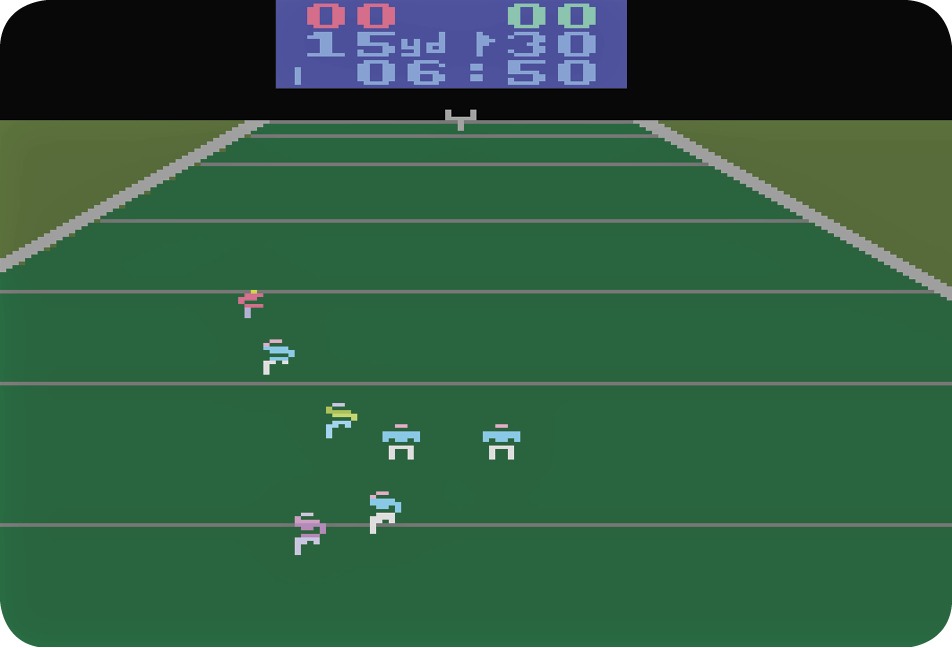
The game begins with both teams running onto the field and taking their positions on the scrimmage line. Player 1’s team (left joystick control) wears red jerseys, and the computer’s or Player 2’s team (right joystick control) wears green jerseys. Once the action starts, the player currently under joystick control on each team has a slightly different-colored jersey.
The defensive (red) team faces you. The green team kicks off to the red team, and the red team’s receiver catches the ball.
The red receiver is now under Player 1’s joystick control. Move your joystick in any direction to maneuver him up the field toward the end zone, while avoiding the green team’s players. When the receiver is tackled, the two teams take their positions at the line of scrimmage, with the offensive team at the bottom of the screen.
With both teams at the scrimmage line, you have an opportunity to choose your plays. Then the action continues.
The Scoreboard
The scoreboard at the top of the screen shows both teams’ scores on the top line. On the second line, the number on the left shows which yard line the ball is currently on. The number on the right shows how many yards the ball must be moved in order to get a first down. The down that’s underway is indicated by one to four flags in the center of the scoreboard. The quarter indicator in the lower-left corner shows which quarter the game is in by displaying one to four vertical bars. The clock on the bottom line keeps track of time remaining in the quarter.
The scoreboard is red when the ball is in the defensive half of the field and blue when the ball is in the offensive half. The game begins with the green team kicking off to the red team. Play stops at the end of the second quarter (halftime), and then the red team kicks off to the green team.
The game ends when the clock reaches 00:00 in the fourth quarter.
At the end of a game, press Reset to play again with the same number of players at the same level, or press Select to make a different game selection.
Running the Play
With both teams at the scrimmage line and the plays selected, the offense can press the red controller button to hike the ball. If the button is not pressed after about four seconds, the ball is automatically hiked.
Once the ball is hiked to the quarterback, both teams carry out their plays. The defensive player rushes the quarterback, the offensive receiver runs the selected pattern, the halfback (or tight end) tries to block the rusher, the linemen blocks, and the cornerback and safety try to cover the receiver. When the quarterback has the ball, he’s under your control. The quarterback can either run with the ball or pass to the receiver, depending on the play selected.
Passing
Wait until the receiver is “open” before throwing the ball to him, then press the red controller button to initiate a pass. You can move your joystick handle left or right to make the quarterback “lead” the receiver and throw the ball in that direction. Release the button to pass the ball.
Running
You can decide either to make the quarterback run with the ball or pass to a receiver, depending on the play selected. Once the ball is thrown, joystick control switches to the receiver. Move the joystick handle to get the receiver in a good position to make the catch.
Maneuver your ball carrier up the field. Move your joystick to make him avoid defensive players, and use your blockers as shields.
When the ball carrier is tackled, the teams go to the scrimmage line for another play selection.
The offensive team has four downs to advance the ball 10 yards. If it’s fourth down, you can punt the ball, or try for a field goal if you’re within 50 yards of the goal line. If the offense misses a field goal, the defense takes the ball. If a punt is kicked into the end zone, the defense takes over at the 20-yard line.
offensive FORMATIONS
 HalFback
 QUARTERBACK
 TIGHT END
 WIDE RECEIVER
 OTHER PLAYERS
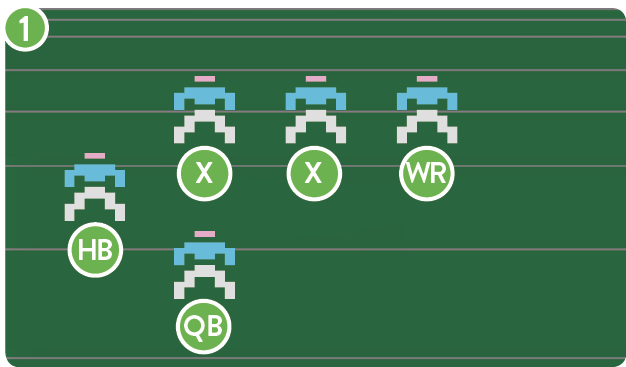
RUN RIGHT,OPTION PASS
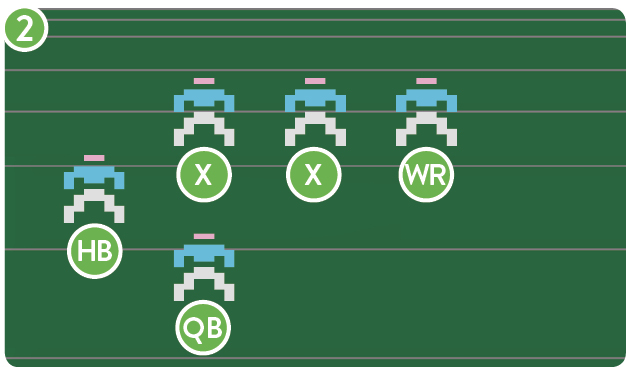
WIDE RIGHT
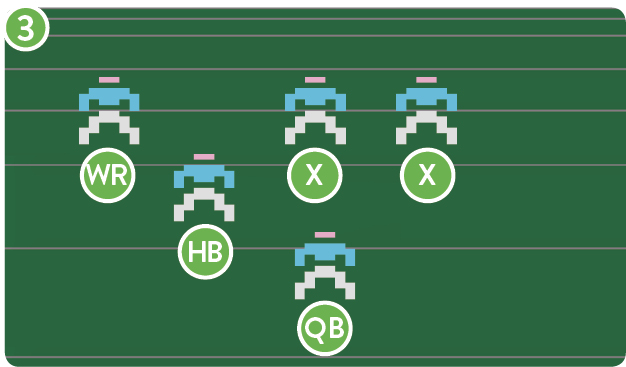
RUN LEFT,OPTION PASS
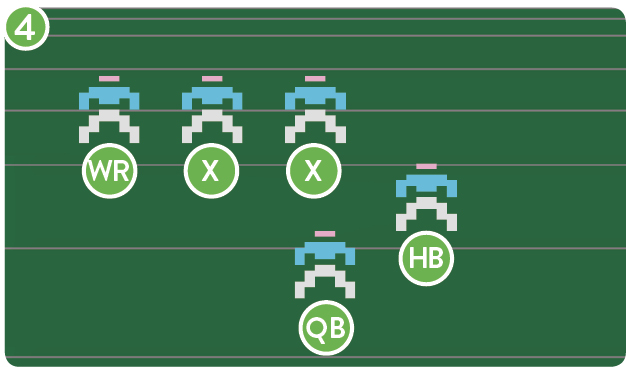
WIDE LEFT
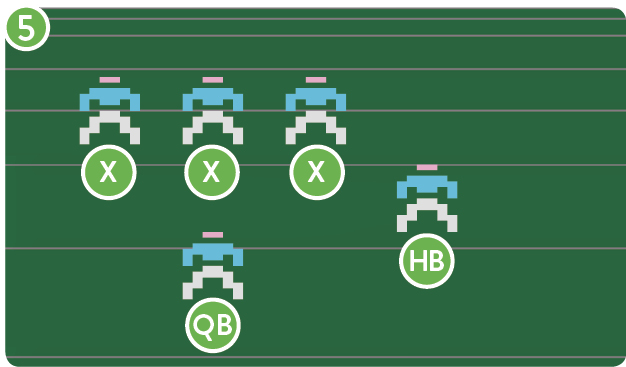
HALFBACK PASS,MOTION LEFT
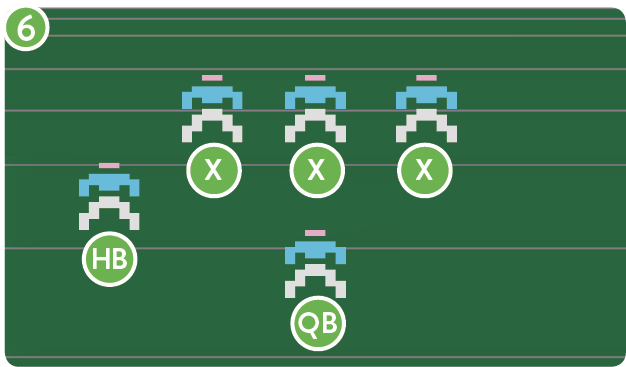
HALFBACK PASS,MOTION RIGHT
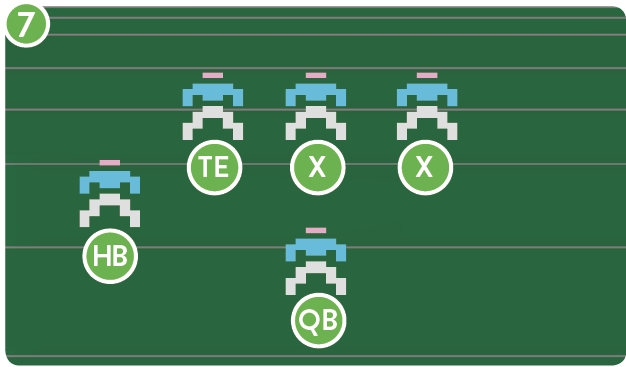
TIGHT END PASS,FAKE MOTION RIGHT
DEFENSIVE FORMATIONS
 CORNERBACK
 SAFETY
 OTHER PLAYERS
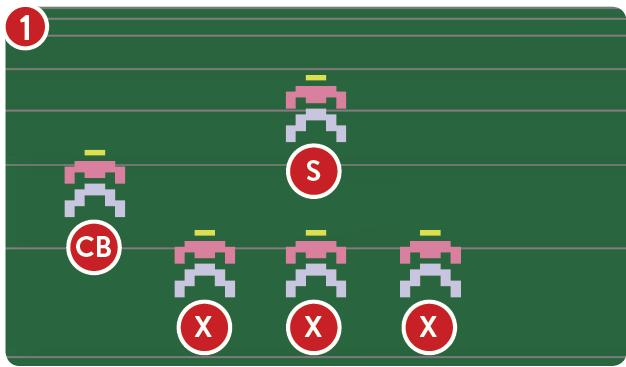
WIDE COVERAGE LEFT
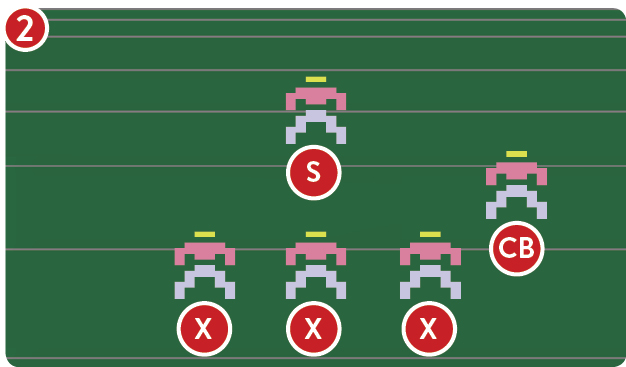
WIDE COVERAGE RIGHT
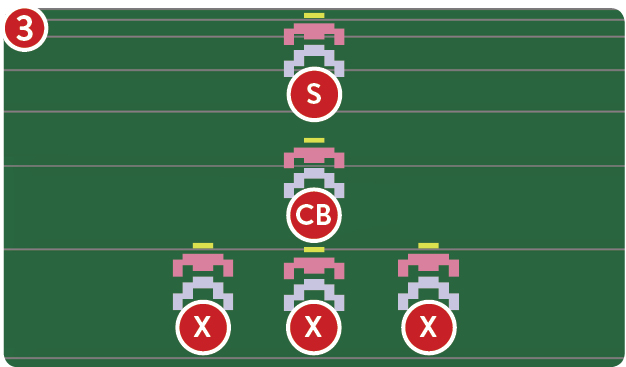
MOTION PREVENT DEFENSE
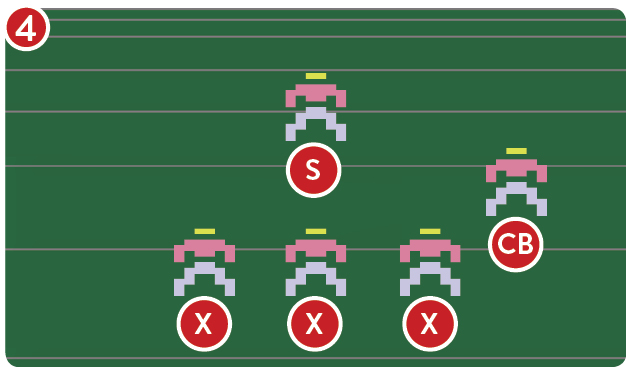
BLITZ CORNER RIGHT
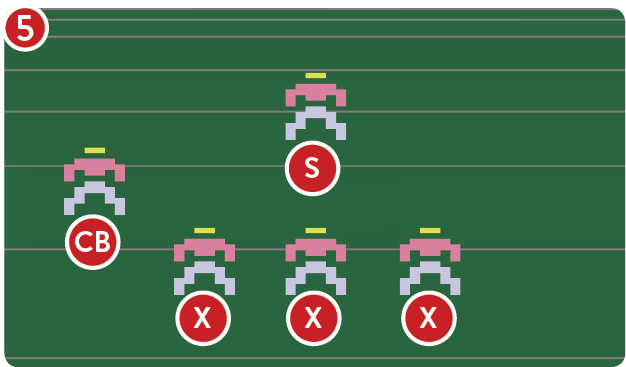
BLITZ CORNER LEFT
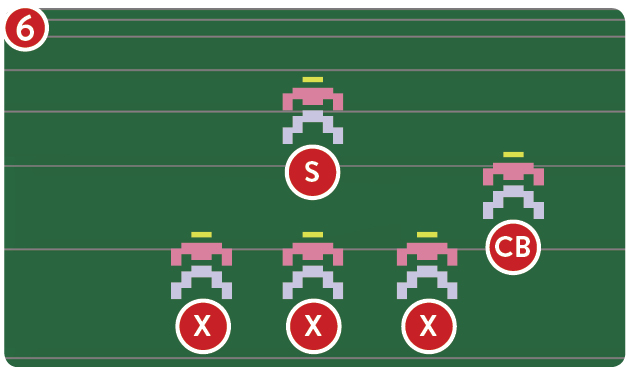
RUN RIGHT DEFENSE
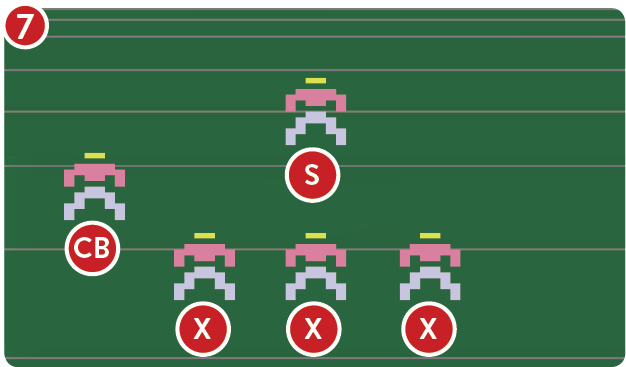
RUN LEFT DEFENSE
A touchdown is scored when the ball carrier crosses the goal line in the end zone. The teams then run onto the field to try for the extra point. After the extra point try, the offense kicks off to the defense.
If the defensive team intercepts a pass thrown by the offensive quarterback, the defensive team becomes the offense and attempts to move the ball up the field toward the goal at the top of the screen. No runback is allowed on an interception.
Selecting Plays
When the teams go to the scrimmage line, you select a play by moving the joystick. Once you’ve made your selection, lock it in by pressing the Fire button.
On fourth down, either a punt or a field goal takes place. The offense has about 25 seconds to select its play and lock it in. If no play is locked in, the previous play is used. After the offense selects its play, the defense has two to four seconds (depending on the game level) to select its play. Again, if no play is locked in, the previous play is used.
The plays you select appear on the scoreboard, in place of your score. When both teams’ plays are locked in, the scores reappear and play resumes.
Super Football Playbook
Offensive Plays
The offense can select both a formation and a pattern (the route the receiver will run). The formation number appears as the left digit of your score and the pattern number as the right digit. Move the joystick handle left or right to choose a formation (from 1 to 9). Move the joystick handle forward or back to choose a pattern (from 1 to 4).
Once the play is underway, use the joystick to control the quarterback or the receiver, depending on which man has the ball.
On motion plays, the halfback goes into motion before the ball has been hiked. When the ball is hiked, the halfback begins the pattern from that point if he’s the receiver. On run plays, the quarterback still has the option to pass.
Offensive Formations
|
1 |
Run right option pass |
|
2 |
Wide right |
|
3 |
Run left option pass |
|
4 |
Halfback pass motion left |
|
5 |
Halfback pass motion right |
|
6 |
Tight end pass fake motion right |
|
7 |
Punt formation |
|
8 |
Field goal formation |
Offensive Patterns
The receiver (wide receiver tight end or halfback) starts the play by running up the field. At that point the receiver runs to points on the field depending on the pattern you selected.
Defensive Plays
The offense selects a formation, and the formation number appears as the left digit of your score. Move the joystick left or right to choose a formation (from 1 to 9).
Once the play is underway, use the joystick to control the cornerback.
On a blitz, the defense rushes two players. The safety plays a deep zone and tracks either the wide receiver or the quarterback.
Defense Formations
|
1 |
Wide coverage left |
|
2 |
Wide coverage right |
|
3 |
Motion prevent defense |
|
4 |
Blitz corner right |
|
5 |
Blitz corner left |
|
6 |
Run right defense |
|
7 |
Run left defense |
|
8 |
Punt formation |
|
9 |
Field goal formation |
|
Level |
Time |
|
1 (Novice) |
3 minutes per quarter |
|
2 (Standard) |
7 minutes per quarter |
|
3 (Advanced) |
10 minutes per quarter |
|
4 (Expert) |
15 minutes per quarter |
NUMBER OF Players
Super Football is a game available for play with one or two players.
Scoring
|
Touchdown |
6 points |
|
Field goal |
3 points |
|
Extra point |
1 point |