
Yo-Kai Watch Guide Story Walkthrough
Chapter 1: Welcome, Yo-kai!
Meet Your Butler
One summer day, Nate Adams goes out on a bug-hunting expedition. On Mt. Wildwood, he discovers an odd sort of vending machine. When he feeds it a coin and examines the ball that pops out, Nate releases Whisper, a friendly Yo-kai spirit. Whisper gives Nate a mysterious watch. Soon, they’re off to town to search for more Yo-kai!

“Feed me! Feed meeeeeee!” Nate follows the mystery voice’s instructions…and your Yo-kai adventure begins!

Meet Whisper, a self-styled Yo-kai butler, at your service! Ignoring the dubious Nate, Whisper immediately leads him on a town-wide Yo-kai hunt.
Story Chart
Objective 1: Talk to Mom downstairs!
Objective 2: Find some bugs at Triangle Park!
Objective 3: Check the trees for bugs!
Objective 4: Talk to the school janitor!
Objective 5: Look for bugs on Mt. Wildwood!
Objective 6: Look for bugs on nearby trees!
Objective 7: Look for bugs on Mt. Wildwood!
Objective 8: Use your Lens!
Objective 9: Talk to the Yo-kai you found!
Objective 4

Talk to the janitor at school, and he’ll tell you where to find rare bugs.
Objective 4

Go behind the school and head north to Mt. Wildwood. Work your way up the narrow forest path.
Objective 8

If your Yo-kai Lens picks up something, search the spot carefully. You’ll find a Yo-kai eventually.
First Friend, First Battle
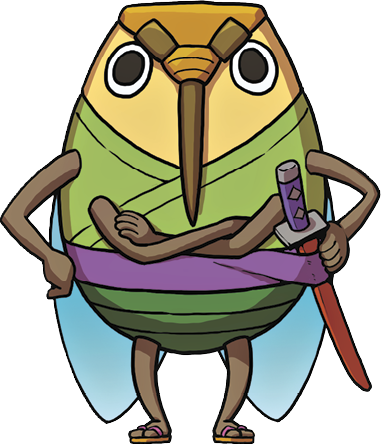
You’ll fight the Yo-kai that appears! When you do, the cicada in your net turns into Cadin, who’ll fight in Nate’s place.
Objective 9

Cadin has strong attacks and techniques, making him a capable ally at the start.
Objective 9

After you beat Buhu, your first foe, he becomes your friend. Now you have two Yo-kai buddies!
Special Advice |
Spend Time with the Controls
Follow the arrow to your objective.
If you’re ever confused about what to do next, just check out the map on the bottom screen. The objective arrow shows you where to go.

Keep following the red objective arrow to reach your target location, person, or Yo-kai.

Important characters are marked with “!” icons. Go up and talk to them!
Save frequently to your diary.
You can save your progress just about anywhere that isn’t a dungeon. An Eyepo can allow a player to save in a dungeon area.

If you don’t save your game, you might accidentally lose your progress.

The Eyepo refills your Yo-kai team’s HP and Soul Meters, and it also lets you swap medals between your Yo-kai Wheel and Medallium.
Move medals to rearrange your active party.
Select Medals from the Main Menu to change your battle team’s formation and equipment.

Arrange your Yo-kai medals to determine which allies are on the front or rear lines.

Examine your Yo-kai team’s skills, stats, elemental affinities, and combat moves in the Yo-kai Medallium!
Get help from Whisper.
Yo-kai Watch has a fantastic in-game Help system. Refer to it if you’re unclear about anything. You can access all of the in-game tutorials, plus much, much more.

You can find all the basics of your adventure in Help. You can learn the ABCs of battle there, too!

Just select a topic, and Whisper gives you a detailed explanation.