
Xenoblade Chronicles X Guide A Primer for Prospective Citizens of Mira
Combat Flow
When you draw your weapon and advance toward an enemy, it’s officially go time. Use the onscreen information, your knowledge of positioning, and the tools at your disposal to pull off the victory.
The Helpful HUD
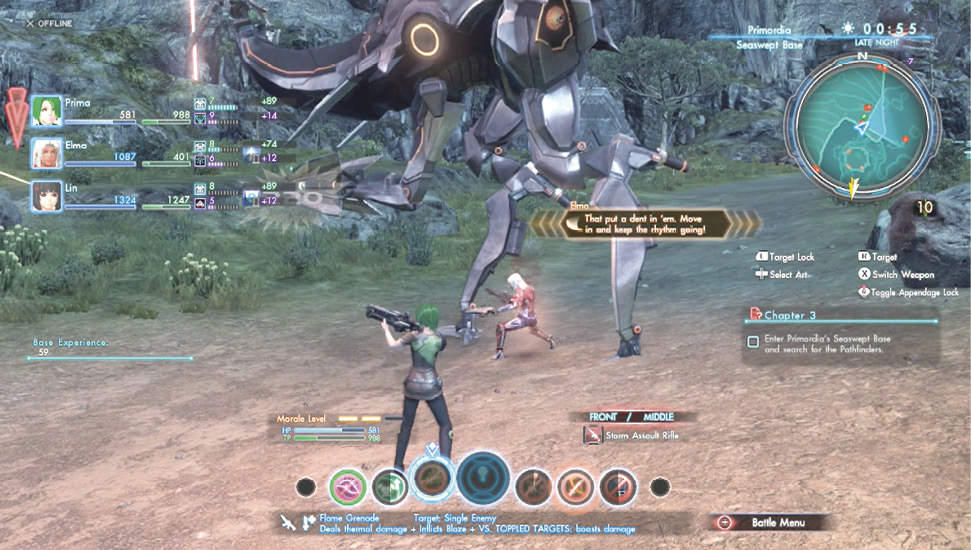
In this screenshot we can clearly see the following previously explained concepts:
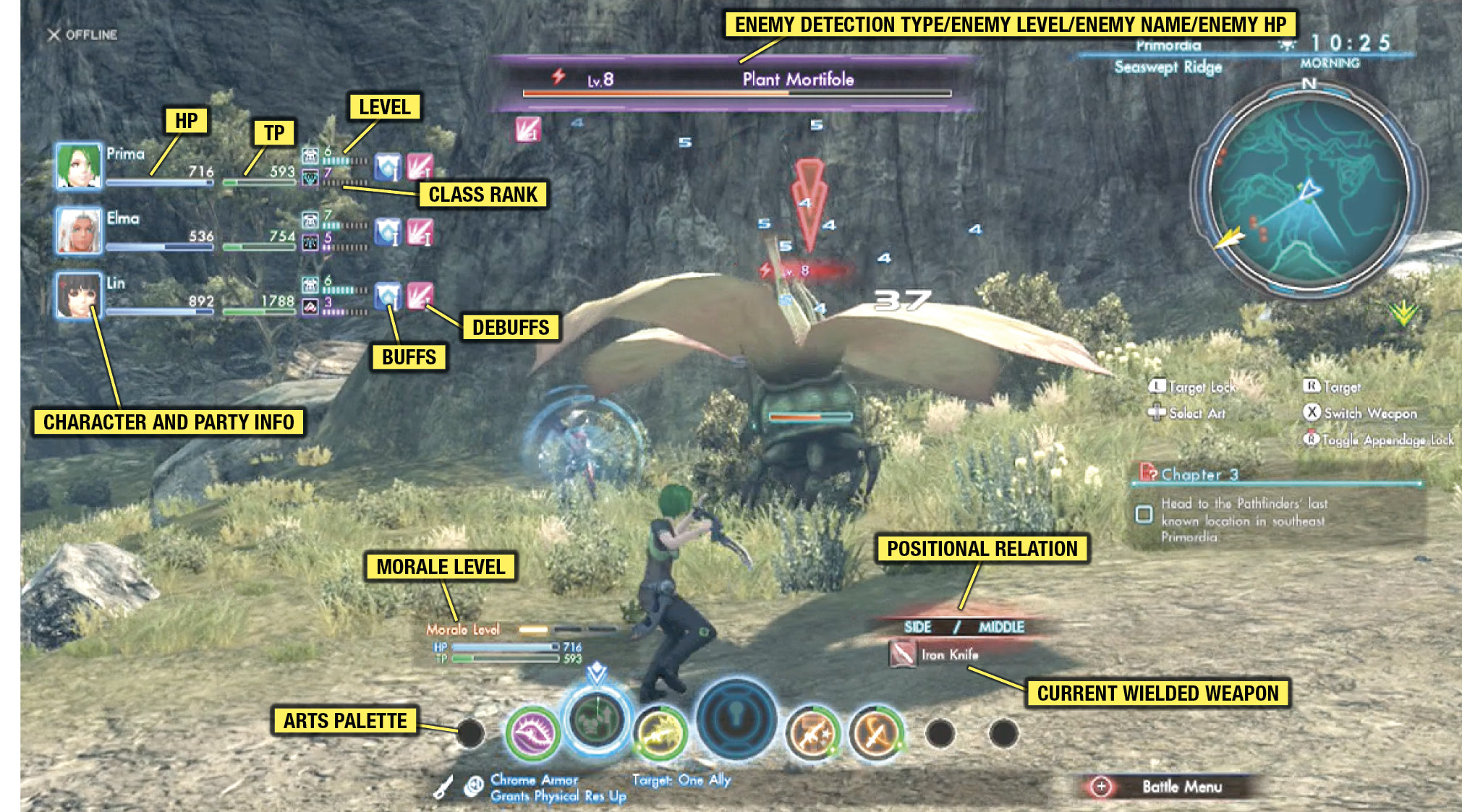
But what are the rest? Glad you asked!
Morale Level
This shows your party’s solidarity. The higher the morale, the better your characters work together. You’ll get chances to activate Soul Voices more often and gain additional TP from their successful activation.
Arts Palette
This shows your currently equipped Arts.
Positional Relation
This shows your position in relation to the enemy. You can attack from the front, but it’s often advantageous to attack from the side or the back. Use the left stick to move your character’s position in real time (shown on the left). You can even jump and sprint in order to manipulate your elevation relative to the enemy (shown on the right). Go for the high ground!
Current Wielded Weapon
This is a good way to keep track of which weapon you have equipped and what sort of damage it’s doing to the enemy.
Battle Menu
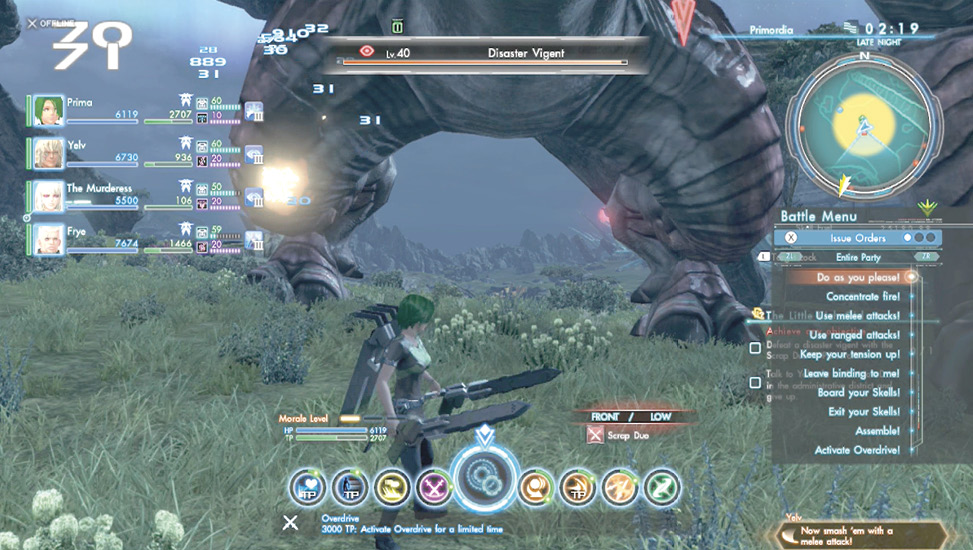
Press(+) during combat or while targeting an enemy to open the Battle menu. You can then press(X) to scroll through submenus.
| issue orders | You can order your party members to follow the tactics you command of them. |
| Items | You can use consumable items, which are received as division rewards. For more on division rewards, check the Social chapter of this guide. |
| Emergency Escape | If you can hold out for 15 seconds after issuing this order, you’ll escape battle and reappear at the nearest landmark, no matter what. This is great for getting out of a bleak situation. |
Auto-Attacking
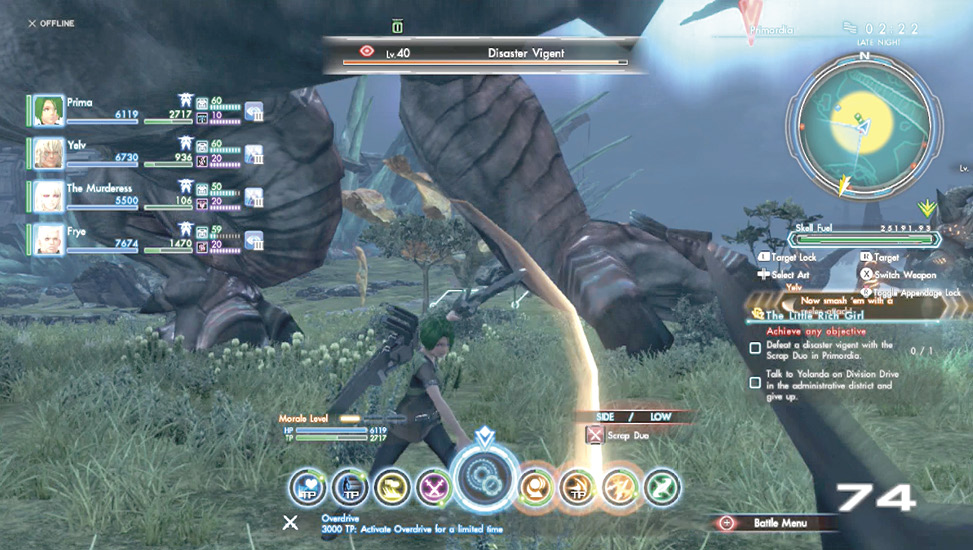
Once combat has begun, your character will automatically attack the enemy at timed intervals. These intervals are determined by weapon stats.
Appendages
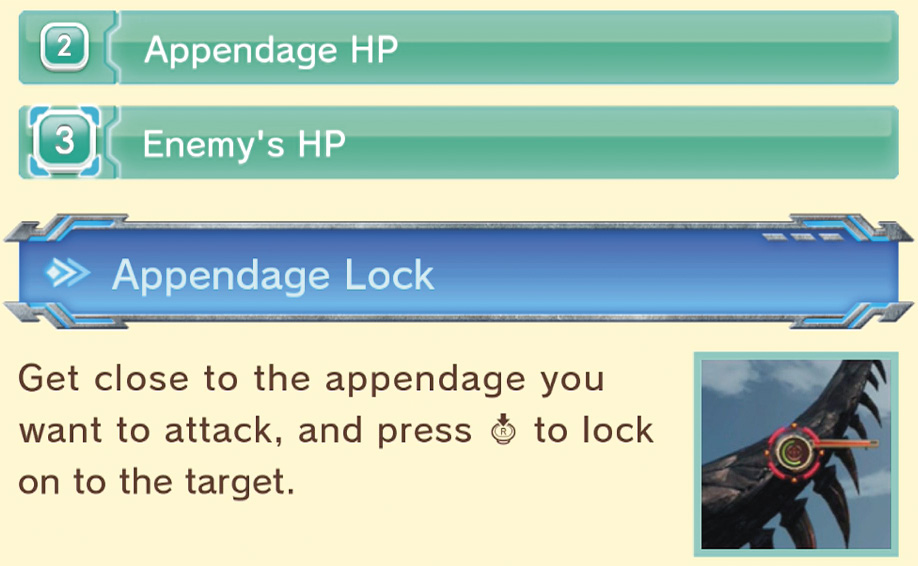
By clicking the right stick during battle, you can zero in on an enemy appendage and concentrate your attacks on it. This has several benefits—increased damage from your attacks and decreased resistances for the enemy for each appendage destroyed. You can also disable enemy Arts by destroying certain appendages, as well as gain special materials—some of which are appendage-exclusive!
The green meter on the left shows the appendage HP, and any name that shows up near the appendage shows the Art that the appendage is associated with.
Cooldown

After you use an Art, a cooldown period takes place; you’ll be unable to use that Art again for a set time. That time varies by Art and that Art’s level and stats.
Once the cooldown timer has passed and the Art is usable again, a secondary cooldown is activated. Wait out this timer and you’ll have access to a more powerful version of the move. It may last more time, it may do more damage, or you may be able to use it more than once!
Soul Voices and Soul Challenges
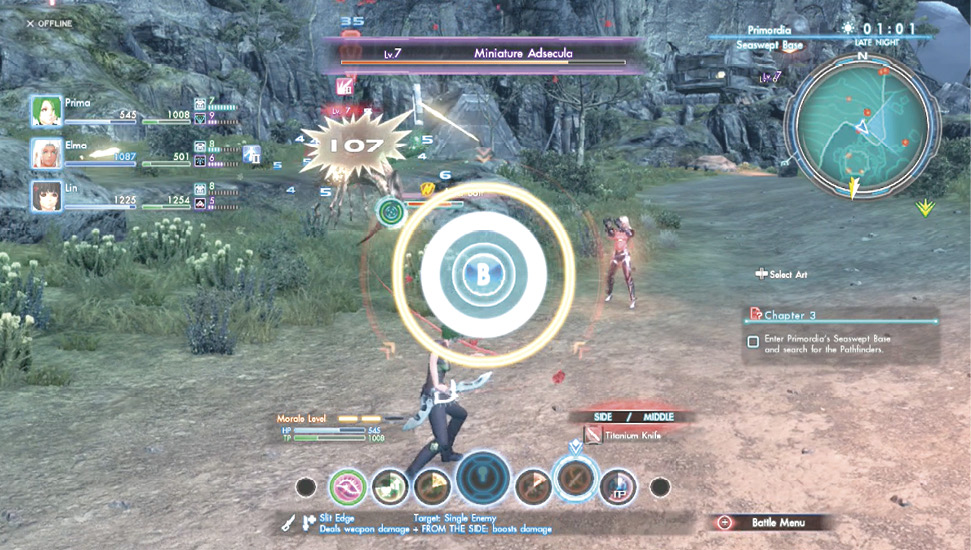
During battle, you and your party members will call out encouragements, commands, and tactics. You can respond to these calls by noting the color of the Soul Voice and activating an Art of the same color. Your party members can do the same when you successfully complete a Soul Challenge and call out a Soul Voice yourself.
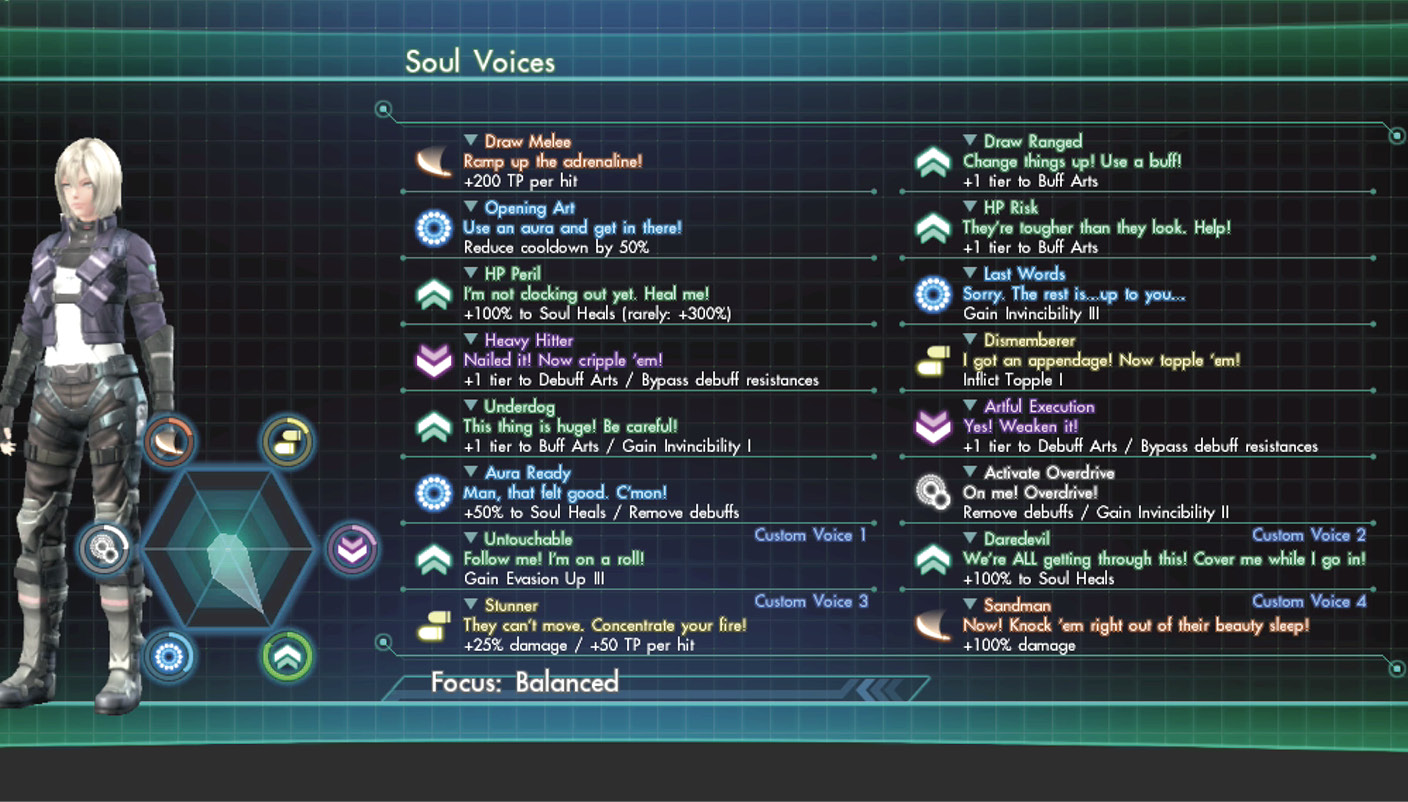
Soul Voices are powerful and can have highly beneficial effects, such as restoring HP and TP, adding temporary levels to Arts, and more. You’ll be able to change all of these in the Soul Voices menu.
The colors respond to the different types of Arts:
| Melee Arts |
| Ranged Arts |
| Debuff Arts |
| Buff Arts |
| Aura Arts |
| Overdrive |
Successful activations also result in recovered HP and increased Affinity between all characters involved in the Soul Voice. Morale also increases.
Soul Challenges are unique to your player character. After certain conditions, such as performing an Art, you’ll see a diagram. Press (B) while the shrinking orange circle is overlapping or within the white circle to successfully complete the challenge. If the orange circle is within the white circle, you earn a Good score, but if it overlaps the white circle, you get a Perfect score and a TP boost, so get the timing right!
While party members’ Soul Voice loadouts are static, you can customize your own Soul Voices in the Soul Voices menu. Check the Characters chapter for a list of Soul Voices, activation conditions, and effects assigned to recruitable party members and customizable for your avatar.
Trying to get Soul Voices to appear more often? Here’s a list of how often they appear and how long it takes them to appear again.
Soul Voice Appearances
| Soul Voice | Priority* | Appearance Rate | Cooldown (seconds) | Triggers |
|---|---|---|---|---|
| Party Member Soul Voices | ||||
| Draw Melee | 2 | 20 | 60 | Drawing a melee weapon. |
| Draw Ranged | 2 | 20 | 60 | Drawing a ranged weapon. |
| Opening Art | 1 | 30 | 60 | Performing an Art. |
| HP Risk | 15 | 75 | 10 | When HP = 60% or below. |
| HP Peril | 14 | 75 | 8 | When HP = 30% or below. |
| Last Words | 3 | 75 | 8 | When HP = 0. |
| Heavy Hitter | 17 | 1 | 30 | When critical hit occurs. |
| Dismemberer | 8 | 75 | 10 | When enemy part is destroyed. |
| Underdog | 10 | 50 | 10 | When a +2 size enemy drops below 50% HP. |
| Artful Execution | 16 | 15 | 10 | When Arts are used very effectively. |
| Aura Ready | 13 | 30 | 10 | When aura Arts are used. |
| Activate Overdrive | 4 | 50 | 10 | When entering Overdrive. |
| Custom Soul Voices | ||||
| Finishing Blow | 5 | 100 | 10 | When defeating an enemy who’s not the last. |
| Untouchable | 6 | 100 | 10 | When you dodge three enemy attacks in a row. |
| Critical Combination | 6 | 100 | 10 | When you get three critical hits in a row. |
| Wayward Weather | 7 | 100 | 10 | When the weather changes and has an effect. |
| Sprinter | 7 | 30 | 10 | Sprint for more than three seconds. |
| Medicine Man | 18 | 30 | 10 | When a male character buffs you. |
| Medicine Woman | 18 | 30 | 10 | When a female character buffs you. |
| Daredevil | 9 | 15 | 10 | Using attack Arts when your HP is 30% or below. |
| Higher Ground | 11 | 5 | 10 | Attack from a higher position than your target. |
| Toppler | 8 | 50 | 10 | Attack your target inflict Topple. |
| Stunner | 10 | 50 | 10 | Attack your target inflict Stun. |
| Sandman | 10 | 50 | 10 | Attack your target and inflict Sleep. |
| Binder | 8 | 30 | 10 | Bind your target. |
| Skell Crush | 12 | 50 | 10 | When you break a part of the Skell you’re riding in. |
| Wrecked Skell | 3 | 100 | 10 | When the Skell you’re riding in hits HP = 0 and breaks. |
| Running on Empty | 13 | 30 | 10 | When the fuel of the Skell you’re riding in reaches 30% or less. |
Tension
Tension points, or TP, rise with each auto-attack, as well as by fulfilling certain conditions with some Arts. When your TP reaches 1,000, you can use Arts that require TP, which tend to be quite powerful. Meanwhile, if you reach at least 3,000 TP, you can dismount from your skell to revive a character or activate Overdrive, which enhances all your combat abilities temporarily.
You keep your TP after each battle, but it resets to 0 if you are ever incapacitated.
Incapacitation and Revival
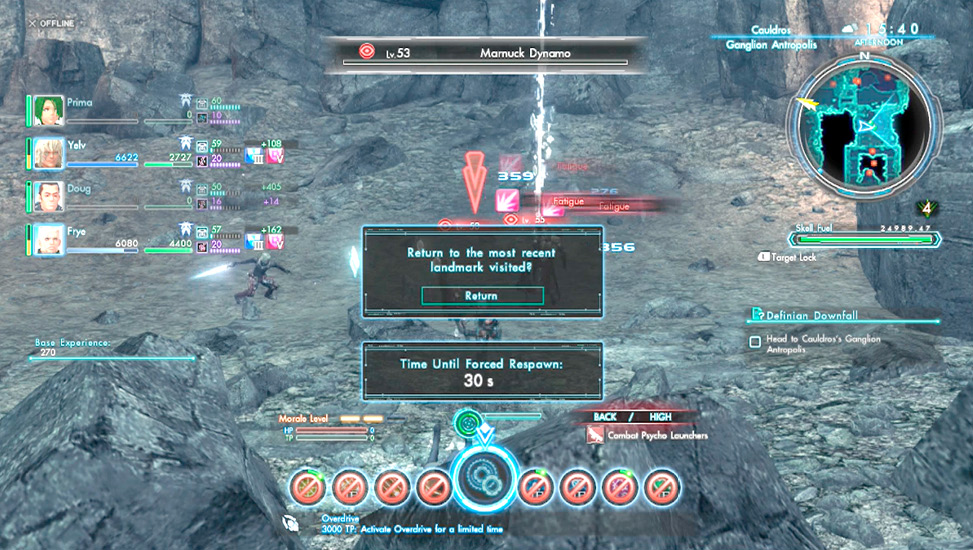
If a character’s HP drops to zero, they will be unable to take further action. If your avatar becomes incapacitated, they can elect to return immediately to the nearest landmark by pressing (A) or wait to be teleported after 30 seconds.
If one of your party members has at least 3,000 TP, they’ll automatically attempt to revive you or another fallen teammate.
When the player character revives party members, the mechanics are as follows:
| Soul Voice Challenge Rating | Result |
|---|---|
| Failure | Party member receives 30 percent of their Max HP when revived. |
| Good | Party member receives 80 percent of Max HP. |
| Perfect | Party member receives 80 percent of Max HP and 1,000 TP. |
When party members revive a player character, HP recovered and TP added are the same as when the player character revives party members; however, the level of reward depends on your Affinity with the party member who revives you.
When party members revive other party members, they will recover only 30 percent of their maximum HP.
All About Overdrive
Once you or one of your party members accrues 3,000 TP, the fun really starts. Activate Overdrive to break the limit of what you can normally do in battle. When Overdrive is active, you instantly gain multiple benefits.
Tertiary Cooldown
You unlock even more powerful versions of your Arts for a limited time. You’ll still have to wait for a timer to complete to use them, but the benefits are worth it.
You can activate Overdrive once you clear Chapter 5 of the main story.
The Overdrive Display
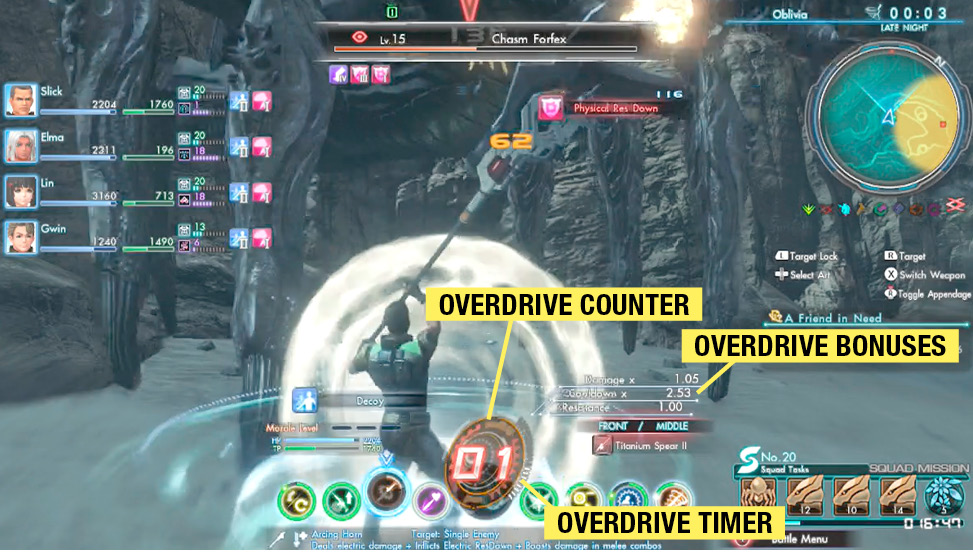
Overdrive Counter
This appears when you activate Overdrive and then use Arts. Its color changes based on the last Art used. Each successful hit from an Art increases this counter. Keep in mind that using ranged and melee attacks or Arts back to back will not increase the counter. Use non-physical Arts (debuff, support, aura) to change the counter’s color and get it climbing again.
Overdrive Timer
This is the meter on the side of the Overdrive Counter. It diminishes over time. Once it runs out, the Overdrive ends. Your job is to make sure that doesn’t happen.
Overdrive Bonuses
These are bonuses accrued from activating Overdrive and doing all you can to keep it going! Benefits range from decreased cooldown time to extra damage.
Multi-Bonus
If more than one person activates Overdrive at the same time, more bonuses can occur.
| Number of people in Overdrive | Bonus Effect |
|---|---|
| 1 | None |
| 2 | Soul Voice Occurrence odds increase by 50 percent. |
| 3 | You gain an extra 50 TP with every hit. |
| 4 | You acquire super armor (invulnerable to Break, Topple, Flinch, Launch, and Knockback) and take 50 percent less damage from attacks. |
Color Combo
The color of the Overdrive Counter changes when using different types of Arts. Different orders of color grant different effects.
| Bonus | 2nd Previous Art Used | Previous Art Used | Current Art Used | Effect |
|---|---|---|---|---|
| Single Bonus | — | Purple | Any | Appendage damage increase |
| — | Green | Any | Double Overdrive count bonus | |
| Double Bonus | — | Blue | Purple | Debuff extension |
| — | Blue | Green | Recover HP | |
| Triple Bonus | Orange | Orange | Orange | Party EXP bonus |
| Yellow | Yellow | Yellow | Class EXP bonus |
Overdrive All Over
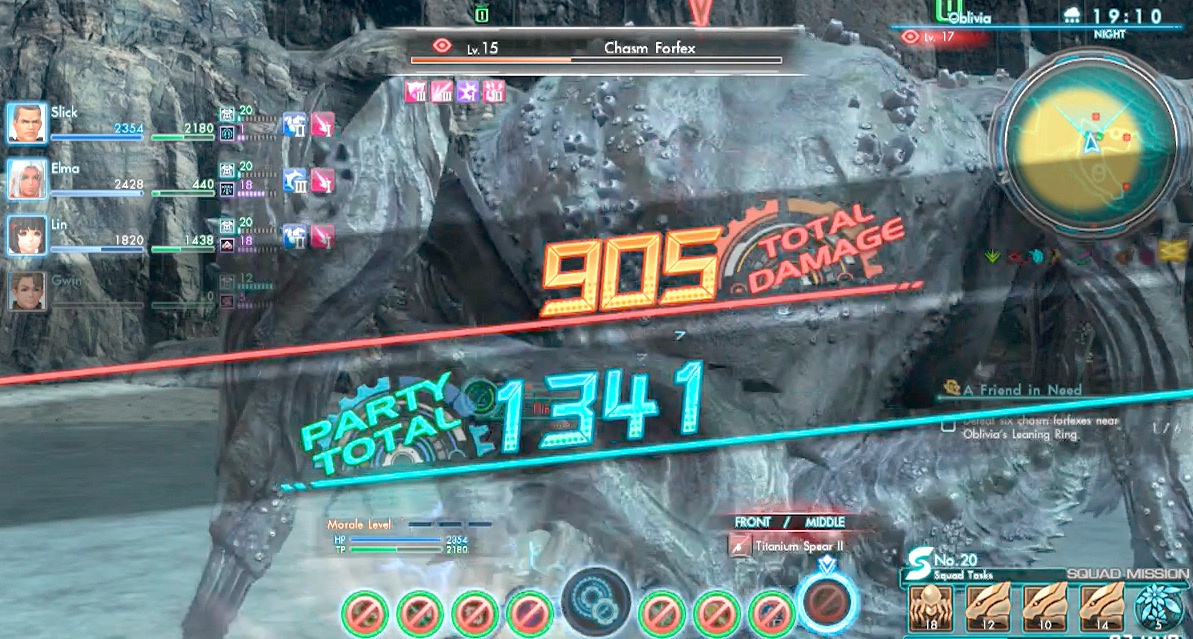
When Overdrive ends, you’ll receive a reading of the total amount of damage dealt by the character who initiated Overdrive (Total Damage), followed by the total amount of damage dealt by all party members while Overdrive was active (Party Total). Use this information to refine your Overdrive tactics.
After the Battle
Once you’re victorious, it’s time for the spoils.
Experience
You gain two types of experience after a battle: EXP and Class EXP. EXP goes toward your character’s level, allowing for base stat boosts. Class EXP goes toward the character’s class rank, allowing them to attain new Arts or skills, or even advance to a new class.
Experience scales with your level and the level of the enemies you defeat, so it’s worth it to continue to seek out stronger enemies.
Drops
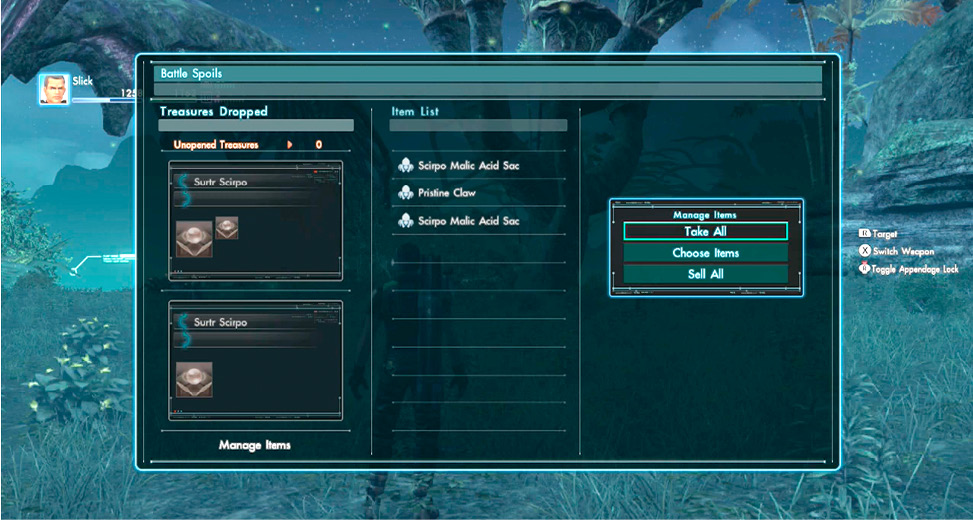
There is a chance that enemies will drop items such as materials or weapons. You can choose what to do in this situation.
| Take All | Acquire all items. |
| Take Individually | Choose which items to take, one by one. |
| Sell All | Sell all the items. |
| Treasure Deal | Send items to other players in your squad. For more on this, check the Social chapter of the guide. |
Retreating
You can press (B) during combat to stop attacking altogether. Once you’re no longer attacking, run away from the enemy! After a certain distance, the battle will end and you’ll be able to recover your HP.