
The Evil Within 2 Guide Basics
Using the Arsenal Menu
Hold or press (depending on your control scheme) the Arsenal button to open your Arsenal Menu. Here you can do or view the following:
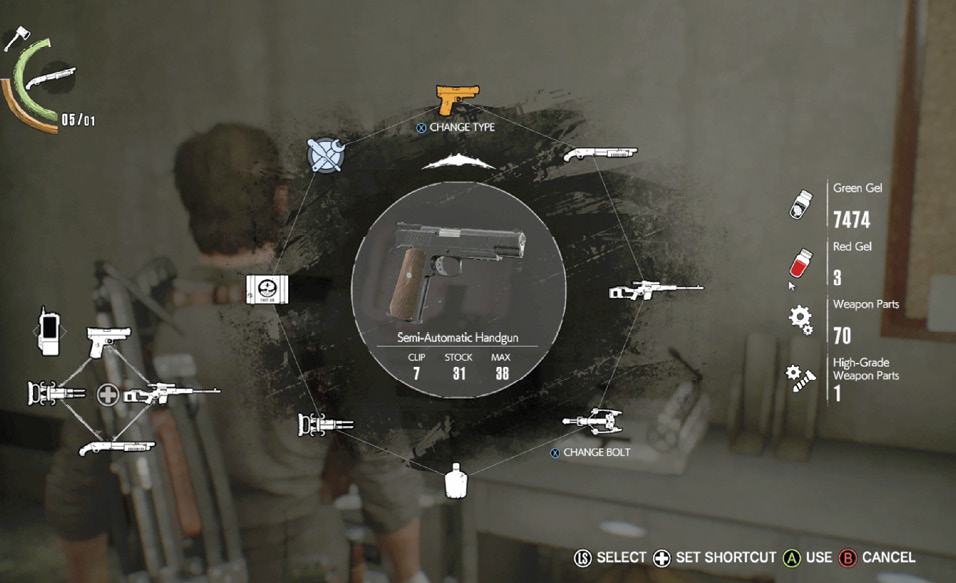
- Select an active Weapon or piece of Equipment including medical items or a Bottle if you have any.
- Assign Weapons and/or Equipment to each of the four Shortcut slots. This lets you switch weapons or select equipment rapidly. Using the mouse/keyboard setup on PC gives the player 8 shortcut slots.
- View your stores of Green Gel, Red Gel, Weapon Parts, and High-Grade Weapon Parts on the right side of the screen.
- View your Health and Stamina bars, your currently equipped ranged weapon or equipment, and your currently equipped melee weapon (Knife or Axe) in the upper left corner of the screen.
- Select the Field Crafting option, which lets you craft ammo or health items without using a Workbench. (For more on Field Crafting, see the next section.)