
Prima Games eGuides
primagames.com Browse Redeem a code Help
The Sims 3 Pets eGuide
Sign in My Guides

Sign in or create an account

We'll email you a link. No password needed, and if you don't have an account yet, the link makes one.

By creating an account or signing in, you agree to our Terms of Service and Privacy Policy.

Have a password?

Had an account on the old eGuides site, or a code from a printed guide? Help and troubleshooting

Sign in with a password

By signing in, you agree to our Terms of Service and Privacy Policy.

Check your email

A sign-in link is on its way. It works once and expires in 15 minutes. Open it and you're in, with an account if you didn't already have one.

Contents

  • Maps
    • Households, Houses, Lots and Collectibles
      • Collectibles
      • Neighborhood 1
      • Neighborhood 2
      • Neighborhood 3
      • Neighborhood 4
      • Neighborhood 5
      • Neighborhood 6
      • Empty Houses
      • Empty Lots
      • Houses to Place
      • Families to Place
  • Essentials
    • Introduction
      • Introduction
      • Leading a New Life
    • Basics
      • Basics Introduction
      • Required Reading
      • Mood
      • Wishes
      • Opportunities
    • Skills
      • Skills Introduction
      • Athletic
      • Charisma
      • Cooking
      • Fishing
      • Gardening
      • Guitar
      • Handiness
      • Logic
      • Painting
      • Writing
      • Other Skills
    • Relationships and Socializing
      • The Art of the Conversation
      • Relationships and Socializing
    • New Simology
      • What's New
      • Traits
      • Pet Trait Reinforcement
      • Moodlets
      • New Wishes
      • Lifetime Wishes
      • New Opportunties
      • New Skills
      • New Socials
    • New Features
      • New Features Introduction
      • Pets and Other Expansion Packs
      • Scrapbook
      • Pet Memories
    • New Objects
      • Buy Mode
      • Other Collections
      • Build Mode Objects
      • New Object Interactions
    • Cheats
      • Cheats
  • Walkthrough
    • Create a Pet
      • Create a Pet introduction
      • Create a Horse
      • Horse Traits
      • Create a Dog
      • Dog Traits
    • Horses
      • Horse Petology
      • Skills
      • Inventory, Lifetime Happiness, and Lifetime Rewards
      • Needs
      • Horse Interactions
      • Horse-Related Objects
      • Equestrian Center
      • Breeding and Raising Horses
    • Dogs
      • Dog Introduction
      • Dog Petology
      • Dog Skills and Inventory
      • Dog Lifetime Happiness and Lifetime Rewards
      • Interacting with Dogs
      • Dog-Related Objects
      • Breeding Dogs
      • Dog Aging and Death
      • Dog Park
    • Cats
      • Cat Petology
      • Cat Skills
      • Cats Lifetime Happiness and Lifetime Rewards
      • Interacting with Cats
      • Cat-related Objects
      • Breeding Cats
      • Cat Jungle
    • Small Animals
      • Small Animals Introduction
      • Habit Interactions
    • Wild Animals
      • Wild Animals Introduction
      • Wildlife
    • Tour of Appaloosa Plains
      • Wide Open Spaces
      • Places of Employment
      • Pet Specific Locations
      • Other Businesses
      • Parks and Fishing

The Sims 3 Pets Guide › Walkthrough › Create a Pet

Create a Pet introduction
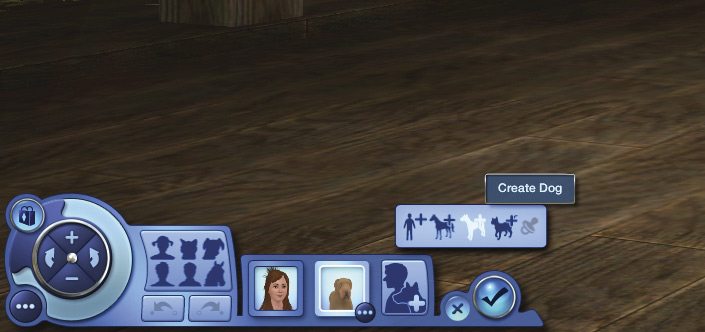
Although established Sim households can gain pets through adoption or by taming wild animals, the most obvious way to gain a household pet is to create one. And you probably want to check out the new town of Appaloosa Plains anyway! It’s much more pet-friendly than other towns, with room to roam, ride, and ramble. And there are new traits to be explored, so let’s start out by making a whole new household in Appaloosa Plains.

When you go into Create a Household, you’ll see that the Add a Sim button has changed to Add a Sim or Pet. However, the first household member must be a Sim. Pets can’t live in a household by themselves; they need at least one Sim to take care of them. Pets also need at least one Sim to shower with love and affection... and an occasional hairball.

Now you can choose to create a Sim, horse, dog, or cat. The last button (grayed out in the image) is the Play with Genetics button.

You cannot have just pets in a household. There must always be at least one Sim to feed and care for them. So in Create a Sim, you must make or add one Sim before you can start making pets. And if you are splitting a household in the Edit Town menu, you cannot split a household so that only pets remain in it. You’ll get a message asking you to choose a house with a family to take care of the pets.

Keep reading with a free account

The first 3 sections of The Sims 3 Pets are open to everyone. An account opens the rest of it, and every other guide in the archive. It's free, and there's nothing to buy.

Bought guides on the old Prima Games site? Your account and every guide you own moved here, so there's nothing to buy again. Sign in.

Create a free account Or browse our free guides

PreviousCheats NextCreate a Horse