
Rage Guide Essentials Life after Eden
Dossier
The Dossier gives you access to all of the items, statistics, and progress you’ve made in RAGE, as well as allowing you to engineer items that help you make your way through the campaign. Press the Inventory button to open the Dossier while in-game. Once opened, you can cycle through various menus.
Inventory
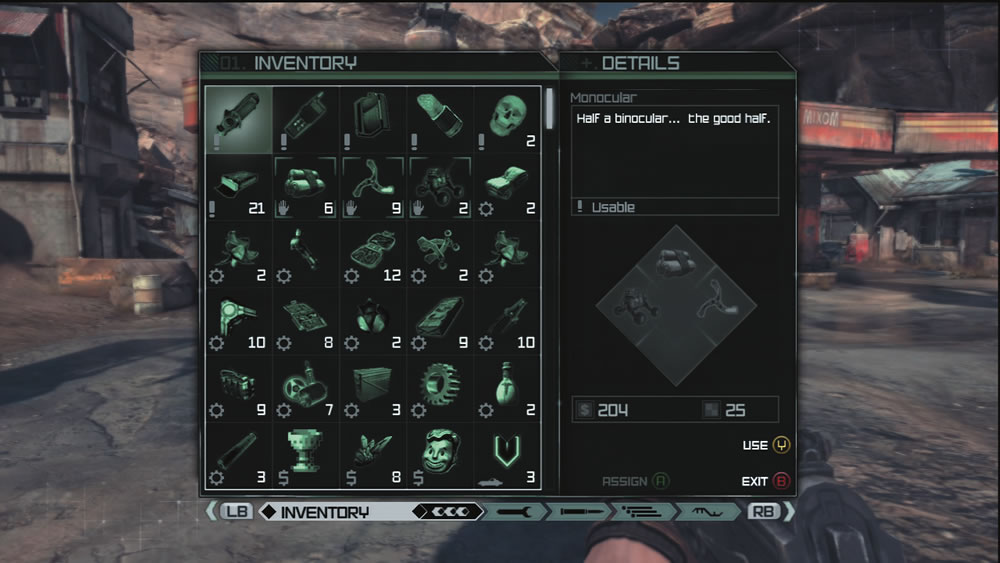
The inventory contains a list of all items and ingredients you’re carrying, as well as descriptions of what they are. You can use items here as well as assign quick use items to four different slots. You’ll notice that items have different icons next to them that tell what purpose they serve. Here’s a quick guide for identifying what does what:
- Exclamation Point: Special items that serve a unique purpose.
- Hand: A quick use item. It can be mapped to the quick use item select menu for fast implementation.
- Gear: An ingredient that can be combined with other ingredients to create usable items.
- Dollar Sign: This indicates that the item has no significant use other than to be sold for cash at a vendor.
Engineering
Here you can construct any item that you have the schematic (or recipe) and ingredients for. Both schematics and ingredients can be found throughout the Wasteland and at vendors in various towns. If you are missing an ingredient, you’ll need to find it somewhere or purchase it from the vendor. If an engineering item you’ve constructed becomes damaged, you can salvage some parts from it by interacting with the item. This is better than having to abandon it completely. For each ingredient, you see the number of that item required by the schematic or recipe, followed by the number of that item you have in your inventory. Select the Build option to build one object. If you want to use up all your ingredients, choose the Build All option. It’s best to build one item at a time as needed, otherwise you may tie up ingredients that could be used to build other items...