
Dead Space 2 Guide Essentials The Basics
The Rig
The RIG
In Dead Space 2, the screen is never cluttered with a heads-up display (HUD). Instead, all of the information you need is displayed on your RIG, which is part of your suit or your weapon.
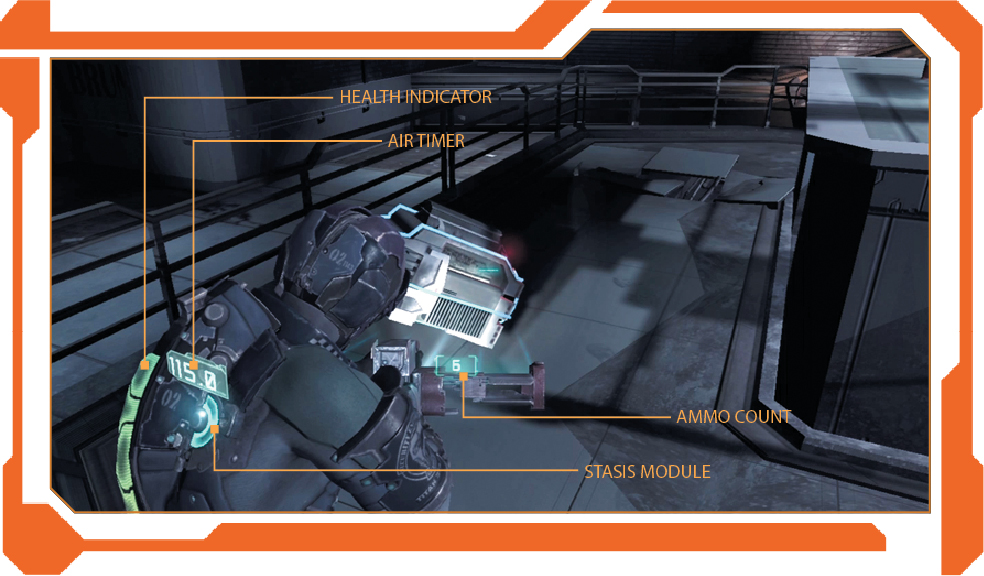
Health Indicator
The blue row of lights running along your spine is your Health meter. The bar begins to deplete as you take damage. When your health is about half, the remaining lights turn yellow. When your health is very low, the last remaining bar turns red. At this point, you must get some medical treatment or the next attack could be your last.
Stasis Module
After you acquire the stasis module, two curved bars will appear on your RIG. When both bars are blue, your stasis module is fully charged. As you use your stasis ability, one bar will dim and the other will turn yellow to inform you that the stasis module is at half charge. When both bars are dim, you will need to recharge your module before you can use stasis again. Your Stasis meter recharges slowly over time, but you can instantly recharge it using a stasis pack or a stasis recharge station. Upgrade your stasis module at a workbench to increase the number of shots and other aspects of stasis.
Air Timer
When you operate in areas without atmosphere, your air timer will appear on your RIG. This shows you how much time (in seconds) you have of remaining oxygen. As the tank approaches empty, the meter flashes red. Either get to an oxygen recharge station or into an area with an atmosphere to refill your tank.
Ammo Count
When you hold down the Aim button to bring up your weapon, the ammo indicator will appear, listing the amount of ammunition currently left in the selected weapon. The indicator will turn orange when the ammo in the weapon gets low. If the ammo counter is red, the current clip is empty and you must reload. If the ammo counter is red with bars at the top and bottom, you have no more ammo for that weapon and must switch to another.