
The Sims 3 Guide Essentials Object Catalog
Object Interactions
If you have played The Sims games before, you know that most objects can be used (and abused) by Sims—in fact, that’s usually the point of putting an object on your lot. It should serve a function.
Some objects have no function beyond boosting a room’s environmental score and giving Sims the Decorated or Nicely Decorated moodlets. Other objects have interactions that provide learning or entertainment or satisfy a need. These objects and their interactions are detailed in this section of the object catalog.
To see what interactions are available on an object, just left-click on it. A radial menu appears. Click on an interaction to add it to the action queue in the screen’s upper-left corner. (If you ever need to cancel an interaction, just click on it in the action queue.)
Alarm Clock
The alarm clocks are useful for getting specific Sims out of bed at designated times. You can always set a Sim to sleep until they are fully rested, but an alarm is good for making sure a Sim never oversleeps for work or school.
Set/Unset Alarm Clock: Multiple Sims can set a special alarm that only works on them. However, if that Sim is not in the room when the alarm goes off, the alarm wakes up everybody else in the room, disturbing their sleep.
Bar
Bars are great party objects. Sims can use them to make refreshments for either just themselves or a crowd, as the interaction Make Drink can be modified to make multiple beverages.
Make Drink(s): Use this interaction to make drinks at the bar for the Sim and other Sims in the room. Other Sims can interact with drinks made at the bar and consume them to satisfy Hunger.
Baseball/Football
Baseballs and footballs are outdoor activities great for entertaining Sims. Athletic Sims and Sims who Love the Outdoors will get the most enjoyment out of throwing around the ol’ pigskin or a baseball.
Play Catch: To use this interaction, there must be another Sim nearby. The two Sims then toss the ball back and forth, having fun. This activity also increases LTR.
Bathtubs
There are several bathtubs you can choose from, but this general rule applies: the more expensive the bathtub, the greater the chance of it breaking and the less time it takes to take a bath. (This last part is particularly useful because as you get busier in life, you can save a lot of time with quicker baths and showers.) Bathtubs remove the Grungy and Smelly moodlets.
Take Bath/Take Bubble Bath: This is the most common interaction with the bathtub. This fills the tub with water and directs your Sim to bathe. Normally, the Sim bathes until he or she is clean, but you can cancel the action early. If you buy bubble bath from the supermarket, you can modify the bath into a bubble bath. Take Bubble Bath will give your Sim the Tranquil moodlet.
Clean Bathtub: When the bath is dirty, you should clean it with this interaction. Sims don’t like dirty surroundings (in fact, it’s a negative moodlet), so keep the tub clean.
Repair Tub: If the tub is broken, your Sim can attempt to repair it instead of calling a repair technician. The chance of this succeeding increases with a higher Handiness skill.
Upgrade: There are two upgrades for the bathtub—Self-Cleaning and Unbreakable. This interaction initiates the upgrade process. If interrupted, it can be resumed later.
Bed
The bed is a critical part of each house. Sims need a bed so they can sleep for an extended period and charge their Energy need. If a Sim does not sleep, they become exhausted and can eventually pass out.
Sleep: All Sims need to sleep. Use this interaction to get the Sim in bed for an extended period of time. This will negative moodlets like Tired, Sleepy, and Exhausted if you sleep for longer than a few hours. Drag the action in the queue to the right to direct the Sim to Sleep Until Rested.
Nap: Napping is a great way to rest up without spending too much time. A nap can result in the Had a Nice Nap as well as dispel negative moodlets like Sleepy, Tired, and Exhausted. If the Sim is Buzzed, they cannot take a nap.
Relax: This interaction directs a Sim to the bed. They lay on top of the cover and just unwind with a book or watch a nearby TV. If another Sim is relaxing on the same bed, they can chat. Relaxing is a good way to lower stress.
Daydream: While Sims are on the bed relaxing, they can daydream. This interaction lets the Sim really unwind with daydreams of Sims they know and places they have been. Ambitious Sims like to daydream more than other Sims.
Make Bed: This interaction directs the Sim to make the bed. An unmade bed lowers the environmental rating of a room.
Cuddle: If two Sims are on the bed and have an amorous LTR, this interaction gets them to snuggle up close. In this interaction, a number of romantic socials are available, such as kiss, make out, and WooHoo.
Bicycle
Bicycles are cheap ways to get around town—and younger Sims love them. To put a bike on your lot, you must make sure to have a Bike Rack, too. There are two types of bicycle: Bi-Trike for Kids and NostalgiCycle. The Bi-Trike can only be used by child Sims.
Birthday Cake
When it comes time to transition between ages, a birthday cake is the way to celebrate. The birthday cake can also be used to force an age transition—but it only works one way. You can either buy a cake at the supermarket or in Buy Mode (look in the Outdoor tab). Sims can eat cake as well as use it to age-up.
Blow Out Candles: This is the interaction that facilitates the age transition. After selecting this interaction, you must then choose when Sim in the family is going to age-up.
Grab a Plate: Tell other Sims to partake of the cake with this interaction. Cake satisfies hunger.
Clean Up: Cakes can spoil just like any other food, so be sure to clean up a cake after the party is over. This interaction places the cake in the trash.
Book
Books are one of the most cherished and most useful objects in The Sims 3. Books provide great entertainment for Sims, giving them Fun. Books are a good way for some Sims to relieve stress. The higher the quality of the book, the more Fun it provides. If you direct a Sim to read a skill book, they will also learn the skill associated with the book while reading.
Read Book: This interaction directs a Sim to sit down and read a book. Sometimes, Sims will flip through a book while standing.
Get Book: This interaction grabs a book from a bookshelf.
Put Away Book: This interaction shelves a book on the nearest bookshelf.
Bookshelf
Bookshelves are convenient places to store all of your household books so they do not clutter up your rooms—or your personal inventory.
Open Bookshelf: To see what books are on a shelf, use this interaction.
Read/Read Something: To read a book from the bookshelf, select this interaction. You can either be specific with the Read interaction or more general with the Read Something interaction.
Put Away Books: This interaction puts all books not on the shelf away. This is a good way to get all books out of your personal inventory and clear up clutter.
Buffet Table
Need to serve multiple Sims at the same time? Buying the buffet table from the Outdoor Cooking collection is an instant solution to your outdoor eating needs. Food can be placed inside the buffet and then Sims can take it as they want or need it. When food has not been placed inside the buffet table, the table is considered “unserved.”
Serve: This interaction places food inside the buffet table so other Sims can easily grab a plate.
Grab a Plate: With multiple food types, the Grab a Plate interaction is modified to include the different types of food in the buffet table. This interaction feeds a Sim, reducing hunger.
Clean Up: When the party is over and the guests go home, clean up the table so food doesn’t go rotten and stink up the place. This returns the buffet table to its unserved state.
Burglar Alarm
The burglar alarm does not have any interactions. Instead, it sits on the wall and protects your house against theft. When a burglar creeps inside your house and enters a room with the alarm, the alarm sounds and not only wakes any sleeping Sim on the lot, but it also triggers an automatic call to the police. A police officer will be at the lot within a minute or two.
Candles
Candles provide both illumination and environmental boosts for a room. You can place a candle on any flat surface.
Light Candle: Sim instantly lights the candle, providing light.
Extinguish Candle: Sims puts out the candle.
Car
There are several automobiles you can purchase in Buy Mode. The more expensive the vehicle, the faster it goes. However, to place a car on your lot, you need to also buy a parking space bar and designate a parking spot for the vehicle.
Go to: Use this interaction to designate a particular spot in town you want the Sim to drive to.
Go Shopping: Use this interaction to set up a shopping trip.
Go to Community Lot: Send the Sim off to a known community lot, like the library or museum.
Chair: Lounge
There are indoor and outdoor lounge chairs that do not have the same properties as a regular chair or seat. The lounge chair is in a permanently reclined position and offers a high amount of comfort.
Relax: Relaxing in a lounge chair reduces stress.
Nap: Napping in a lounge chair is like napping in bed. It reduces stress, and if you get enough of a snooze, you earn the Had a Nice Nap moodlet.
Chess Table
The chess table is an excellent way to improve your Sims’ Logic skill. The more a Sim plays chess, the better they get at the game. Playing chess with other Sims is a good way to socialize and raise LTRs.
Challenge Sim to a Game: This interaction directs your Sim and a designated Sim to an open chess table. While playing, your Sim increases the Logic skill. When the game is over, both Sims stand up and leave the table. If you won, the game is logged in the Logic Skill Journal.
Play Chess With: Play Chess is a good way just to enjoy a leisurely game with a nearby Sim. While playing, the Sim increases his or her Logic skill. You can also adjust this interaction in the action queue to play until the skill level improves.
Practice Chess: This is a single Sim interaction with the chess table. The Sim sits down and pores over the pieces, improving Logic skill. This interaction can be adjusted in the action queue to play until the skill level improves.
Watch Chess: Watching other Sims play chess provides Fun.
Computer
The computer is one of the most important objects in the house because it has so many functions. The computer is a communication tool, it can be used to move, it is used to have fun and relax, and it is applicable to certain skills. Having a computer on your lot is a good investment. The better the computer, the less of a chance it has to break and the more Fun it provides when playing games. The more expensive computers also help do homework faster.
Chat: Chatting on the computer is fun and it improves LTRs with other Sims.
Check for Responses: If your Sims left a forum post, you can check for a response with this interaction. This can result in different moodlets, depending on the answer.
Find Coupons: Frugal Sims can use the computer to seek out deals around town.
Find Job: Every day, five new career options become available via the computer. Use this interaction to see who’s hiring.
Hack: Computer Whiz Sims can hack away on the computer to earn a little extra money on the side.
Join/Leave Book Club: Use this interaction to sign up for a book club that delivers new books every week. You can also cancel the service.
Make Inappropriate Forum Post: Inappropriate Sims can exercise this trait online and leave nasty posts in message boards.
Move Out: When it comes time to move or kick a Sim out of the house, use this interaction to bring up the Moving interface.
Overclock: Computer Whiz Sims can attempt to overclock the computer. If successful, they get an upgrade.
Play Chess: Logic-minded Sims can play chess against the computer to improve the skill.
Play Computer Games: Sitting down and playing computer game is a good way to have easy, harmless fun. (Games are harmless, right?)
Repair Computer: If the computer breaks, the Sim can attempt to repair it. Handy Sims have a better chance at actually fixing the machine.
Resolve Work Issues: Workaholic Sims get this interaction for checking in on the office while away from work. This increases work performance.
Run Forensic Analysis: Level 10 Law Enforcement Sims in the Forensics track can use this interaction to make money from home.
Solve the Unsolvable: Genius Sims can attempt to run some hardcore formulas at home to make extra cash.
Upgrade: Handiness skill Sims can upgrade with either Improve Graphics (makes playing games more fun) or Make Unbreakable (computer no longer breaks).
Work from Home: Workaholic Sims can work from home to improve work performance, but it will add stress and decrease Fun.
Write Report/Review: Sims in the Journalism career use this interaction to write reports and reviews for work.
Refine Writing Skill: Practice the Writing skill with this interaction without actually working on a novel.
Write Novel: Use this interaction to start a novel. You are asked which genre from a list of known genres, determined by skill level, and then for a book title. Whenever the Sim comes back to the computer, they can Continue Writing... or Scrap Novel to start over with a new book.
Crib
The crib is where babies and toddlers sleep to get the most energy refreshed. Babies happily remain in cribs until they get hungry or lonely and cry for attention.
Hold: Use this interaction to pick a baby or toddler out of the crib.
Put in Crib: Place a baby or toddler into the crib.
Dishwasher
When Sims have a dishwasher in their kitchen, they automatically use it when directed to clean up plates and dishes. The dishwasher is faster than washing dishes by hand in the sink. Cheap dishwashers are loud and prone to breaking.
Repair Dishwasher: If the dishwasher breaks, you can try to fix it. The higher the Handiness skill of the Sim repairing it, the better the chances of actually making the repairs.
Upgrade: There are two upgrades that can be performed on the dishwasher—Make Silent and Make Unbreakable. These upgrades silence the dishwasher and keep it from breaking down.
Dollhouse
Kids love playing with a dollhouse in their room, but the dollhouse has a few extra interactions for Sims with a certain disposition.
Play: This interaction sits the Sim down in front of the dollhouse to play with it and increase fun.
Join: Join lets other Sims sit with a toddler or child already playing with the dollhouse and share in the fun.
Smash: Mean-Spirited Sims can actually smash a child’s dollhouse. If this action is seen by an adult, the adult will scold the young Sim who smashed the dollhouse.
Dispose: Use this to clean up a broken dollhouse.
Door
Almost every house must have at least one door on it. Sims automatically move through doors when directed inside or outside. However, you can designate one door on your house as the “front door,” which all other Sims will use to enter the house. Left-click on the door and choose the Set as Front Door interaction. If you want to designate a different door, just Unset Front Door on the previous front door and pick a different one on the house.
Dresser
Some dressers are nice enough to improve the environment of a room, but all of them let Sims interact with their clothing collections.
Change Outfit: This directs the Sim to change into one of their other outfits.
Create Outfit: This interaction takes the Sim into Create a Sim where a new outfit can be picked out to replace older duds.
Easel
The easel is how Sims improve the Painting skill. When Sims interact with the easel, they slowly raise their Painting skill. There are different interactions the Sim can perform with the easel depending on their Painting skill, as well as different sizes of canvases to paint. However, there are two main painting interactions:
Paint: When a Sim is above level 3, they get the Paint interaction.
Practice Paint: Sims below level 4 in the Painting skill can only choose Practice Paint from the interaction menu.
Food Processor
The food processor is a useful small appliance that speeds your cooking process if you have a recipe that requires chopping, mixing, or doing anything with the cutting board. Your Sim will instead take the food from the fridge and go directly to the food processor. Once the food processor is done, the cooking process continues normally.
Have/Serve: Left-clicking on the food processor brings up the Have/Serve interaction, but it leads only to recipes that would use the food processor.
Fire
Fire is a dangerous thing. If an object catches fire, such as a fireplace or a stove, it has the potential to spread to surrounding surfaces and objects. It can also catch Sims on fire, too, and that has the potential to kill them. If a fire breaks out, you must take care of as soon as possible.
Extinguish: Use this interaction to put out the flames. Your Sim automatically pulls out a fire extinguishers and starts hosing down the flames, putting it out in a moment or two.
Fire Alarm
Like the burglar alarm, the fire does not have any interactions. It hangs on the wall in any room, ready to alert you of fire. If a fire occurs in the same room as the fire alarm, the alarm sounds. Any sleeping Sim on the lot is immediately woken. A firefighter is also dispatched to the house to take care of the flames if no Sim is on the lot to extinguish the flames themselves.
Fire Pit
The outdoor fire pit is a good place for multiple Sims to gather, warm themselves, and be social.
Light Fire: This interaction lights the fire pit. This is required to do any of the other interactions.
Sit at Fire: This interaction sits your Sim down at the fire where they can be social and have Fun.
Warm Self: Warm Self gives Sims the Cozy Fire moodlet.
Poke Fire: Poking the fire keeps it going and gives the Sim a little bit of Fun.
Roast: If Sims have food items in their personal inventory, they can roast them over the fire and fill some Hunger.
Roast Marshmallow: If the Sim has no food items in personal inventory, then Roast Marshmallow is the default interaction. Also satisfies some Hunger.
Fireplace
The fireplace is a central point of the household where multiple Sims can gather to warm themselves and socialize.
Light Fire: This interaction lights the fireplace. This is required to do any of the other interactions.
Warm Self: Warm Self gives Sims the Cozy Fire moodlet.
Poke Fire: Poking the fire keeps it going and gives the Sim a little bit of Fun.
Put Out Fireplace: Extinguish the flames before leaving the house!
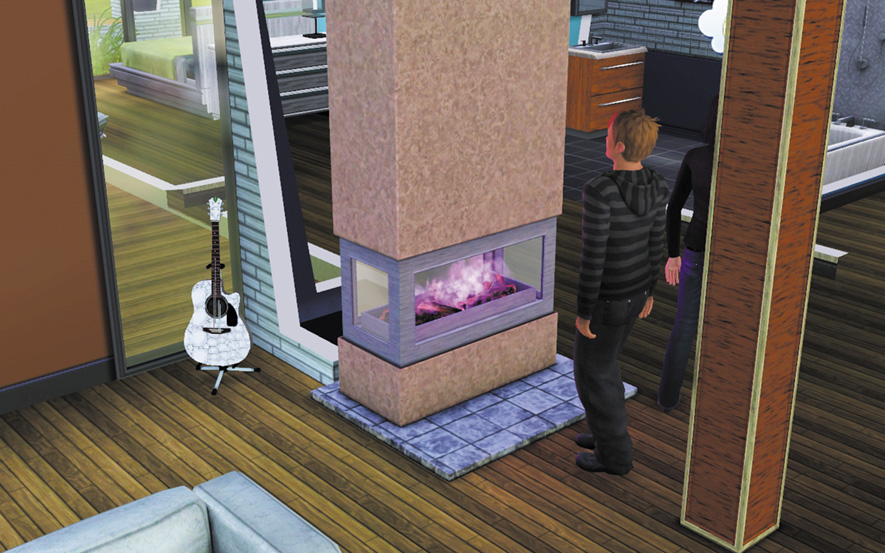
Change Fire Color: High-end fireplaces and upgraded cheap fireplaces can be directed to change flame color.
Upgrade: There are multiple fireplace upgrades for tinkering Sim to try out—Auto-Light, Fireproof, and Fire Colors.
With a nice fireplace, you can change the color of the flames to your personal tastes? Like purple? You got it!
Fish Bowl
Have a cool collection of fish thanks to your advanced fishing skill? Buy fish bowls and place them around the house to show off your wet little friends. Fish add to the environment of a room.
Dispose: Get rid of a dead fish with this interaction.
Feed: Feed the fish in the bowl.
Stock/Restock: Sims can order a fish to place in the bowl directly from the Sim’s personal inventory.
Scoop Out Fish: This places a fish in a bowl back into a Sim’s inventory.
Flamingo
The flamingo is a yard ornament that is just fun to have around. It improves the environment of an area.
Kick: Evil and Mean-Spirited Sims can kick over flamingos. If the Sim is on a neighbor’s lot and is seen abusing the pink, plastic feathered friend, they lose LTR.
Stand Up: Stand a kicked flamingo back up so it can again contribute to the environment of a room/area.
Food
Food is any prepared recipe or dish that comes from the kitchen, is stored in the fridge, or is delivered to the lot by pizza delivery. Food satisfies Hunger and, if the food is high quality, gives Sims good Meal-related moodlets.
Serve: Prepare a recipe for the family on the lot. After cooking, the food will remain on the counter until put away.
Clean Up: Clean up food on the counter so it does not spoil. Throwing away perfectly good food gives a negative moodlet.
Put Away Leftovers: Store unfinished portions in the fridge for later consumption.
Foosball Table
The foosball table is a fun object that can relieve stress and improve LTRs with Sims who play together, because they socialize while playing. Unlike chess, foosball games are not tracked.
Play Foosball: Step right up to the foosball table and start fiddling with the knobs. Right away, Fun is satisfied. Other Sims nearby will automatically join in.
Join Foosball: If other Sims are playing foosball, use this interaction to join in.
Fridge
The fridge is a crucial object for your house -- like a toilet or a bed, it is not complete without one. The fridge is where you store all of your ingredients for cooking so you can just left-click on it and select a recipe to prepare.
Have/Serve: This interaction leads to a list of possible recipes. If the recipe requires ingredients not in the fridge, the price of making the dish is listed next to it. The funds are automatically deducted when choosing the recipe to have or serve. Serving a recipe creates a larger set of portions. This takes longer, but results in leftovers which can be eaten later.
Have Quick Meal: Grab a quick meal for free from the fridge. These meals do not boost cooking skills, but do sate hunger.
Eat Leftovers: Eat a serving of leftover dishes in the fridge.
Clean Out Bad Food: After a few days, leftovers go bad. The fridge starts to stink, which makes Sims Disgusted to be around it. Use this interaction to take the food to the trash.
Garden Gnome/Magic Gnome
The garden gnomes are nice little sculptures that add an environmental benefit to any room/area they are in. The Mysterious Mr. Gnome version of the garden gnome has some cool magic tricks it pulls when nobody is looking.
Kick Gnome: Pushing the gnome over with your foot eliminates its environmental bonus.
Stand Up: To restore the gnome, use this interaction.
View: Just bask in the gnome’s glow.
Grill
Whether you are using the grill at home or at a community lot like the beach, the grill is great place to gather up friends and have a communal meal. Sims make grill-ready foods on them, like hot dogs and hamburgers.
Grill/Serve: This interaction directs a Sim to the grill and has them start whipping up some grilled delicacies for other Sims to enjoy.
Guitar
Play: This is the common interaction with the guitar and is a good way to start the Guitar skill development cycle. When you get good, the music that comes out of the guitar is quite pleasant and cheers up Sims in the immediate area.
Perform: This interaction lets you pick a specific composition to play.
Serenade: This is a romantic interaction for wooing a would-be partner.
Play for Tips: When a Sim takes a guitar off the lot, they can play for tips. Passing Sims may kick in a few Simoleons depending on the skill of the player.
Harvestable
Harvestables are fruits and vegetables grown from the Gardening skill or bought from the supermarket. Most harvestables are food and can be used to cook recipes. The higher quality the harvestable, the better the dish.
Eat: Eat the harvestable.
Pick Up: Pick up a harvestable from a surface or the ground.
Plant: You can plant any harvestable in the ground to grow it. Once planted, you can water, weed, and care for it with tricks picked up by developing the gardening skill. For more on how to grow harvestables, please see the Gardening skill section of the Simology chapter.
High Chair
The high chair is a special seat for toddlers. Toddlers are happy to sit in the high chair. While a toddler is in a high chair, it cannot catch fire.
Put in Chair: Place a baby in the high chair so it can be fed.
Serve Food: Use this interaction on a baby in a high chair to give it pureed food from the food processor.
Give Bottle: No food processor? No worries. Give the baby a bottle to sate its hunger.
Clean: Babies are messy. Clean the high chair after it has been used.
Hot Beverage Maker
The hot beverage maker is a kitchen object that can only be placed on the counter. The machine makes caffeinated beverages.
Serve Hot Beverage: Use this interaction to create up to six hot drinks for Sims from the machine.
Drink Hot Beverage: Use this interaction to create a single-serving hot drink from the machine. The drink is caffeinated, so it gives Sims the Buzzed moodlet.
Lights
Sims need light sources in every room so they can see what they are doing. Whether you place a ceiling lamp on the ceiling or a regular lamp on a table, you need to make sure rooms have plenty of light. There are several interactions for lights:
Auto-Light: Set lights in your house to turn on automatically as night approaches.
Turn On/Turn Off: Manually turn on lights in your house. You can choose just the selected light, all lights in a single room, or all lights in a house.
Set Color: Spice up your house by changing the color of the bulb in the light. There are several colors to choose from.
Set Intensity: Change the intensity of the light from dim to normal to bright.
Mailbox
Every household lot has a mailbox out front. Use the mailbox to send and receive mail, including gems and metals that you send away for processing. Don’t forget to check the mailbox for bills and pay them regularly.
Get Mail: Get mail sends a Sim to the mailbox to collect whatever the mail carrier brought that day.
Pay Bills: Pay bills to keep the repo man at bay.
Donate: Good Sims can donate to charities and get the Charitable moodlet. Evil Sims can give money to nasty causes and enjoy the Evil moodlet.
Microwave
Like the food processor, the microwave is an optional piece of kitchen equipment that increases the speed of cooking a meal. However, using the microwave does decrease the quality of the food. Having the microwave adds the frozen meal to the quick meal menu at the fridge.
Have/Serve: Use this interaction on the microwave to make dishes and recipes that can be sped up by using the microwave.
Upgrade: Upgrade the microwave with Faster Cooking to make the object work even faster,
Mirror
The mirror is a common household object with multiple uses, such as working on the Charisma skill. Some mirrors add environmental bonuses to rooms and give the Sim a bit of Fun.
Change Appearance: Use this interaction to change the Sim’s outfit.
Check Self Out: Snob Sims love this interaction, but all Sims get a little fun out of checking themselves out.
Gussy Up: Sims who love to check themselves out will walk up to the mirror and start posing. They get the I Am Beautiful moodlet.
Play with Mirror: Young Sims love to play in front of mirrors. They have a lot of fun doing so.
Practice Speech: This interaction practices public speaking and increases the Charisma skill.
Newspaper
Unless directed otherwise, the Newspaper Delivery Service Sim delivers a newspaper every morning. Newspapers can stack up and be a real eyesore, so don’t let them accumulate outside the house. Over time, old newspapers darken and look gross. Fresh papers are always bright.
Read Newspaper: Sims will pick up the paper and find a place to sit, if possible. They scan the paper for news and events, including discount skill classes.
Find Job: Use this interaction to spot a job listing in the paper. Several job openings are displayed. You can select any of them -- or none if you so choose. Different jobs are offered every day.
Clip Coupon: Frugal Sims can spot deals in the paper for the shops in town.
Recycle: Use this interaction to direct your Sim to place the newspaper in the trash.
Phone
The phone which you can buy and install in your house behaves exactly like the cellphone in your personal inventory. From the phone, you can call for services, chat with friends and acquaintances, start the moving process, and arrange a party.
Pool
Pools are wonderful things to have on your lot, but you can also get the same benefits by visiting one of the community pools in town. Swimming in the pool increases the Athletic skill, but does lead to the Fatigued moodlet if you swim for a very long time. Sims no longer need a ladder to get in and out of the pool. They can get out anywhere if directed.
Swim: This is the basic interaction for a pool. This directs the Sim to change into a swimsuit and get in the water.
Extinguish Self: If a Sim is on fire and near a pool, they can dive in and put out the flames.
Potty Chair
The potty chair is a special toilet for toddlers. Grown Sims can teach a toddler how to use the bathroom by interacting with the potty chair. This is an important interaction to teach a necessary skill before the toddler ages up into child.
Potty Train: Teach the toddler how to use the potty.
Empty: Empty a used potty chair so it doesn’t smell and disgust other Sims.
Use: Once trained, toddlers can use this interaction to go to the bathroom all on their own.
Seat
There are a variety of seats you can buy and install on your lot, such as barstools, dining chairs, couches, sofas, loveseats, and desk chairs. Each chair has its own comfort rating, which in turn can give Sims a Comfy moodlet. Sims instinctively use seats when eating or reading.
Sit: Direct a Sim to sit down in a chair, sofa, or some sort of seat.
Cuddle: Two Sims can cuddle up on a loveseat.
Nap: Sims can take naps on couches and loveseats and enjoy the same benefits as napping on a bed or lounge chair.
Chat: Sims can sit down on a sofa or couch and chat with other Sims also sitting on the couch.
Seeds
Many harvestables start out as seeds, which can be planted in the ground and taken care of until they sprout into bushes and trees that give off fruit and flowers.
Pick Up: Use this command to pick up a found seed.
Plant/Plant Many: Use this interaction to place seeds into the ground in and around your lot.
Shower
Showers satisfy Hygiene requirements faster than baths and depending on the quality of the shower, give a variety of moodlets. Showers also remove negative Hygiene moodlets, like Grungy and Smelly. Cheap showers occasionally give the Cold Shower moodlet, while expensive showers result in Exhilarating Shower.
Take Shower: Use this interaction to take a shower. Sometimes, you receive the Squeaky Clean moodlet.
Clean: When a shower is dirty, clean it out.
Repair Shower: If the shower is broken, you can attempt to repair it instead of calling a repair technician to take care of it.
Put Out Self in Shower: If a Sim is on fire, use this interaction to extinguish the flames in the shower.
Upgrade: Handy Sims can upgrade this shower so it is Unbreakable or Self-Cleaning.
Sink
Sinks function quite as you might expect. These objects are good for taking care of Hygiene needs. In the kitchen, sinks are used to wash dishes. In the bathroom, they are used to wash up and brush teeth.
Brush Teeth: This interaction makes Sims brush their teeth, which in turn gives the Minty Breath moodlet.
Wash Hands: After using the toilet, your Sim should use the Wash Hands interaction to regains some lost Hygiene.
Clean: Dirty sinks need to be cleaned regularly or else they become disgusting.
Repair: Broken sinks squirt water everywhere and can lead to puddles. If a Handy Sim is on the lot, they can repair the sink. Otherwise, phone a repair technician.
Upgrade: Handy Sims can upgrade sinks so they do not break.
Sprinkler
The sprinkler is a great object for gardeners as this cuts down on the amount of time needed to water harvestables. Sprinklers have a large watering radius, which you can see in Buy Mode when moving it on to your lot.
Turn On/Off: Turn on the sprinkler to start watering plants. Within a few seconds, the harvestables are at their maximum needed water level.
Play With: Sims like to play in the sprinkler. Use this interaction to direct fun-loving Sims to the sprinkler so they dance and play. This satisfies Fun needs.
Upgrade: The sprinkler can be upgraded to Auto-Water, which takes care of plants every day without any need for further interaction.
Stereo
The stereo is a fun object that offers entertainment to Sims within listening distance, especially if the stereo is tuned to a station playing the same kind of music that is the Sim’s favorite. Sims around a stereo get the Enjoying Music moodlet. If the music favorite is a match, that moodlet gives a greater mood boost. The stereo is also used to work on the Athletic skill via workouts.
Turn On/Off: This interaction turns the stereo on and off.
Change Station: Use this interaction to change the station on the stereo. The stereo stations match the different kinds of music Sims can pick as favorites in Create a Sim.
Change Volume: Adjust the volume of the stereo in case others are sleeping.
Workout: Start working out with the stereo to boost the Athletic skill.
Dance: Dancing to the music coming out of a stereo meets the Fun need. Sims can dance with each other, which improves the current STC.
Repair: If the stereo breaks, a Sim can try to fix it.
Upgrade: There are three stereo upgrades—Make Unbreakable, Soup Up Speakers, and Wire House with Speakers. Make Unbreakable guarantees the stereo will not break down anymore. The Soup Up Speakers increases the Enjoying Music moodlet. Wire House with Speakers lets every room in the house listen to music from a stereo. This can amplify the range of the Enjoying Music moodlet. (It can also wake up sleeping Sims if you aren’t mindful.)
Stove
The stove is a critical component of the kitchen if you plan on cooking meals. Without it, making food is almost impossible. The stove is key to boosting the Cooking skill. As the Sim cooks over the stove, the blue skill meter fills. Cheap stoves have a tendency to burn food and catch on fire. The nicer the stove, the better the food, the quicker the food cooks, and the fewer times you need to worry about fire damage.
Have/Serve: This interaction starts cooking a selected recipe.
Clean: Stoves get dirty, so clean them regularly to make sure you serve only the best food.
Upgrade: There are a few upgrades for the stove. The Self-Cleaning upgrade eliminates the need to ever clean the stove again. Improve Cooking Quality is a good way to help a cheap stove make food like an expensive one. Fireproof a stove so it never catches your kitchen on fire.
Swing Set
The swing set is a fun outdoor activity for Sims of all ages. Sims who swing together get a nice LTR bump for having fun with each other. Sims who Love the Outdoors also get a boost just out of being outside and playing on the swings.
Push: This interaction directs a Sim to push another Sim on the swing and get them started. While pushing another Sim, both have Fun and get an LTR bump.
Swing: A Sim can play on the swings alone to get a little Fun.
Telescope
The telescope is a key object for logical Sims. This object is a little expensive, but worth it for its ability to help develop the Logic skill and bring in money through the Search Galaxy interaction.
Look Through/Stargaze: During the day, Sims look through the telescope. At night, they stargaze. Sims have fun with these activities and get a small Logic skill boost while doing so.
Search Galaxy: Once a Sim reaches Logic skill level 3, they can start searching the galaxy for celestial bodies and make extra cash. Searching the galaxy also raises the skill.
Terrarium
When you bring an insect home (butterfly, beetle) and drag them from your personal inventory to a surface, they are automatically placed inside a terrarium. Here, the bug lives until you decide to release it, if ever. Terrariums increase the environmental rating of a room, too. The rarer the bug, the more it adds to a room.
Watch: Enjoy watching the bug in the terrarium -- it’s relaxing.
Give Name: Name your bugs.
Release: Set the bug free.
Toilet
Use: To relieve the Bladder need, use the toilet. The Sim sits down and takes care of business without any further assistance.
Flush: Once the Sim has finished going to the toilet, flush. Please. Sometimes, flushes result in clogged toilets and puddles.
Clean: When the toilet gets dirty—which is often, especially on cheap toilets—Sims must clean it. Otherwise, they get Disgusted when they see it.
Unclog: When a toilet gets clogged up, Sims can try to unclog it on their own. Handy Sim have a better shot at success.
Upgrade: Make Self-Cleaning fixes up a toilet so Sims no longer have to clean it. Make Uncloggable eliminates the need to ever have to repair the toilet again.
Tombstone/Marker/Urn
When Sims die and the grim reaper takes them away, they leave behind a grave marker or urn for their remains. Sims can carve an epitaph on it or mourn over it. Sims can also pick up the marker and keep it with them or take it to another lot (such the graveyard).
Engrave: Chisel a nice epitaph to a Sim who now sees the shadows behind the skies.
Pick Up: Pick up the marker and place it in personal inventory.
Mourn: Weep and wail over the death of a loved one.
Toys
Children and toddlers have a variety of toys they can play with to keep busy and satisfy Fun. The stuffed bear can be carried around for Fun or remove the Lonely moodlet. If Sims sleep with the bear, they get the Cuddle Time moodlet. The toy xylophone is fun to play with. Baking with the toy oven actually gives kids a head-start on the Cooking skill. Cakes cooked in the toy oven give the Good Meal moodlet. Up to four Children can play with the activity table.
Trash
Trash bags are real eye sores and they can lead to negative moodlets. Be sure to get rid of trash bags by dragging them into trashcans, either inside your house or to the trashcan near the curb outside.
Trashcans and Compactors
Every household lot has a trashcan outside of the house. Sims in the Journalism career can sift through the trash to get the necessary dirt to write a report. There are interior trashcans and compactors for taking care of garbage inside the house.
Empty: When the interior trashcan gets smelly, empty it into the trashcan outside.
Rummage: Want to check out your neighbors’ trash? Use the rummage interaction on another lot’s trashcan to do through it. Who knows what you might find?
Repair Compactor: If you have a compactor and it breaks, use this interaction to attempt a repair. Handy Sims have a greater chance of success.
Upgrade: Handy Sims can upgrade the interior trash compactor so it can take more trash before needing to be emptied. They can also upgrade it to Unbreakable.
Treadmill
The treadmill is one of two pieces of exercise equipment you can install on your lot, but it is also available at the gym for free. Working out on the treadmill lowers your Hygiene, so make sure you have time for a shower after using it.
Work Out: Directs the Sims to the treadmill. While on the treadmill, you can set the tone for the actual workout. Any moodlets related to the kind of exercise are earned, such as Fatigued, Sore, and Pumped.
Train: If the Sim has the ability to train another Sim in Athletics (level 6), use this interaction to train a Sim on the treadmill.
TV
The television is, as they say, a necessary evil. With the exception of the Technophobe, Sims love to watch TV. They enjoy vegging out with their favorite shows, flipping channels to find something that tickles their fancy. There are a few education channels on the TV that increase skills, such as Cooking and Gardening. But a number of different traits are also well served by the TV, depending on whether or not it has a lot of channels. Cheap TVs only have a few channels. Expensive TVs have all of the possible channels. Here is the channel break down by the level of television:
1: Romantic Rendezvous: Over-Emotional and Hopeless Romantic Sims get a boost out of this channel.
1: KidZ Zone: Children love to watch this station—as do Childish adult Sims.
1: Action World: Excitable, Daredevil, and Party Animal Sims like this channel.
1: Sports Universe: Athletic Sims like this station.
2: Got Garden?: Green-Thumb, Vegetarian, and Loves the Outdoors Sims like this channel. It also boosts the Gardening skill.
2: Cookin’ Cable : The Cooking skill is boosted by this channel. Natural Cook and Couch Potato Sims like this channel, too.
2: Terror TV: Neurotic, Coward, and Over-Emotional Sims actually get Scared by this channel.
3: Fishing Fracas: The Fishing skill is boosted by this channel. Angler Sims and Loves the Outdoors Sims enjoy this channel.
4: Super Shopping: This is the top channel you can get on TV. It provides a lot of fun.
Here are the TV interactions:
Turn On/Off: This interaction turns the TV on and off. Turning the TV off when somebody else is watching it is considered rude.
Watch TV: Plop down in front of the TV and just start watching.
Change Channel: Pick a channel from the selection your TV gets.
Workout with TV: Watch an workout show and exercise along with it to boost your Athletic skill.
Repair TV: If the TV breaks, you can try to fix it. If you don’t have a high Handiness skill, you may fail and get a nasty shock.
Sabotage: Technophobe Sims can purposefully break a TV.
Upgrade: The Make Unbreakable upgrade prevents the TV from breaking. The Boost Channels upgrade raises the TV up to the next tier of channels. This only works once per TV. You cannot take the cheapest TV all the way up to HD.
Videogame System
Videogames are a great way to blow off steam and escape from the hustle of the real world. (Hey, we don’t have to tell you that, right?) Videogames are not cheap, but they offer a lot of Fun. Videogame systems must be placed near a TV to be useful.
Play Videogames: This is a fun interaction that satisfies a Sim’s need for leisure.
Adventure: This interaction works on the goggles system. There are three kinds of VR adventures to take: action, fantasy, and sci-fi.
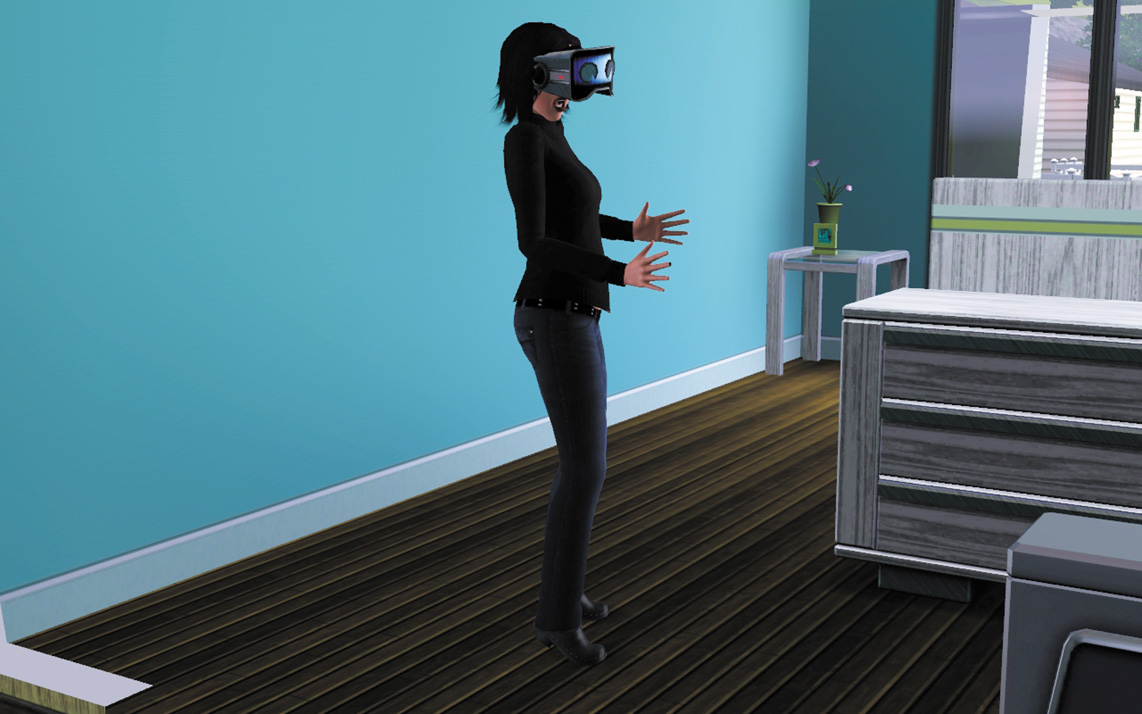
You actually play along with your Sim on the adventure, guiding them through choices that appear on-screen.
Window
Houses need windows to let in natural light and just look attractive. There is just one interaction Sims can have with windows.
Look In Window: Teens and older can use this interaction to walk up to a neighbor’s house and peer through the windows. This lets you see inside the house. If the owner of that house spots you peeking, they shoo you away and your LTR takes a hit.
Workout Bench
The workout bench is a weight system that increases strength training. This piece of equipment can be bought in Buy Mode and found at the local gym.
Work Out: Directs the Sims to the exercise bench. While on the bench, you can set the tone for the actual workout. Any moodlets related to the kind of exercise are earned, such as Fatigued, Sore, and Pumped.
Train: If the Sim has the ability to train another Sim in Athletics (level 6), use this interaction to train a Sim on the workout bench.