
The Sims 3 Guide Essentials A Day in the Life
Relationships and Socializing
Wishes, opportunities, and moods are all affected by one very important facet of The Sims 3: socializing. Hermits have their place in Sunset Valley, but for Sims to get the most out of life, they must venture outside the front door and start interacting with other citizens
Making friends in Sunset Valley is an easy way to make Sims happy—unless they are total misanthropes. By interacting with other Sims, you may see new opportunities pop up or have your Sims discover new wishes on the basis of seeing other Sims having fun with a specific object or activity.
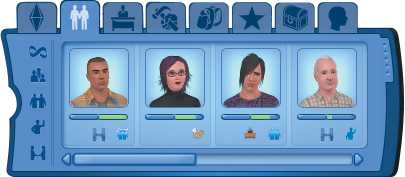
As Sims meet people, they are added to the Relationships panel. Here, you can monitor the progress of a relationship by looking at the two meters directly below the portraits. The green meter on the right fills as a relationship with a Sim improves.
If the relationship sours, the meter on the left turns red. Directly below the meter are small indicators that show the current status of the relationship and any factors that help describe the relationship, such as spouse (little rings) or family (a small collection of people).
When you first encounter a new Sim, the Sim is characterized as an Acquaintance. As a relationship improves or decays, the descriptor of the relationship changes. Here are three categories of relationships and the different descriptors:
Positive: Acquaintance, Friend, Good Friend, Best Friend, Distant Friend, Old Friend, Romantic Interest, Fiance, Spouse
Negative: Rival, Enemy, Old Enemy, Ex-Friend
Neutral: Stranger
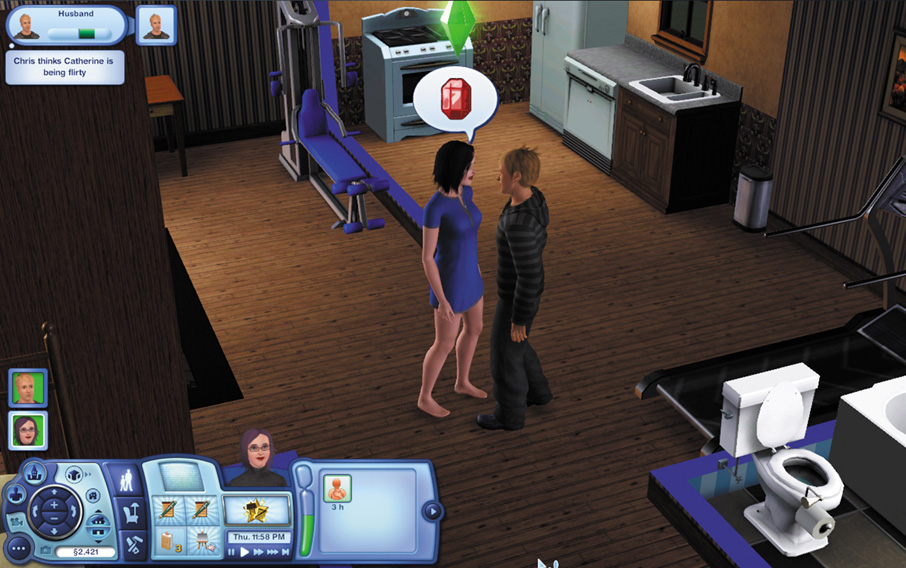
Relationships are affected by socializing with Sims via conversations. When you initiate a conversation, you can choose from a litany of available actions and conversation pieces. These are called “socials.” Socials can be positive, neutral, and negative. Every Sim will have a different set of available socials.
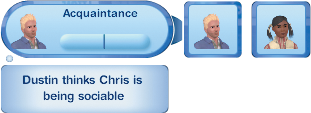
When a conversation is struck, your interaction with the other Sim appears in the screen’s upper left. The Relationship meter under the portrait of the Sim in the Relationship panel now appears on the main screen. Below the meter, you see how the other Sim views your Sim.
These ratings help put your relationship in context and guide how you should steer the conversation to reach a desired effect. If another Sim thinks you are funny, then keep up the jokes. If the Sim thinks you are interesting, perhaps you can steer this thing toward romance. And if the other Sim thinks you are dull or drab, you need to correct course.
Try finding out what the other Sim is interested in and talk about it, or throttle back whatever thing you are doing that is upsetting the other Sim. For example, if you flirted with a Sim and they regarded you as creepy, then you need to not flirt anymore. Try normal conversation for a while so the other Sim accepts you as just being social or polite.