
The Sims 3 Guide Essentials A Day in the Life
Mood Maintenance
The immediate measurement of a Sim is mood. A Sim’s happiness, neutrality, or misery is quickly identified by their current mood, which is displayed in the Mood meter that occupies the center of the screen, right next to the portrait of the active Sim.
The Mood meter is shaped like an upside-down exclamation point. Good mood is represented by green. As the Sim dips toward neutral or tense feelings, the color of the meter turns yellow.
When the meter displays red, your Sim is seriously troubled. You need to pay immediate attention to the Sim and rectify whatever situation or interaction is upsetting the Sim.


The portrait also chips in with mood management by mirroring the Sim’s current mood. A happy Sim is represented with a smiling portrait. A sad or disturbed Sim wears the kind of frown that you simply must try to turn upside-down.
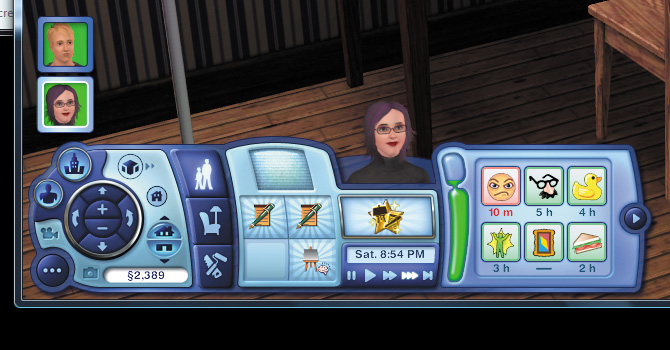
Your constant goal is to push your Sim’s mood into the “bubble” at the top of the Mood meter. If you can keep your Sim happy long enough to push the mood rating into that bubble, the Sim begins earning Lifetime Happiness points.
The stream of Lifetime Happiness points continues until the Sim’s mood drops back out of the bubble. While you earn a lot of Lifetime Happiness points
by fulfilling wishes in nice-sized chunks, if you can keep a trickle coming in via the Mood meter, you’ll be surprised how soon you can start buying Lifetime Rewards.
Moodlets
Managing mood in The Sims 3 is considerably easier than in The Sims 2 thanks to the introduction of moodlets. Moodlets show you exactly what is affecting your Sim’s overall mood at any given time. Moodlets are not necessarily passive indicators—your actions and commands greatly influence your Sim’s moodlets.
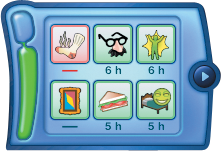
The Moodlet panel is directly next to the Mood meter. All current moodlets are shown here. To learn more about each moodlet, mouse over it to see a fuller description.
Because moodlets contribute to your Sim’s overall mood, you need to pay close and constant attention to the Moodlet panel. Some moodlets require direct attention, particularly the negative ones, which appear with a red outline.
There are two types of moodlets: positive and negative. To keep your Sim happy, you need to do things that bring about more positive moodlets. Moodlets have varying degrees of effect on overall mood, so it’s always best to seek out activities that bring about the biggest positive effect on overall mood.
Fulfilling a wish is a good way to cause a positive moodlet. But minor things can also promote a positive moodlet, such as having your Sim brush his teeth, thus receiving the Minty Breath positive moodlet.
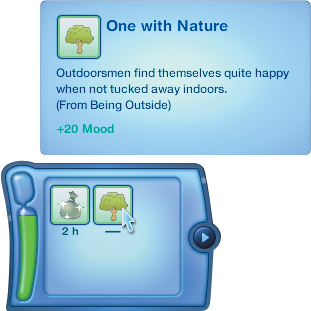
Because no mood-influencing factor is eternal, moodlets have timers on them. While a moodlet is active, its full effect is seen in the overall mood. There is no decay over time. Pay attention to the time on a moodlet and try to make sure your Sim will experience another positive event before a good moodlet runs out.
Some moodlets are actually warning that a negative impact on the overall mood is about to take place unless the factor that inspired the upcoming negative moodlet is removed. For example, a moodlet showing that a Sim is hungry and has to use the bathroom appears with a timer.
If the need is addressed before the timer counts down, the chance of suffering the negative moodlet associated with these activities is avoided. If the need is not addressed in time and the negative moodlet occurs, it’s too late to rectify the situation.
Let’s say your Sim hasn’t eaten in a while and the Hungry moodlet appears. You have two hours to feed the Sim. If you fail to feed the Sim, the Hungry moodlet is replaced by Very Hungry, which knocks down the overall mood. Even if you fed the Sim right after the Very Hungry moodlet, you still must suffer the hit to overall mood.
Negative moodlets bring down the overall mood. Sometimes, you just have to ride a negative moodlet out and try to offset it with a positive moodlet. However, some negative moodlets can be nullified by performing an action.
The Sore moodlet brings down the overall mood as long as it is active, for example. If another Sim was to give the sore Sim a brief massage (which is a social), the Sore moodlet vanishes.
Needs
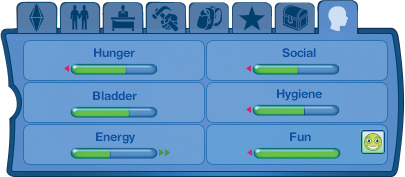
Needs are not as central to The Sims 3 as they were in previous games. While the needs of a Sim are still important to overall mood, the introduction of moodlets offers a more interactive way to deal with a Sim’s specific needs.
Still, you should check in on needs to make sure your Sim is taken care of. If you wait until your Sim’s Bladder rating drops low enough that she has to use the bathroom within a set amount of time, the Has to Pee moodlet appears.
Now the timer is on to get to a bathroom before the Has to Pee moodlet devolves into passing out entirely from bladder failure.
There are six needs to monitor:
Bladder
Energy
Fun
Hunger
Hygiene
Social
These needs are addressed not only with activities such as eating or taking a bath, but also through the purchase of certain objects. Many objects affect needs, such as a new toilet, mirror, or bathtub. When you are shopping in Buy Mode, mouse above an object to see what needs it addresses and how.
The higher the need rating, the more the object does to address the specific need. For example, not all tubs and showers are created equal. The more expensive the tub or shower, the more it improves a Sim’s Hygiene rating when the Sim interacts with it.
Each need in the Needs panel is accompanied by a meter. This meter measures the current level of satisfaction for that need. The Hunger meter, for instance, shows you if the Sim needs to eat. The amount of hunger satisfaction is seen in green. If the meter is mostly green, the Sim is not hungry.
However, if the meter drops to the 50 percent level, the background of the meter turns yellow. This means the need should be addressed before it slips into the negative, which is red. Once a need drops into the red, a negative moodlet occurs and the overall mood takes a dip.