
PlayStation All-Stars Battle Royale Guide Essentials Basics
Controls
Getting Ready to Rumble
Preparation is the key to success, in life as in battle. Before choosing an All-Star and stepping into the ring, it’s imperative that you gain at least a basic understanding of how to control your character and navigate the menu options. Knowing how to get into a fight and being able to land an attack is but the first step on your journey to uncover the mystery of who assembled these PlayStation superstars and heading online to decimate your foes.
Controls
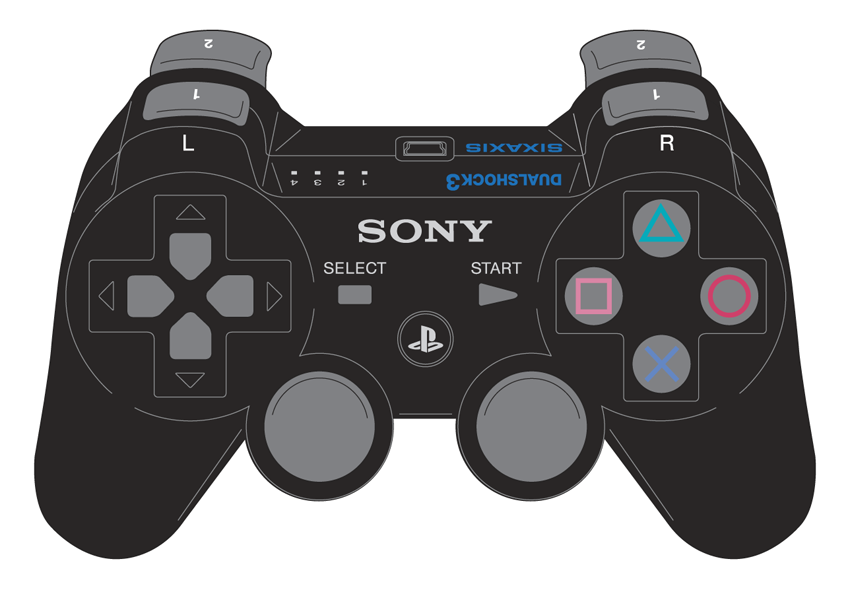
Every All-Star has brought an arsenal of superior weaponry to the Battle Royale. Kratos has the Blades of Athena; Dante has his twin guns, Ebony and Ivory; Sackboy has his Cakeinator. You have your controller, the most powerful weapon of all. Based on your personal preferences, PlayStation All-Stars Battle Royale supports three different input devices: the standard DualShock 3 controller, arcade-style fight sticks, and the PlayStation Vita system.
DUALSHOCK 3
| Move | directional buttons or left stick |
| Jump/Double Jump |
 /
,
/
,
|
| Attack 1 |

|
| Attack 2 |

|
| Attack 3 |

|
| Throw Opponent | right stick |
| Pick Up/Discard Item |

|
| Super Attack |

|
| Block/Air Dodge |

|
| Dodge Roll |
+
 /
/

|
| Taunt |

|
| Pause Menu |

|
The DualShock controller is as iconic as the system it connects to, as its basic shape hasn’t changed much since the first PlayStation arrived in 1995. Likely to be the most widely used interface for players, the DualShock 3’s greatest advantage is its two movement input options. Using the left stick, you can control how fast your character moves by gradually moving it closer to the outside, but at the expense of less accuracy when performing attacks that require a directional input. Your character is forced to always run when using the directional buttons, but you can be assured that your
attack doesn’t accidently result in an
 attack.
PLAYSTATION®VITA
| Move | directional buttons or left stick |
| Jump/Double Jump |
/
,
|
| Attack 1 |
|
| Attack 2 |
|
| Attack 3 |
|
| Throw Opponent | right stick |
| Pick Up/Discard Item | tap the touchscreen |
| Super Attack |

|
| Block/Air Dodge |

|
| Dodge Roll |
+
/
|
| Taunt |

|
| Pause Menu |
|
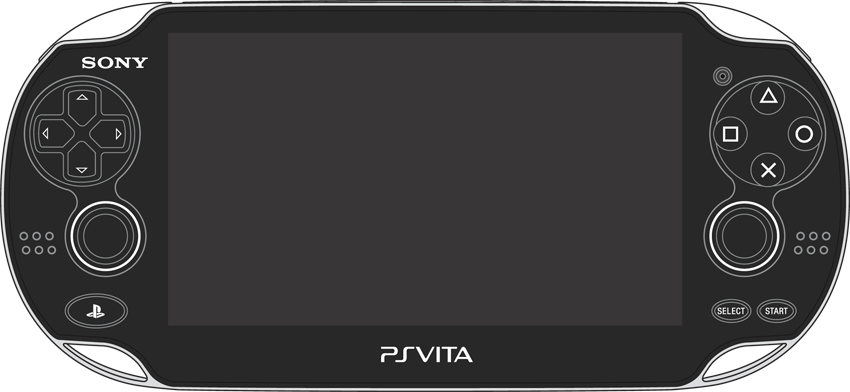
PlayStation Vita owners get to share in a new high point in PlayStation history, as
PlayStation All-Stars Battle Royale
is the first title to support Cross-Play and Cross-Buy features. This means that the PlayStation 3 and PlayStation Vita versions of the game can play against one another, online or on the same network. Both versions are absolutely identical, except the PlayStation Vita version slightly changes the way you interact with Items, perform Taunts, and activate Super attacks due its lack of a second set of shoulder buttons. To pick up or drop an Item, just tap the touchscreen when your character is near. Press
to execute your Super attack, and press
to perform a Taunt.
All strategies, data, and combos presented in this guide work for both the PlayStation Vita and PlayStation 3 versions of the game.
ARCADE STICKS
| Move | directional buttons or left stick |
| Jump/Double Jump |
/
,
|
| Attack 1 |
|
| Attack 2 |
|
| Attack 3 |
|
| Throw Opponent |
|
| Pick Up/Discard Item |
|
| Super Attack |
|
| Block/Air Dodge |
|
| Dodge Roll |
+
/
|
| Taunt |
|
| Pause Menu |
|
Those who tend to play more traditional fighting games might already own an arcade stick, as its joystick and button layout accurately recreate the arcade experience and allow for more precise attack inputs. Due to the resurgence of fighting games over the last four to five years, arcade-quality sticks are relatively easy to acquire these days. Since they use actual arcade components, these types of controls can be fully customized with buttons, ball tops, and internal components to suit an individual player’s needs.
PlayStation All-Stars Battle Royale
can accommodate arcade-style players easily, despite the lack of a right stick for throws. Fight stick players can press
+
/
 /
/
to throw their opponent in the desired direction.
/
/
to throw their opponent in the desired direction.
Character movement is limited to run-only when using an arcade stick, due to the lack of analog input. You also may want to consider which type of joystick “gate” you wish to use. The “gate” is a plastic plate on the underside of a joystick that restricts its movement area. Typically, most sticks come equipped with a “square gate” that restricts maximum movement to the four corners of the gate, but some may prefer an octagonal gate that allows for more precise quarter-circle motions. Since all attacks have inputs that involve a simple direction + button input, a square gate seems like a natural fit to the gameplay of PlayStation All-Stars . However, it all comes down to personal preference and what works best for you.
The Menus
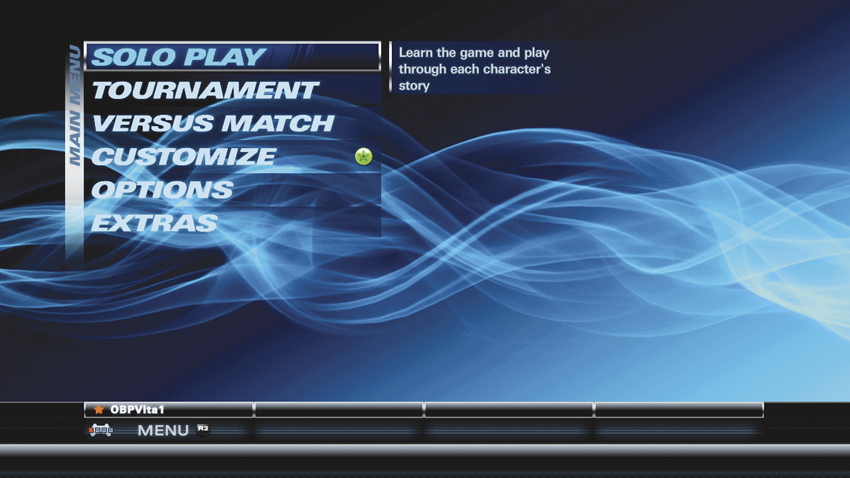
From bashing through each character’s story in Arcade Mode to fighting your way to the top of the Seasonal Leaderboards, the Main Menu serves as your portal to the world of PlayStation All-Stars . It may seem redundant to cover this in a strategy guide, but it’s important to know where the action is!
SOLO PLAY
For those lone wolves out there, Solo Play is where to find all of the single-player offerings available in the game. Tackle each character’s story in Arcade Mode, challenge yourself in a series of Combat Trials, or fine-tune your combos in Practice Mode.
Nearly every single-player game type offers three levels of difficulty: Hero, Legend, and All-Star. Higher difficulties yield smarter and more ruthless AI competition but also richer rewards for the daring brawler who can defeat them.
Arcade Mode
Select a character and experience the Battle Royale from their point of view, eventually uncovering the mystery behind this merging of worlds. Arcade Mode consists of a series of battles ranging from one-on-one to team-based game modes, eventually leading to a battle with your character’s rival… and, of course, the final boss.
The opponents and stages encountered in each level change depending on your current character and difficulty level. Be sure you’re familiar with the ins and outs of a character before tackling the All-Star difficulty level if you wish to survive. For strategies on rival match-ups and defeating the final boss (along with spoiling its identity), check out the Arcade Mode section.
Combat Trials
Those looking to test their mettle need look no further than the Combat Trials menu, where a number of unique matches with special rules awaits. Combat Trials are broken up into two categories: General and Character.
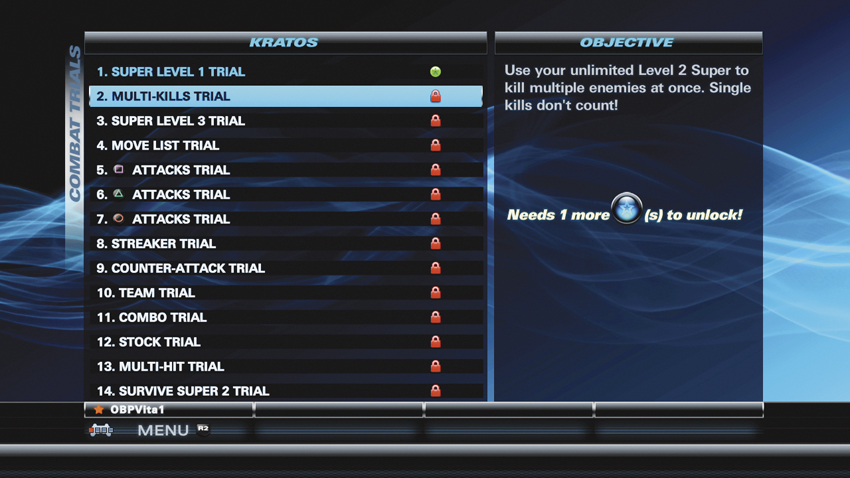
General Combat Trials challenge your understanding of the fundamentals of fighting in PlayStation All-Stars . There are 10 General challenges in total, each putting you in control of a different character with unique victory conditions.
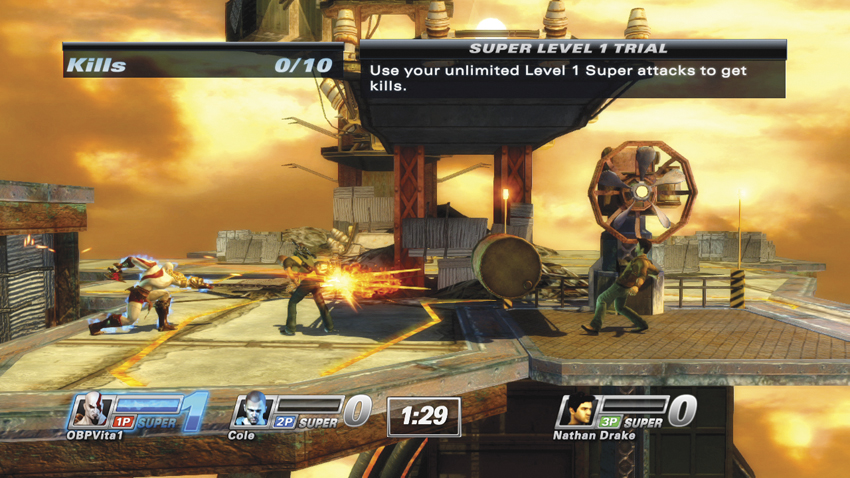
Now, things get a bit scarier in the Character Combat Trials. Each character has between 21 and 24 trials selected from a pool of unique challenges, all of which are identical across the entire cast. Character-specific trials involve proving your mastery with a specific move or ability that the character possesses, such as executing Kratos’s counter move or using PaRappa’s skateboard to reflect projectiles.
All Combat Trials offer the same three difficulty levels as Arcade Mode. Increased difficulty not only means that your opponents are more ruthless, but stricter time and score requirements are present, as well. Rules and tips for each Combat Trial can be found in the Combat Trials section.
Practice Mode
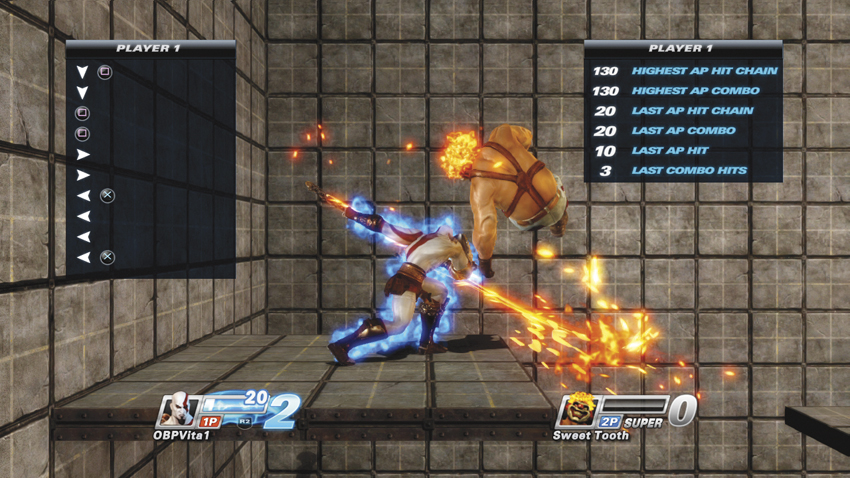
Online warriors and local-only brawlers alike should be spending a lot of time in Practice Mode if they hope to improve their game. Practice Mode lets you fight for an unlimited amount of time on any stage against any opponent, with a wide range of preset AI options to recreate nearly any gameplay scenario.
Tutorial
Everyone has to start somewhere, right? The Tutorial menu is your go-to spot to learn the basic gameplay mechanics of PlayStation All-Stars . The game includes Basic and Advanced sections that apply to all characters, while Character tutorials provide a basic overview of each character’s move list. When you want to get more in-depth with a particular All-Star, the Combo tutorials demonstrate attacks that work well together.
PARTY BAR
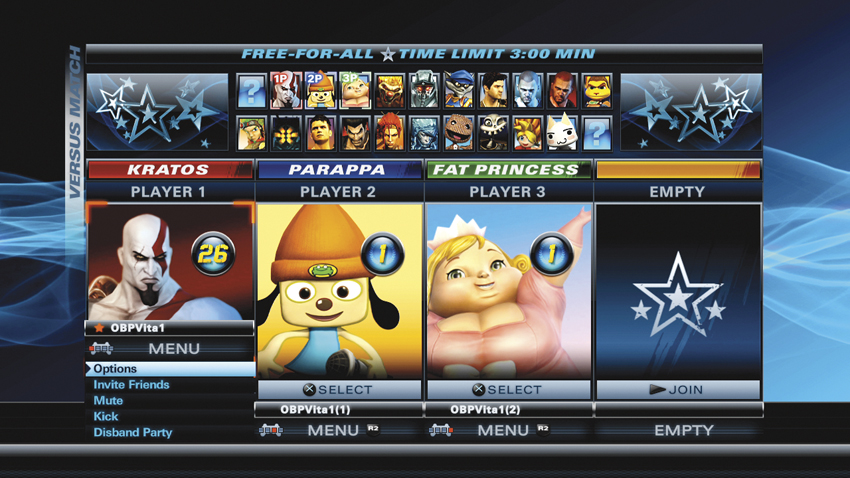
The Party Bar, located at the bottom of all menus, offers an easy way to get a group of friends together for a communal beat-down. Press
to open the Party Bar, and select Invite Friends to quickly invite anyone from your PlayStation Network friends list to join your party. Local players simply need to press
to join in on the action. PlayStation Vita players can find the Party Bar by tapping an icon in the upper-right corner of the touchscreen.
The Options selection allows for changing global game options on the fly. If there’s a troublemaker in your party, select Kick and then their PSN ID to boot them out… or select Disband Party to kick everyone out all at once.
TOURNAMENT
Fighting games are almost always more fun when playing against living, breathing, human opponents. Luckily, PlayStation All-Stars is outfitted with several excellent options for doing just that!
Ranked Match
Those who aspire to climb the online leaderboards are going to be spending a lot of time brawling in Ranked Match games. Ranked matches follow a specific set of rules: three-minute matches, default item drop rates, default AP generation, and a mixture of Free-For-All and 2v2 modes. You may bring a partner into Tournament mode either via an online invite or by using a second controller on the same system.
Quick Match
Quick Match offers a more casual online experience, allowing you to define the matchmaking options. You may filter search parameters by game type (FFA or 2v2), match limit (timed, stock limit, kill limit), or item preferences (allowed or not allowed). Quick Match games are not ranked, and you may only have one other player in your party.
Season Leaderboard
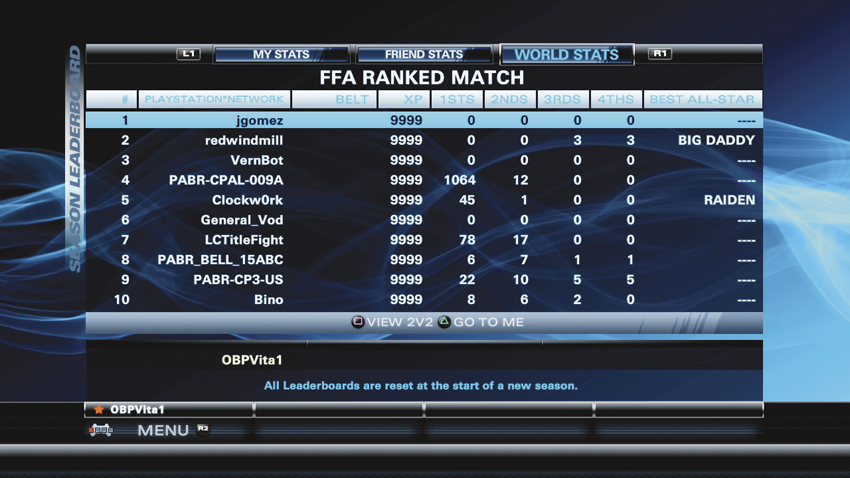
The Season Leaderboards is where players can view how they stack up to one another based on their performance in ranked Tournament matches. Your overall rank, Supers Per Minute (SPM), and number of times placed 1st/2nd/3rd/4th are put on display for the world to see.
If you’re not entirely happy with your current ranking, don’t worry. Unlike a majority of fighting games where the leaderboard is perpetual, the leaderboards in PlayStation All-Stars are reset at the beginning of every season, which lasts a fixed number of days. To see the number of days remaining in a season, simply highlight the menu option from the Main Menu, and take a peek at the description text.
VERSUS MATCH
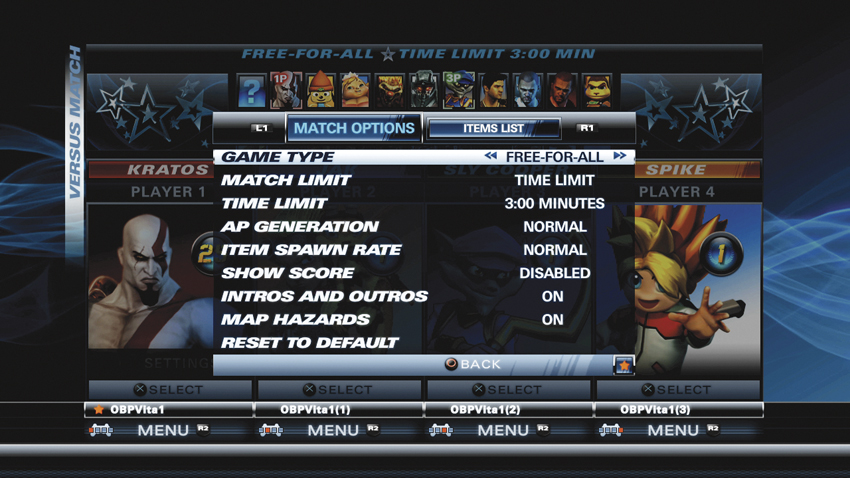
Versus Match offers the ultimate “anything goes” experience with friends. The party leader can set every rule for the match, all the way down to which items can and cannot spawn! Press
(SELECT on PlayStation Vita) to bring up the list of options.
Opponents can be invited from your friends list, sitting on the couch next to you with another controller, or a combination of the two! Anything goes!
CUSTOMIZE
Completing matches, completing Combat Trials, clearing Arcade Mode, and finishing other noteworthy tasks reward you with Ranking Points that gradually level up your characters’ individual Ranks and unlock various goodies. The Customize menu is where you can put those goodies to use, or view the requirements for unlocking even more!
Profile
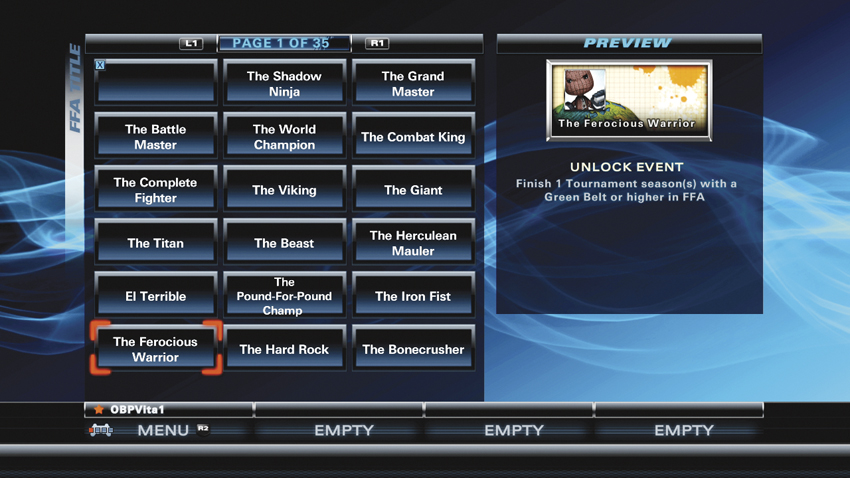
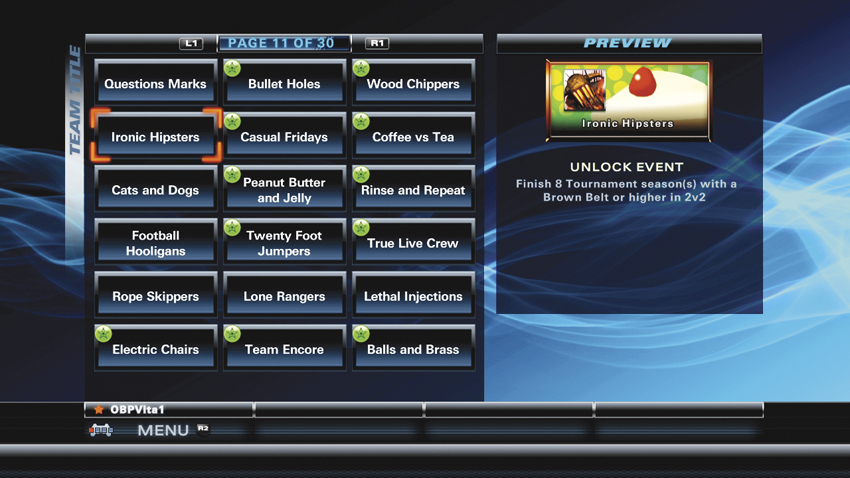
Your Profile Card sits underneath the portrait of your character on loading screens and serves as a fun piece of flair to show off before matches. Player Cards consist of three elements: a backing, an icon, and a title. Each of these can be set in the Profile menu, including separate titles for Free-For-All and Team-based game modes.
You may also select a personal Minion to accompany you into battle. Minions, which are cute, “super-deformed” versions of supporting cast members from each All-Star franchise, serve as mascots that cheer you on in pre and post-game sequences, or when you score multiple kills with a single Super attack.
Characters
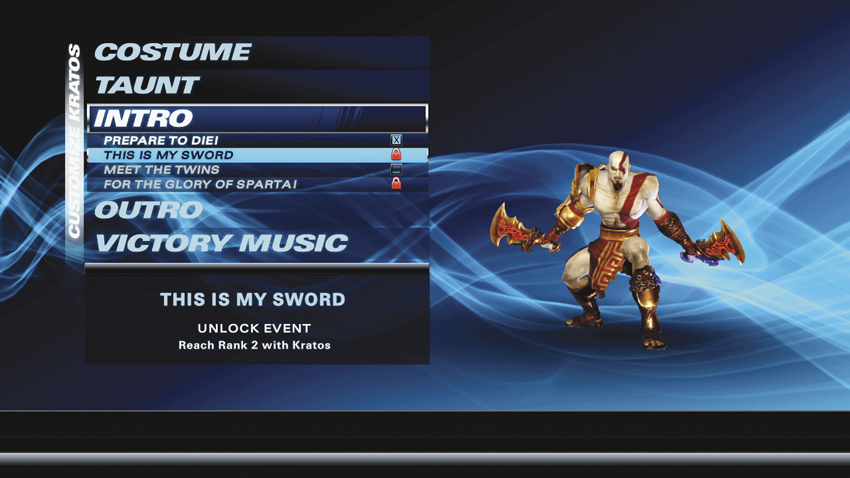
In addition to Player Card flair, you can also unlock cosmetic changes for each and every character. This includes costumes, Taunt animations, intro/outro animations, and even victory music!
Goals
Goals are a number of pre-defined challenges that reward Ranking Points and new customization items as their requirements are met. These are tracked over the course of your entire PlayStation All-Stars career and range in difficulty across seven different categories: Session, Career, Tournament, Ranked Match, Arcade, Combat Trials, and Versus. There are 443 Goals to reach in total, so you’d better get started soon! For a complete list of Goals and reward descriptions, check out the Goals section.
OPTIONS
Also accessible from the Party Bar, the Options menu allows you to adjust Music and SFX volume, along with toggling Subtitles and Vibration on or off.
Controls customization can be found on this menu, too. There are presets established for controllers and arcade sticks, or you can manually configure the game controls to suit your play style.
EXTRAS
Each character’s biography and the credits video, showcasing the fine men and women who brought PlayStation All-Stars Battle Royale to life, can be viewed from this menu.
Ranking System
“To the victor goes the spoils,” as the saying goes, and in PlayStation All-Stars , the spoils of war are awarded in the form of Ranking Points, or RP for short. Ranking Points are awarded for meeting various criteria in any game mode and are the key to unlocking rewards used to customize your Player Card and characters.
CHARACTER RANKS
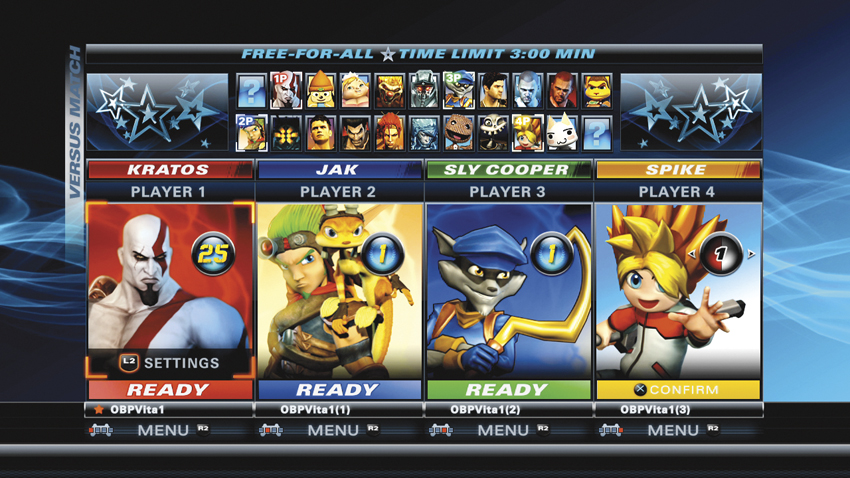
A character’s current Rank is displayed inside the circle next to their portrait. Ranking Points are awarded on a per-character basis, with characters earning a single Rank for every 1,000RP earned. By gaining additional Ranks, you can unlock new costumes, Taunts, and other customization items for that character along with icons and backings to add a bit of flair to your Player Card. Each character can claim up to 300 Ranks, which translates into 300,000RP per character to max out the entire cast!
EARNING RP
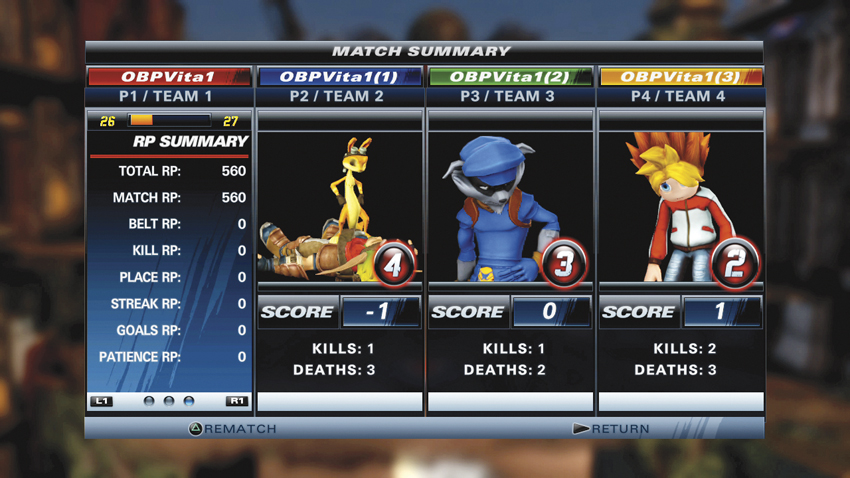
Luckily, the Ranking Points flow freely in PlayStation All-Stars . Just completing Arcade Mode on All-Star difficulty can raise a character from Rank 1 to Rank 20 in a single playthrough. There are plenty of ways to earn RP outside of Arcade Mode, too. Everything from completing an online match to bashing bots in Versus Mode can increase your Rank, and completing the various Goals the game offers can jump your character ahead several more Ranks in an instant. All of the RP you earn, regardless of source, is awarded at the end of a match and can be viewed on the Match Summary screen after a battle. In addition, unique RP Bonuses are awarded to players based on various criteria, listed in the following table.
RP Bonuses
| # | Bonus Name | RP Summary Category | Description | RP Awarded |
|---|---|---|---|---|
| 1 | Online Match Completion | Match RP | Complete an online match without quitting or disconnecting. | 1000 |
| 2 | Versus Match Completion | Match RP | Complete a Versus match. RP awarded is variable based on CPU vs. Human opponents. | Variable |
| 3 | White Belt Bonus | Belt RP | Bonus award for possessing a white belt and completing a match. | 50 |
| 4 | Orange Belt Bonus | Belt RP | Bonus award for possessing an orange belt and completing a match. | 150 |
| 5 | Blue Belt Bonus | Belt RP | Bonus award for possessing a blue belt and completing a match. | 250 |
| 6 | Green Belt Bonus | Belt RP | Bonus award for possessing a green belt and completing a match. | 350 |
| 7 | Purple Belt Bonus | Belt RP | Bonus award for possessing a purple belt and completing a match. | 450 |
| 8 | Red Belt Bonus | Belt RP | Bonus award for possessing a red belt and completing a match. | 550 |
| 9 | Brown Belt Bonus | Belt RP | Bonus award for possessing a brown belt and completing a match. | 750 |
| 10 | Black Belt Bonus | Belt RP | Bonus award for possessing a black belt and completing a match. | 900 |
| 11 | Win Streak Bonus | Streak RP | Bonus begins after two 1st place wins in a row and increases in value as the streak continues. | 500/750/900 |
| 12 | Second Place Streak Bonus | Streak RP | Bonus begins after two 2nd place wins in a row and increases in value as the streak continues. | 250/350/550 |
| 13 | No Disconnect Streak Bonus | Streak RP | Bonus begins after completing two full matches without disconnecting and increases as streak continues. | 100/150/200 |
| 14 | 1st Place | Place RP | Awarded for finishing a match in 1st place. | 400 |
| 15 | 2nd Place | Place RP | Awarded for finishing a match in 2nd place. | 250 |
| 16 | Patience Bonus | Place RP | Bonus earned by waiting for the online matchmaking system to place you into a match. Increases based on time. | 15~450 |
| 17 | Kill Bonus | Kill RP | Variable bonus based on the number of Kills earned during a match. | 50~1000 |
| 18 | Combat Trial (Hero) | Goals RP | Awarded for completing any Combat Trial on Hero difficulty. | 1000 |
| 19 | Combat Trial (Legend) | Goals RP | Awarded for completing any Combat Trial on Legend difficulty. | 1250 |
| 20 | Combat Trial (All-Star) | Goals RP | Awarded for completing any Combat Trial on All-Star difficulty. | 1400 |
| 21 | Arcade Match (Hero) | Goals RP | Awarded for completing any Arcade Mode match on Hero difficulty. | 1000 |
| 22 | Arcade Match (Legend) | Goals RP | Awarded for completing any Arcade Mode match on Legend difficulty. | 1250 |
| 23 | Arcade Match (All-Star) | Goals RP | Awarded for completing any Arcade Mode match on All-Star difficulty. | 1400 |
GLOSSARY OF TERMS
absorbs projectiles—An attack property where the attacker is unaffected by contact with a projectile. The projectile’s AP value is added to the attacker’s Super Meter.
active—Refers to the period of time an attack can connect with an opponent. An attack enters its recovery phase after the active phase. Normally used when discussing frame data.
air—In fighting game terms, air is used to describe actions that take place while the character is not touching the ground. Air attacks, air dodge, and air recovery are all examples of this usage. While in the air, a character is considered to be in an “aerial” state.
air recovery—The period of invincibility that occurs while a character returns to a neutral state after either being forced into the air by an attack or hit by an attack in the air. Players can hold
,
, or
to recover in the held direction.
AP—All-Star Power. This energy source is the main focal point of the game, as players must acquire AP to perform Super attacks.
AP Penalty—AP Orbs are ejected from a character’s body when hit by an item attack, Hazard, or throw. There are four categories of AP Penalties, each forcing a character lose a percentage of their total AP: Light (3%), Medium (5%), Heavy (10%), and Throw (15%).
attack—Any action that can strike an opponent. Attacks are typically performed by pressing
,
, or
alone or in combination with a directional input, but the term can also refer to offensive items.
block—A primary defensive option that negates most enemy attacks, activated by holding
. Blocking prevents the player from losing AP or entering a disadvantageous hit state due to an attack. Super attacks, throws, and some item attacks are unblockable.
blockstun—When an attack comes in contact with a blocking opponent, the brief window during impact when the opponent cannot act is referred to as blockstun.
bread and butter—aka “BnB.” This term generally refers to a character’s most useful combo, attack, or tactic that works in a majority of gameplay situations.
buffer—Refers to a character action that can be inputted during another action and occurs once the original action has completed.
buff—An temporary increase to a character’s default abilities. For example, the Boots of Hermes item increases a character’s speed for a brief period of time. This increase is a buff.
butt-drop—A type of stagger, butt-drop is a hit state that forces an opponent to fall on his/her butt for a brief moment and become vulnerable to attack. Example: Drake
.
cancel—Beginning a new action before the previous action is completed. Most characters have an attack or two that can be canceled by another attack. Some attacks can also be canceled by a jump, counter, or dodge roll.
chip—Chip, also occasionally called “chip damage,” refers to AP gained by attacking a blocking opponent. The amount of AP earned through chip is half that of a full-contact hit.
charge—The act of holding down an attack button to increase its strength. Only certain attacks are chargeable.
close range—When a character is one character length or less away from their opponent.
combo—Landing two or more attacks in succession, from which the opponent cannot escape. Combos allow the attacker to gain a great deal of AP without fear of a counter attack.
confusion—A status effect where the affected player’s movement controls are reversed and attack inputs are mixed up.
corner—Refers to any area of a stage where a wall and the ground meet. Certain combos can only be performed in a corner.
counter—Multiple definitions. The act of dodging an enemy attack and retaliating while they remain stuck in an attack animation. A command counter refers to an action available to certain characters that requires a button input and instantly retaliates on hit. Counter-Super refers to the act of killing an opponent with a Super attack while they’re performing a Super attack of their own. Only Level 1 and Level 2 Supers may be countered.
crumple— A hit state where the opponent slowly drops to their knees before entering a knockdown state. Three types of crumple are present in the game: Crumple Forward (Kratos
(hold)), Crumple Spin Left (Evil Cole (charge)
), and Crumple Spin Right. The only important distinction between the three is that executing two of the same type of crumple in a row causes a knockdown as part of the Infinite Avoidance System.
eject tornado—A hit effect that sends the opponent flying away from the attacker at a 45-degree angle. If the character cannot air recover by the time they hit a wall, the attack results in a wallbounce.
eject roll—A hit effect that sends the opponent away rolling away from the attacker along the ground at high speed. Characters are invincible during an eject roll.
eject spiral—A hit effect that sends the opponent away from the attacker, pinwheeling through the air at a more shallow angle and slower speed than eject tornado.
float—A hit effect that forces the opponent to slowly rise toward the top of the level. Typically, players have some control over their character if the float is caused by a level Hazard, such as in the Time Station level, but players do not have control if caused by a character attack like Jak’s
.
frame data—A high-level method of breaking down character animations, allowing players to analyze all aspects of a character’s abilities. Fighting games typically display at 60 frames per second, or FPS, and any action a character performs—jumping, walking, attacking, and the like—requires a certain amount of time to complete its animation. STARTUP refers to the time it takes for an attack to become ACTIVE, which is when the attack can hit an opponent. RECOVERY indicates the time it takes for an animation to complete before the character can start another. By looking at these numbers, and how they relate to one another, it is possible to discover new combos or compare the speed of multiple attacks from different characters against one another.
freeze—A hit state where the opponent is frozen in place for a period of time. Freeze times vary based on the source of the attack.
full launch—A type of launch reaction where the opponent is knocked straight up into the air, peaking just short of double jump height. The opponent will perform an air recovery if left alone. Example: Kratos
.
guard break—An attack that forces a blocking opponent into a stumbling animation, opening them up to attack.
Hazard—A level element that causes a player to lose AP on contact or be placed in a disadvantageous position. Hazards can be a background creature, incoming missiles, or explosive barrels, for example. Also can be referred to as a level Hazard.
hit confirmation—The act of verifying that a hit landed successfully before initiating a follow up attack.
hit state—A hit state refers to several disadvantageous animations a character can be placed in after being stuck by an attack. Launches, staggers, knockdown, and crumple are all examples of hit states.
hitstun—The brief moment where a character cannot perform an action after getting hit by an attack.
ignore projectiles—An attack property that causes projectiles to have no effect on the character during its active frames.
Infinite Avoidance System—A behind-the-scenes mechanic that prevents players from becoming caught in never-ending combos. Once the IAS kicks in, the opponent immediately becomes invincible until they touch the ground or perform an attack. IAS triggers include performing two attacks in a row that result in the same crumple or stagger type, or if the attacker earns 100AP in a combo against a single opponent.
invincible—A move property where the character cannot be attacked, indicated by a white flash on the character model. Everyone is invincible while performing a dodge roll or air dodge, or when recovering from a knockdown. Some characters have moves that are invincible, too!
item—Items are special objects that spawn at random times during a match. When picked up, an item can give its user a unique attack or increase their basic abilities.
jump—The act of pressing
to transition from a grounded to aerial state. Jumping again while in the air results in a double jump.
jumping in—The act of jumping towards an opponent’s location with the intent of attacking.
Just Frame—An input method originating from the Tekken series, a Just Frame action requires that two inputs are activated immediately after one another.
KD—See knockdown.
keepaway—A play style that focuses on keeping opponents as far away from the player character as possible.
kill—Catching an opponent with a Super attack results in a kill. Kills are the only way to score points in PlayStation All-Stars Battle Royale .
kneel stagger—A type of stagger where a hit forces the opponent to briefly fall to one knee, leaving them vulnerable to a follow-up attack. Abbreviated as “kneel” in data tables.
knockdown—A hit state where the opponent is forced to lay flat on the ground for one to two seconds before they wake up. Abbreviated as “KD” in data tables.
launch—An attack property that knocks the opponent into the air. There are four types of launch reactions: mini-launch bounce, mini-launch sweep, mini-launch lift, and full launch.
level—Multiple definitions. When capitalized, Level refers to the three different Super attacks. Lowercase level can refer to stages or when discussing the vertical relationship between different platforms.
lockdown—A style of play focused on keeping an opponent pinned in a small area.
long range—When a character is a half-screen or more away from their opponent.
mash—The act of rapidly pressing a single button multiple times. The damage or effectiveness of certain attacks can increase when mashed.
mid-range—When a character is within a quarter-screen distance or less from their opponent.
mini-launch bounce—A launch reaction where the opponent is bounced off of the ground. Results in a knockdown when opponent reaches the ground. Abbreviated as “bounce” in data tables. Example: Nariko
.
mini-launch lift—A launch reaction where the opponent is lifted into the air, spinning head over heels. Results in an air recovery if opponent is left alone. Abbreviated as “lift” in data tables. Example: Sweet Tooth
.
mini-launch sweep—A launch reaction where the opponent is knocked off of his/her feet and descends slowly. Results in a knockdown when the opponent reaches the ground. Abbreviated as “sweep” in data tables. Example:
Drake
.
point-blank range—When a character is within the range of a throw. Also known as “throw range.”
poison—A temporary status where the affected character slowly loses AP over time until the poison wears off.
projectile—An attack that is separate from the character model and travels independently of the character, typically something like a bullet or energy beam.
Rank—The overall experience level of a character. Complete Goals and win matches to earn Ranking Points in order to increase a character’s Rank.
Ranking Points—Experience earned by completing matches and Goal requirements. Ranking Points are earned on a per-character basis. Abbreviated as RP.
recovery—The period of time it takes for a character to finish an animation before beginning another. This can refer to attacks, movement, or getting up from a knockdown. Recovery can also be referred to as recovery frames when discussing frame data.
rushdown—A play style that focuses on relentlessly getting close to an opponent to unleash a constant stream of attacks.
safe—Used when discussing an action that can be performed without fear of getting hit.
shock—A hit reaction to certain electrical attacks or Hazards where the opponent is held in place briefly just above the ground. Results in air recovery if left alone. Example: Radec
.
slow—The opponent’s movement speed is greatly reduced for a brief period of time. Example: Drake
.
spacing—The distance between characters. Spacing is typically measured in terms of screen length (e.g., quarter-screen, half-screen), character width (equal to one square on the practice stages), or jump height. Screen length is based on the average level size.
spam—The act of repeating the same attack without stopping. While generally frowned upon in the fighting game community, “spamming” can actually be a very effective tactic.
spawn—The act of entering a battle. Dying or falling off a level and then returning to the game is known as a respawn.
stagger—A prolonged hit stun. There are two types of staggers: butt-drop stagger and kneel stagger. Like crumples, performing two of the same type of stagger in a row will result in a knockdown.
startup—The time it takes before an attack becomes active and can actually hit an opponent. Used primarily when reading or referencing frame data.
state—Refers to the status of a character in terms of positioning or hit effect. For example, a character in the air is in an “aerial state,” or a character who’s suffered a knockdown is in a “knockdown state.”
status effect—Refers to effects that can affect a character over time or outside of a normal hit state. Shock, freeze, poison, and float are all examples of status effects.
stock—The number of lives a player has before they are eliminated from Stock Limit games.
stun—Opponent is briefly locked into a dizzy animation while standing, returning to a neutral state if left alone. Mash buttons to reduce the time of a stun effect.
super armor—A special move property where the attacking character can absorb a certain number of hits before being knocked out of their attack animation. In
PlayStation All-Stars
, super armor is defined in terms of how much AP the opponent would have gained had the attacks landed normally. Example: Big Daddy
(hold).
Super—A character action performed by pressing
after building up the requisite amount of AP energy. Super attacks are the only way to kill opponents.
Super time-out—A status effect where a character’s ability to use Super attacks is temporarily disabled, indicated by a red glow around the Super Meter and character model. Examples: Hedgehog Grenade item.
tap—The act of pushing a button quickly.
turtling—Can refer to a playstyle that focuses heavily on defense, or to a player who does little else than block during a match.
twitch—Any attack that does not force the opponent into hitstun. Attacks or Hazards with twitch properties generate AP but have no effect on an opponent’s ability to move, defend, or attack.
wake-up—The period of time it takes a character to get back on their feet after a knockdown. Characters are invincible during wake-up, and you may hold
or
to have them instantly enter a dodge roll during this period.
wallbounce—A struck character bounces off the wall and goes flying in the opposite direction. Typically caused by an attack that ejects the opponent.
whiff—Another term for when an attack fails to connect with an opponent.
zoning—A play style that involves keeping an opponent within a certain distance from your character that is advantageous for you but disadvantageous for them.