
Prima Games eGuides
primagames.com Browse Redeem a code Help
The Sims 4 eGuide
Sign in My Guides

Sign in or create an account

We'll email you a link. No password needed, and if you don't have an account yet, the link makes one.

By creating an account or signing in, you agree to our Terms of Service and Privacy Policy.

Have a password?

Had an account on the old eGuides site, or a code from a printed guide? Help and troubleshooting

Sign in with a password

By signing in, you agree to our Terms of Service and Privacy Policy.

Check your email

A sign-in link is on its way. It works once and expires in 15 minutes. Open it and you're in, with an account if you didn't already have one.

Contents

  • Whats New?
    • Introduction
    • Create a Sim
    • Emotions
    • Neighborhoods
    • Whats Your Story?
    • Building and Designing
    • Is That All?
  • Make a New You
    • Introduction
    • Creating a Sim
  • Get a Job
    • Introduction
    • Choosing a Career
    • Going to Work
    • Michaela the Secret Agent
    • Horace Gets Fired
  • Build Up Those Skills
    • Introduction
    • Skills
    • Child Skills
    • Mentoring Skills
    • Collecting
  • Tour of the Worlds
    • Introduction
    • Willow Creek
    • Oasis Springs
  • Achievements
    • Introduction
    • Careers
    • Player Feats
    • Relationships
    • Sim Feats
    • Skills and Crafting
    • Wealth and Collecting
  • Feelings, Lots of Feelings
    • Introduction
    • Emotions
    • Moodlets
  • I'm Home
    • Introduction
    • Households
    • Moving In
    • Pre-Made Households and Homes
    • Willow Creek
    • Oasis Springs
  • Architecture and Design
    • Introduction
    • Build Mode
    • Building a House
    • Furnishing and Decorating
    • Building Venues
  • Meet Other People
    • Introduction
    • Relationships and Socializing
    • Events
    • Families
    • Aging
    • Death
  • Sharing
    • Introduction
    • The Gallery
  • I Need More Stuff
    • Introduction
    • Living Room
    • Kitchen
    • Dining Room
    • Bedroom
    • Bathroom
    • Study
    • Kids Room
    • Multi-Room Objects
    • Hobbies and Skills
    • Outdoors and Landscaping
    • Styled Rooms
    • Home Design
  • Living the Sim Life
    • Introduction
    • Meeting Your Needs
    • Michaelas Life
    • Aspirations
    • Whims
    • Spending Satisfaction Points

The Sims 4 Guide › Get a Job

Going to Work

Unlike early The Sims games, in The Sims 4, there are no buildings in town that your Sims actually travel to for their work, and they don’t get picked up by a car. Instead, when it is time for work, they change into an outfit for their career—if required and provided by that career—and walk to the curb where they disappear for a number of hours. Then when their shift is completed, the Sims return home—usually with some needs that require tending after a long day at work.
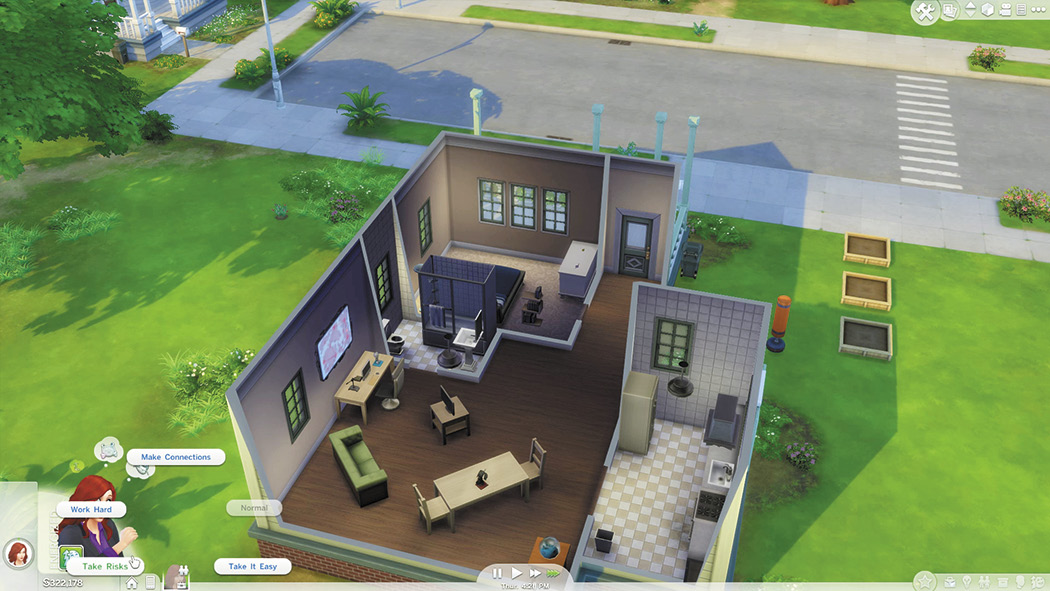
How hard do you want your Sim to work? You decide!

While at work, you can not directly control your Sim or even access their informational windows in the lower right corner of the screen. However, you can set the tone of their work efforts. While each career has some different tones, they are all very similar. To select a tone, locate the Sim’s small portrait at the screen’s bottom left side and click on little Briefcase icon to open a menu of options. The default tone is normal where the Sim does a moderate amount of work and his or her needs decay at a normal rate. If you move the cursor over each tone, it gives you a description of the effects of the tone. Usually two or more tones will decrease the amount of work your Sim does, but help build up needs such as Social or Fun. While you can take it easier, you can also choose to work harder. There are one or two of these options as well. By working harder, your Sim will progress faster toward promotion. However, he or she may become Tense and this can decrease Energy, Social, and Fun needs more quickly depending on the tone you select.

Tip

If you want to get promoted as quickly as possible, have your Sim work harder. However, be prepared to spend some time getting all their needs as close to maxed out before work and then helping get them back up after work as well. However, once you get to the highest level of your career, there is no need to work hard anymore, so let your Sims enjoy being at work.

Changing Careers

Your Sims are not stuck working in one career for their entire lives. In fact, you can change careers as much as you like. Just use the cell phone to quit your job. Or you can find a new job and when you get it, you can then quit your old job. After reaching level 10 in a career, you may decide you want your Sims to try something new. The downside of starting a new career is that you are likely at a lower level and will be making less money. However, if you find you can’t live on this reduced income, you can always see if there is an opening in your previous career. If there is, you can get your old job back.

When you quit and rejoin a Career, you will rejoin at one level below the level you quit at. The level at which you rejoin will continue to decay the longer you are not working in that Career. For example, If you quit the Astronaut Career at level 5 and rejoin the same day, you will be at level 4. If you decided to join two or three days after, you will re-enter at a lower level than that initial day. If you have already chosen a branch in a career, you are stuck in that branch. Unfortunately you can’t go back and try the other branch with the same Sim.

Keep reading with a free account

The first 3 sections of The Sims 4 are open to everyone. An account opens the rest of it, and every other guide in the archive. It's free, and there's nothing to buy.

Bought guides on the old Prima Games site? Your account and every guide you own moved here, so there's nothing to buy again. Sign in.

Create a free account Or browse our free guides

PreviousChoosing a Career NextMichaela the Secret Agent