
The Sims 3 Late Night Guide Essentials New Simology
Create a Sim
If you decide to create a new Sim in Late Night , you will discover a handful of changes to the Create a Sim toolkit.
There are many new options, such as the arrival of astrological signs, new traits, and new Lifetime Wishes. Late Night also carries over tattoos, which were originally introduced in the Ambitions expansion pack.
Cosmetic changes
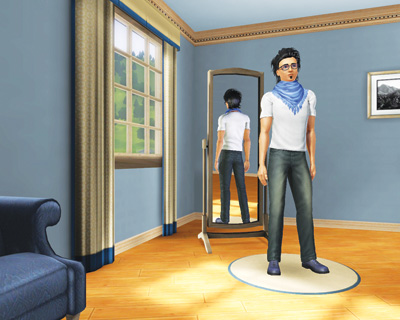
When you first enter the Create a Sim tool, you meet a pre-built Sim just waiting for you. You can choose this pre-set Sim and dig right into the personality or you can use this Sim like modeling clay.
You can also play around with the Sim Bin, a collection of pre-made Sims that can be called into the Create a Sim “dressing room” and changed to your liking. Perhaps you dig that Sim’s hairstyle but want a different color. Or you are struck by the face of a Sim but just aren’t sold on a certain aspect, like the chin.
Chances are, though, that you will want to make more than just one or two small tweaks. You will want to design a Sim from the toes up (or the hair down). From the first screen of the Create a Sim toolkit, you have five tabs of options and potential changes. Here are the five tabs and their functions:
Basics: This tab lets you name your Sim and change its gender, skin tone, and age.
Hair: Use this tab to change your Sim’s hairstyle, which includes adding headgear.
Looks: Go here to change the general appearance of your Sim’s head and face, including making adjustments to chin, nose, eyes, and cheeks.
Clothes: Select your Sim’s basic wardrobe from this tab, including everyday wear, athletic garb, and formal clothes.
Personality: This tab lets you assign specific traits to your Sim, choose personal favorites (food, music, and color), and select a Lifetime Wish.
Late Night adds many new options to these tabs. There are new clothes, new hairstyles, and much more, so be sure to experiment with the incredible new wardrobe choices. There are slinky cocktail dresses, new suits, sweet shoes, and more to make sure your Sim is appropriately dressed for a night out in Bridgeport.
Tattoos
The biggest Create a Sim addition is the arrival of tattoos.To add a tattoo to your Sim, choose the Looks tab. There is a new Tattoo button at the bottom of the menu, directly under Make-Up. When you select Tattoo, your Sim appears in front of the mirror with not much on.
This gives you a near-full view of their body so you can apply the tattoo exactly where you want without any obstructions. You may apply a tattoo to four places on your Sim: back, arm, chest, and ankle.
In each body location, you can choose from a few different spots. For example, on the back, you can pick the shoulders, small of the back, or right in the dead-center.
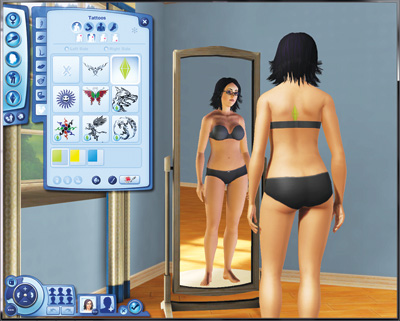
Below the body part selector, browse through the field of available tattoos. There are many choices, from tribal art to a Magic Gnome.
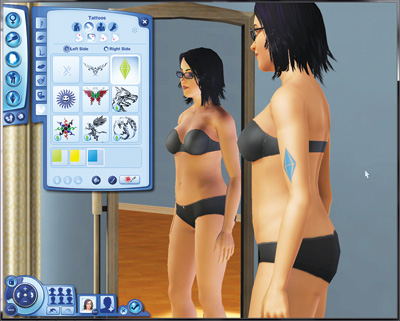
Once you select the tattoo, you can adjust its colors. Some tattoos have just a single color, while others have multiple fields to alter.
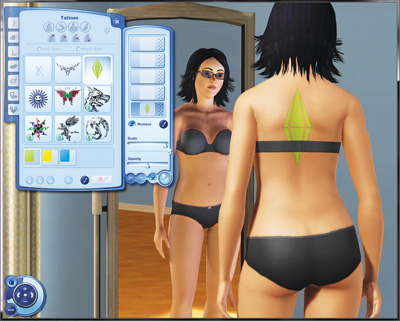
You can mix and match tattoos through the Advanced button. Here, you can also adjust the opacity of the tattoo and its size.
Astrological Signs
When crafting your Sim’s personality, you now can give them an astrological sign. You can select from the twelve familiar signs of the zodiac.
This is as close as you can get to setting an actual birthday for your Sim, as these signs are associated with time periods on this side of the screen, although Sims operate on a far different calendar than we do. The twelve zodiac signs are:
| Aries | Taurus |
| Gemini | Cancer |
| Leo | Virgo |
| Libra | Scorpio |
| Sagittarius | Capricorn |
| Aquarius | Pisces |
The zodiac signs do not have a direct effect on a Sim’s personality. There is no horoscope that uses signs to determine behavior. (That’s what your mouse is for.)
But it does give Sims an extra thing to talk about. Sims can use a new flirty What’s Your Sign social to hopefully learn a potential paramour’s astrological sign.
If the other Sim deigns to share, this information is stored on that Sim’s relationship entry in the Relationship tab of the Status Panel. If the other Sim has a compatible sign, you both receive a small relationship boost. These are the compatible signs:
Aries: Leo, Sagittarius, Gemini, and Aquarius
Taurus: Virgo, Capricorn, Cancer, and Pisces
Gemini: Libra, Aquarius, Aries, and Leo
Cancer: Scorpio, Pisces, Taurus, and Virgo
Leo: Aries, Sagittarius, Gemini, and Libra.
Virgo: Taurus, Capricorn, Cancer, and Scorpio
Libra: Gemini, Aquarius, Leo, and Sagittarius
Scorpio: Cancer, Pisces, Virgo, and Capricorn
Sagittarius: Leo, Aries, Libra, and Aquarius
Capricorn: Virgo, Taurus, Scorpio, and Pisces
Aquarius: Libra, Gemini, Sagittarius, and Aries
Pisces: Scorpio, Cancer, Capricorn, and Taurus