
The Sims 3 Showtime Guide Essentials New Objects
Stage Objects
If you’re new to Starlight Shores, chances are you don’t have a lot of Simoleons left after purchasing your home. That’s okay. As you get established in a new career, money will start trickling in. At that point, it’s time to go shopping!
In addition to a wide variety of stage objects, Showtime adds a number of new household objects including simple items like chairs, dressers, tables, and lamps. But there are also a number of unique fun-boosting items like the Buck & Chuck Bronco or PlasmaPunch Gyroscopic Conductor.
So no matter what you’re looking to add to your house or stage, the new objects in Showtime have you covered—and you can find them all in this chapter.
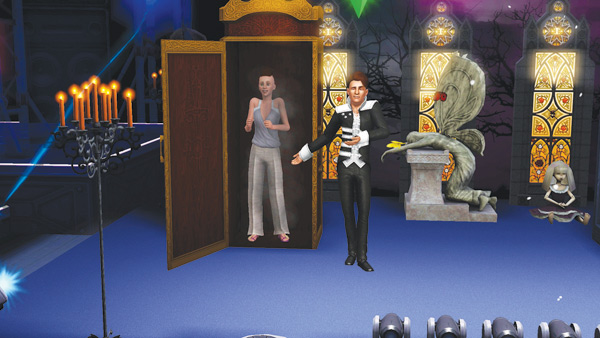
Always match stage props from the same theme to increase your performance score. The Gothic Blackfyre props are perfect for adding a sense of mystique to magic shows.
Showtime introduces several stage objects associated with the new performance careers. Performers can place these objects on stage prior to a gig, helping boost their performance score while creating a unified theme for their show. These objects are broken into two categories: Stage FX objects and Stage Props.
Stage FX objects are items like lights and FX machines that produce cool effects like sparks, fire, arcs of electricity, or even bubbles. Stage Props range from simple objects such as themed crates to elaborate backdrops.
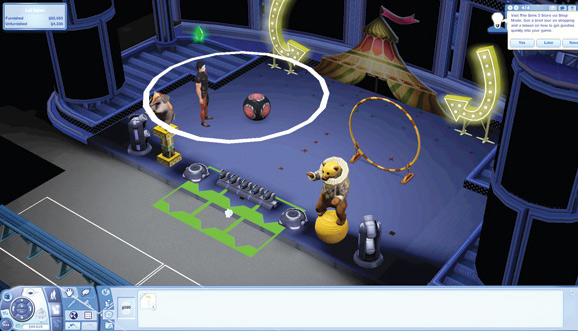
Space on stage is very limited. So place your objects carefully while paying attention to overall aesthetics and theme.
Designing a stage is similar to designing a room—you want to pack as much onto the stage as possible to wow your audience! However, you can only place these stage objects at predetermined spots on the front and back of the stage.
The more you can squeeze on stage, the better your performance score. But instead of simply going for quantity, pay close attention to the themes of your props. Your performance score will get a slight boost when you decorate the stage with props from the same theme.
For example, if you want to go for a Gothic theme, choose the Blackfyre prop family. Or perhaps you want a sci-fi theme? Then go for the futuristic Sim Tech props. Not only are the props a great way to boost your performance, they make great decorations/ furniture for your house too. For a complete list of all Stage FX objects and props, go to the Object Catalog section.