
Assassin's Creed: Brotherhood Guide Essentials Reference and Analysis
Moves
As we join the mid-life adventures of the Prophet Assassin and his brethren, it makes sense that almost all of Ezio's moves are unlocked and available from the outset. That said, Leonardo's Double Blade, Poison Darts and Climb Leap Glove must be sought before the full repertoire of techniques can be performed.
Moves Overview
Basic Moves
|
MOVE |
DETAILED DESCRIPTION |
|---|---|
|
Walk/Move Character |
Tilt Movement Stick in the required direction. |
|
Fast Walk |
Tilt Movement Stick in the required direction and hold Legs Button. |
|
Look/Control Camera |
Use Camera Stick to look around and control the camera. |
|
Run |
Tilt Movement Stick in the required direction and hold High Profile Button. |
|
Sprint/Free Run/Free Run Leap |
Tilt Movement Stick in the required direction, hold High Profile Button and Legs Button. |
|
Jump Up |
Hold High Profile Button, press Legs Button to crouch, release to jump. |
|
Breaking A Fall (Forward Roll) |
Hold Movement Stick forwards when falling to roll on touchdown. |
|
Target Lock |
Press Target Lock Button to lock on a target, press button again to exit Target Lock. |
|
Eagle Vision |
Hold Head Button to activate Eagle Vision, press button again to deactivate. |
|
Speak/Shop/Examine |
Press Head Button to speak, enter Shops or examine certain items. |
|
Interact |
Press Empty Hand Button to interact with Ezio's environment. |
|
Steal/Pickpocket |
Press or hold Legs Button (preferably while moving) to steal from citizens. |
|
Loot |
Hold Empty Hand Button until the Loot icon has filled. |
|
Pick Up/Drop Weapon |
To pick up a weapon, press Empty Hand Button while standing over it. |
|
Pick Up/Drop Dead Body |
To pick up a dead body, press Empty Hand Button while standing over it. |
|
Gentle Push |
Hold Empty Hand Button and use Movement Stick to push through crowds. |
|
Shove |
Hold Movement Stick and High Profile Button to run, and press or hold Empty Hand Button to shoulder barge. |
|
Throw Money |
Press Weapon Hand Button when money pouch is equipped. |
|
Quick Select |
Use Quick Select Buttons to instantly equip/use weapons and items. The four available slots are customizable. |
|
Equip Weapon |
Open radial menu by holding Weapon Select Button, select with Movement Stick, release Weapon Select Button to equip. |
|
Customize Quick Select menu |
Open radial menu by holding Weapon Select Button, select with Movement Stick, press corresponding direction on Quick Select Buttons to change item in slot. |
Climbing and Leaping
|
MOVE |
DETAILED DESCRIPTION |
|---|---|
|
Start Climbing |
Tilt Movement Stick in the required direction, hold High Profile Button and Legs Button. |
|
Climb |
Tilt Movement Stick in the required direction. |
|
Climb Faster |
Tilt Movement Stick in the required direction and hold High Profile Button. |
|
Climb Ladder/Switch Side |
Push Movement Stick up/down to climb, left/right to switch sides. |
|
Look Down from Platform |
Push Movement Stick towards edge when standing on platform. |
|
Ledge Drop |
Push Movement Stick towards platform edge, press Empty Hand Button to drop down. |
|
Drop/Let Go |
While hanging from a ledge, tap Empty Hand Button. |
|
Catch Back/Grasp |
While falling, grab onto a ledge or handhold by holding the Empty Hand Button. |
|
Wall Run |
Hold High Profile Button and Legs Button to free run up a wall. |
|
Beam Drop |
Tap Movement Stick and Empty Hand Button to drop down on chosen side. |
|
Beam Shimmy |
Hanging from beam or pole, use Movement Stick to shimmy along beam. |
|
Free Run Drop |
During Sprint or Free Run, release Legs Button before a platform edge to drop down instead of jumping. |
|
Climb Leap |
While climbing, press Movement Stick up and Legs Button. Requires Climb Leap Glove. |
|
Climb Leap Grab |
Once you've jumped during Climb Leap, hold Empty Hand Button to grab a ledge. |
|
Back Eject |
While climbing, release Movement Stick, hold High Profile Button, then press Legs Button to jump backwards. |
|
Side Eject |
While hanging or climbing, hold High Profile Button and push Movement Stick left/right and press Legs Button to jump sideways. |
|
Wall Eject Back/Wall Eject Side |
While running up a wall, push Movement Stick and press Legs Button to jump in the chosen direction. |
|
Advanced Catch Back |
After Side Eject, push Movement Stick toward wall and press Empty Hand Button to grab ledge or handhold. |
|
Swing on pole |
Hold High Profile Button and Legs Button, push Movement Stick forward to swing from pole to pole. |
|
Turn on pole |
While hanging from pole, pull Movement Stick down to turn around. |
|
Ride Lift |
On platform, press High Profile Button to ride Lift to rooftop. |
|
Leap of Faith |
Push Movement Stick toward landing spot, then press High Profile Button and Legs Button. |
Combat
|
MOVE |
DETAILED DESCRIPTION |
|---|---|
|
Enter/Exit Fight Mode |
Pressing Target Lock Button enters/exits Fight Mode. |
|
Step Dodge |
While in Fight Mode, tap Movement Stick to quickstep sideways, back or behind target. |
|
Switch target |
While locked on, tap Camera Stick to cycle through targets. |
|
Taunt |
Press Head Button while locked on to an enemy. |
|
Attack |
Press Weapon Hand Button to attack. |
|
Execution |
Attack with Weapon Hand Button, then again 1-4 times as the previous attack makes contact with the enemy. |
|
Special Attacks |
Hold, then release Weapon Hand Button. Depending on the weapon equipped, this leads to Sweep, Throw, Throw Sand or Flying Knives. |
|
Kick |
While locked on, press Legs Button. |
|
Deflect/Block |
Hold High Profile Button. |
|
Dodge |
Hold High Profile Button and press Legs Button just before an enemy attack lands. |
|
Counter Kill |
With weapon equipped, hold High Profile Button and press Weapon Hand Button just before enemy attack lands. |
|
Disarm |
When unarmed, hold High Profile Button and press Weapon Hand Button just before enemy attack lands. |
|
Grab Opponent |
While locked on and close, press Empty Hand Button. |
|
Grab: Push Opponent |
During Grab, push Movement Stick to move enemy or aim for throw. |
|
Grab: Throw Opponent |
During Grab, press Empty Hand Button. |
|
Grab: Headbutt |
During unarmed Grab, press Head Button to perform up to three attacks. |
|
Grab: Punch |
During unarmed Grab, press Weapon Hand Button to perform up to three attacks. |
|
Grab: Knee |
During unarmed Grab, press Legs Button to perform up to three attacks. |
|
Grab: Kill |
During Grab, with weapon equipped and Movement Stick neutral, press Weapon Hand Button. |
|
Counter Grab |
Press High Profile Button and Empty Hand Button to counter an enemy Grab, hold Buttons to throw enemy. If Grabbed, tap Buttons rapidly to escape. |
|
Finish Enemy On Ground |
With weapon equipped, press Weapon Hand Button over toppled enemy. |
|
Stomp Enemy On Ground |
Unarmed, repeatedly press Weapon Hand Button over toppled enemy. |
|
Escape Fight |
Hold Movement Stick, High Profile Button and Legs Button to break away. |
|
Standing Tackle |
Press High Profile Button and Empty Hand Button. |
|
Running Tackle |
During Free Run/Sprint, with enemy highlighted, press Empty Hand Button. |
|
Air Tackle |
From platform, wall or beam, press High Profile Button and Empty Hand Button. |
Ranged Attacks
|
MOVE |
DETAILED DESCRIPTION |
|---|---|
|
Throw Knives/Shoot Pistol/Shoot Crossbow |
Lock on enemy with Target Lock Button, press Weapon Hand Button to throw/shoot. |
|
Focus Pistol and Crossbow |
Hold Weapon Hand Button for accurate aim, release button to shoot. |
|
Cancel Shot |
Press Legs Button or Target Lock Button while aiming to cancel Pistol, Poison Dart or Throwing Knives attack. |
|
Pistol Execution |
Equipped with a Medium weapon, hold the Weapon Hand Button during an Execution after several successful moves to kill with the Pistol. |
|
Throw Long or Heavy weapon |
Hold Weapon Hand Button and release button when target is highlighted red. |
|
Flying Knives (Special Attack) |
Hold Weapon Hand Button until targets are highlighted red, use Movement Stick to adjust targets, release Weapon Hand Button to throw. |
|
Apple of Eden – Change Allegiance |
Hold Weapon Hand Button until the first wave reaches the enemy. |
|
Apple of Eden – Mind Kill |
Hold Weapon Hand Button until the second wave reaches the enemy. |
Assassinations*
|
MOVE |
DETAILED DESCRIPTION |
|---|---|
|
Stealth Assassination |
In Low Profile, press Weapon Hand Button up close. |
|
Assassinate From Hiding Spot |
With enemy locked or highlighted, press Weapon Hand Button. |
|
Assassinate From Ledge |
Hanging from a ledge below your target, press Weapon Hand Button. |
|
Air Assassination |
While climbing, or from ledge or beam above, highlight or lock on your target and press Weapon Hand Button. |
|
Double Blade Assassination |
In Low Profile, press Weapon Hand Button between two guards (requires Double Blade). Can be performed from a ledge or beam above as Double Air Assassination. |
|
Assassinate With Poison |
From close range in Low Profile, press Weapon Hand Button. |
|
Assassinate With Poison Dart |
Lock on enemy from range with Target Lock Button, press Weapon Hand Button (requires Poison Dart). For accurate aim, hold and release Weapon Hand Button to shoot. |
|
Knock Out |
Unarmed in Low Profile, press Weapon Hand Button for non-lethal stealth blow. |
* The Assassinations in this table require the Hidden Blade. Most can also be performed in a High Profile version by holding the High Profile Button, though this negates stealth and draws attention.
Swimming
|
MOVE |
DETAILED DESCRIPTION |
|---|---|
|
Swim |
Tilt Movement Stick in the required direction. |
|
Swim The Crawl |
Tilt Movement Stick in the required direction and hold High Profile Button. |
|
Fast Swim |
Tilt Movement Stick in the required direction and hold High Profile Button and Legs Button. |
|
Submerge |
Hold Legs Button to hide below the water's surface. Tilt Movement Stick to swim stealthily. |
|
Dive |
Hold Movement Stick, High Profile Button and Legs Button to jump, then press Legs Button again in mid-air to dive. |
|
Climb Out Of Water |
Press Movement Stick, High Profile Button and Legs Button to exit water. |
|
Throw Knives |
On surface, lock on enemy with Target Lock Button, press Weapon Hand Button. For accurate aim, hold and release Weapon Hand Button to shoot. |
|
Swim Assassination |
On surface of water below target, press Weapon Hand Button. |
Horse Riding and Combat
|
MOVE |
DETAILED DESCRIPTION |
|---|---|
|
Call |
Press Head Button to call a horse. |
|
Mount/Dismount/Hijack |
Press Empty Hand Button to mount, dismount or hijack a horse. |
|
Trot |
Tilt Movement Stick in the required direction. |
|
Walk |
Tilt Movement Stick in the required direction and hold Legs Button. |
|
Canter |
Tilt Movement Stick in the required direction and hold High Profile Button. |
|
Aerial Mount |
Tilt Movement Stick towards horse below, hold High Profile Button and tap Empty Hand Button to leap into saddle. |
|
Fight From Horseback |
With Medium or Ranged weapon drawn, press Weapon Hand Button to attack. |
|
Stand On Saddle |
Hold High Profile Button and press Legs Button to stand on saddle. |
|
Sit Back Down In Saddle |
Release High Profile Button after standing on saddle. |
|
Jump From Horse |
While standing in saddle, press Legs Button. |
|
Aerial Dismount |
While standing in saddle, hold High Profile plus Legs Buttons to grab an overhead beam. |
|
Tackle From Horse |
While cantering, press Empty Hand Button to leap from saddle and knock target to ground. |
|
Unseat Horseman |
With Medium weapon or larger drawn, lock on target and hold High Profile Button when Horseman charges past. |
|
Assassinate Horseman |
With Hidden Blade equipped, press Weapon Hand Button (from ground, ledge or horseback). |
Faction Controls
|
MOVE |
DETAILED DESCRIPTION |
|---|---|
|
Assassin Signal |
Press Call Assassins Button to call Assassin recruits. |
|
Call Arrow Storm |
With 3 Assassin Signals available, hold Call Assassins Button. |
|
Hire/Stop/Follow |
Press Head Button to command Faction members. |
|
Issue Faction Order |
Lock on enemy with Target Lock Button, press Head Button. |
|
Close Eyes |
Press Empty Hand Button over dead recruit. |
Vehicle Controls
|
MOVE |
DETAILED DESCRIPTION |
|---|---|
|
Gondola: Enter Rowing Position |
Press Empty Hand Button to mount gondola. |
|
Gondola: Exit Rowing Position |
Press Legs Button to exit gondola. |
|
Gondola/Tank: Steer |
Tilt Movement Stick left and right to steer. Pull back to reverse/back up. |
|
Gondola: Row |
Repeatedly press Empty Hand Button. |
|
Parachute: Deploy/Release |
Press Weapon Hand Button in mid-air. |
|
Carriage: Steer |
Tilt Movement Stick left and right. |
|
Cannon/War Machines: Use/Release |
Press Empty Hand Button. |
|
Cannon/War Machines: Aim |
Tilt Movement Stick in the required direction. |
|
Cannon/War Machines: Fire |
Press High Profile Button. |
|
Flying Machine: Steer |
Tilt Movement Stick left and right. |
|
Flying Machine: Gain Altitude/Nose Up |
Pull Movement Stick down. |
|
Flying Machine: Dive/Nose Down |
Push Movement Stick up. |
Camera & Interface
|
MOVE |
DETAILED DESCRIPTION |
|---|---|
|
Center Camera |
Press Center Camera Button to center the camera behind Ezio. |
|
First-Person View |
Press First-Person Button to toggle first-person view On/Off. Can be used with Eagle Vision. |
|
Look Down from Platform |
Push Movement Stick towards edge when standing on platform. |
|
Display Map/Database |
Press Map Button. |
|
Access Animus Desktop |
Press Pause Button. |
|
Synchronize Map from Viewpoint |
Press Head Button when perched on a View Point. |
|
Mark Treasure Chest, Borgia Flag or Feather on Map and Mini-Map |
Look at treasure in Eagle Vision (hold Head Button to toggle On/Off) to record location. |
Advanced Techniques
Surviving against tougher opponents requires skill and finesse. This section details some of the most noteworthy abilities listed on the previous pages, with a special emphasis on the new Executions and Execution Streaks – two moves that both newcomers and players of previous Assassin's Creed games will want to learn.
Executions
The Execution is a stunning combo of successive hits against a single opponent, the last of which delivers the finishing move or Execution itself (Fig. 1). Simply tap your Weapon Hand Button repeatedly to perform the move. The number of hits required to complete an Execution depends on the weapon used:
|
Weapon/Category |
Hits required |
|---|---|
|
Fists |
5 |
|
Hidden Blade |
4 |
|
Small weapons |
3 |
|
Medium weapons |
3 |
|
Heavy and Long weapons |
2 |
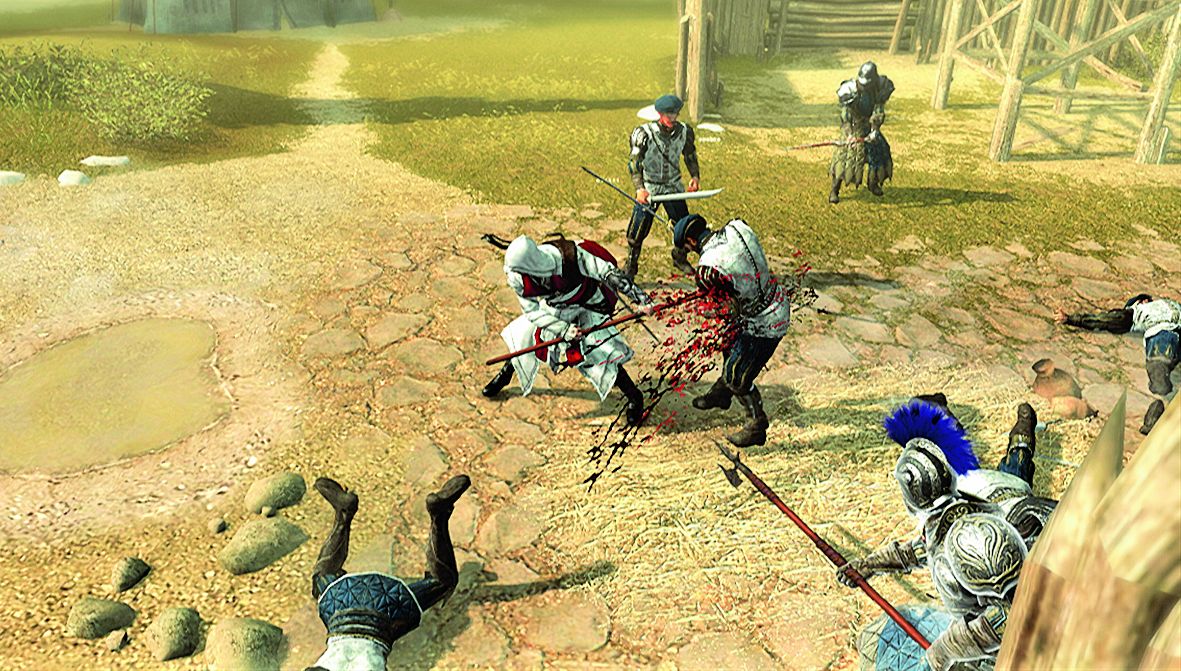
Figure 01
The principle behind the move is to speed up combat as an alternative to Counter Kills. Even if the enemy deflects some of the moves (you'll hear the clang of clashing weapons) the full sequence will stun them and break their defense. But stronger enemies are combo-resistant, deflecting your hits strongly enough to ruin the timing of the sequence: in this case you will need to weaken them with a Kick, or Dodge their attack and retaliate before they recover.
Execution Streaks
Ezio is in mid-Execution, finishing the first victim of the Streak.
Already, while the animation is still unfolding, the player lines up another victim by using the Movement Stick to highlight them, and presses the Weapon Hand Button to "stack" the next Execution in the Streak. When the first enemy falls, this will deliver an instant slaying move to the next. Repeat this procedure for as long as you can.
Streaks offer a superbly efficient new method for disposing instantly of the toughest archetypes. Having initiated a Streak with a lowly Militia, for instance, you may then prioritize a Brute or Seeker as the next target for an easy kill.
Every time you perform an Execution, you can then chain further Executions against nearby targets. Even when facing an entire horde of enemies, you need only dispatch the first by standard means; the rest will fall to a sequence of single-hit kills, if timed correctly.
First, you need to lose the habit of defensively holding the High Profile Button at all times; until an enemy attacks, you should only use the Movement Stick and the Weapon Hand Button. Secondly, you must always be thinking ahead to the next enemy, watching for incoming attacks and choosing the ideal target in reach. Thirdly, you really do need only one hit to kill: wildly mashing the buttons will swiftly reduce your chances of neat terminations.
There is some luck involved in keeping a chain going – the proximity of foes, irksome ranged attacks, resistant archetypes – but you can improve your odds by using larger weapons and moving around to keep more enemies within reach.
An Execution Streak can be initiated with many moves, not just a standard combo Execution. You can also try:
- Counter Kills.
- Killing Disarmed guards with their own weapons.
- A Long weapon's Sweep Special Attack.
When you've performed several successful kills in a Streak, ranged finishing moves become available. With a Medium weapon equipped, Ezio can perform a Pistol Execution. With a Small Weapon, Ezio will use a Throwing Knife to finish an enemy. Even a thrown Spear may conclude a streak.
Mid-Streak Interruptions
- So what happens if an enemy attacks while you're performing an Execution Streak? The flashing Health Meter warnings over the heads of the guards will alert you to an intended strike, so be ready to press your High Profile Button and Weapon Hand Button to perform a Counter Kill at the last moment. A successful Counter will become an additional Execution, seamlessly performed on your assailant and added to the running headcount while keeping the Streak alive. Once again, though, you should be immediately lowering your defense during the animation and identifying another victim. High-scoring Streaks will necessarily incorporate several perfectly timed Counter Kills.
- If you let enemies get too close to your back, they will attempt to break your Streak with a Grab. Though you can shake them off with the Counter Grab move, the likelihood is then increased that another enemy will rashly step in to attack and prevent you scoring an easy finish on their grounded colleague. So always be ready to Counter Kill after a Counter Grab as a fast way to start a new Streak.
- Agiles can cancel both Executions and Execution Streaks by dodging and thus breaking the sequence of moves. Either target them as the first victim or leave them alone until they attack, then Counter Kill to keep the Streak running.
Playing To Impress
Three cumulative tips will immediately enhance your endeavors to become a Master Assassin.
1. The automatic "on sight" targeting is very generous in many cases. You may sometimes prefer to use the Target Lock Button to fix on specific enemies, but as a rule, when you see that your target is highlighted, many contextual moves will be instantly available for spontaneous stunts.
2. Height extends this range even further, so if you can reach a higher vantage point from beams or rooftops then you can target an enemy by sight alone from a distance. Simply climbing up a wall and looking down into the street is sufficient, especially if you are prepared to act in High Profile.
3. You can transition from climbing and free running into other moves with great fluidity. Combine this with the height and sight advantages and your playing time will be enriched with superheroic feats of prowess.
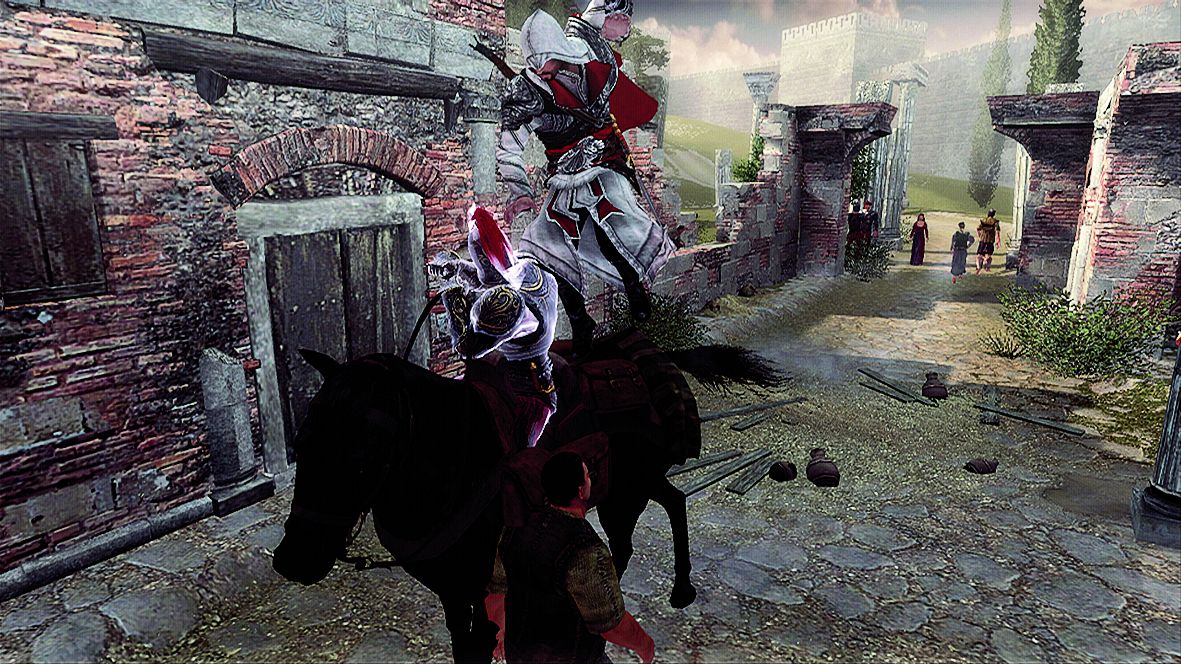
Figure 02
You can test this for yourself right away. First, hijack a horse from a rider in the street, then climb a building and attempt an automatic "on sight" High Profile hijack from above (Fig. 2). Once you've seen the difference, you won't go back...
Crossbow Counters
Aficionados of Hidden Blade combat will be interested in the peculiar potential of the Crossbow. Already an effective ranged weapon against heavier archetypes, it is also deadly when wielded defensively as a melee weapon. Counter timings are similarly tight to the Hidden Blade and equally fatal against most enemies (Fig. 3), and the reach of the weapon between attacks can be directed against Gunmen and other ranged aggressors in mixed groups.
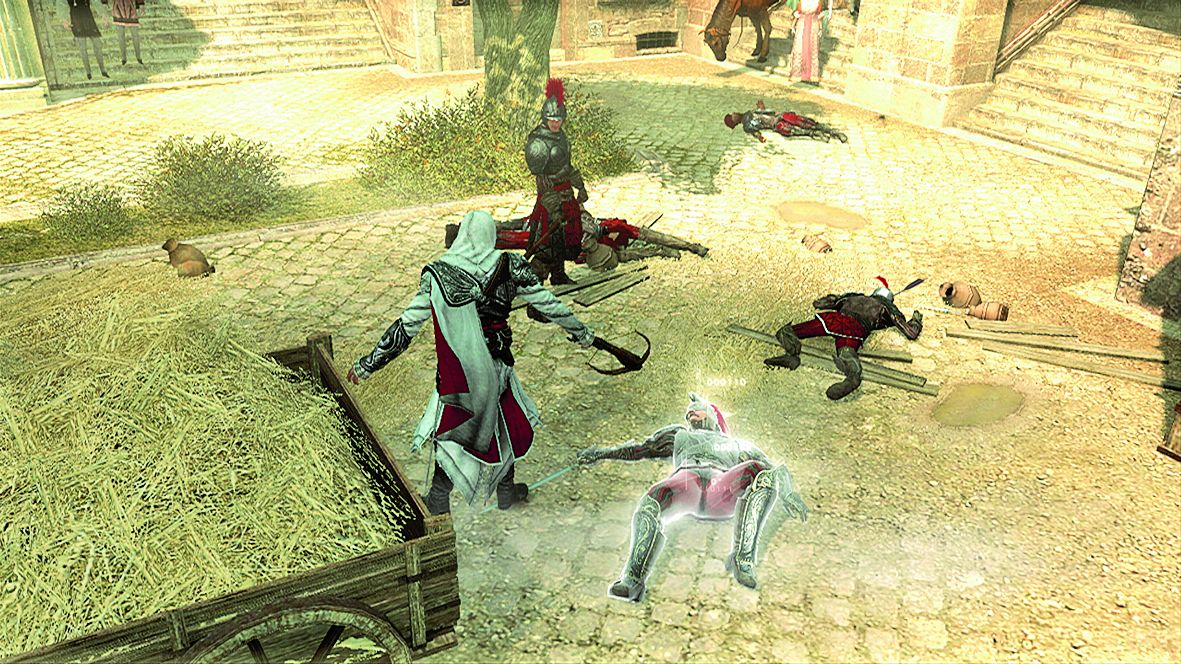
Figure 03