
Little Big Planet: Karting Guide Essentials Create Mode
Creating a Level
Hope you have wrapped your head around every little tool the Create Mode Popit has to offer, because its time to put all of that know how into practice and build a full sized level.
Sacka Sacka Island
The Creator Curator, and chief of the Sacka Sacka Islands, Acka Archie, has a problem. The tallest peak on the north end of his island has ruptured, revealing the mountain was actually a giant volcano! The Volcano God has burst forth from the giant crater sending down flaming fireballs into the beach village below. Unfortunately, the island is only a memory now, one that exists in his mind. Help him build his island and save his people from fiery destruction! To get started, pick an empty spot on your Moon to help him craft the island from scratch!
Plan of Attack

Before you start building, planning things out can help organize all those ideas. Don’t think about the mechanics while creating, just put it all out there and worry about the details later. The fun of building a track is experimenting with all the tools and features in the Create Popit. As he created his homeland, Acka Archie’s drew all his ideas in a notebook, without a care in the world for mechanics (or his terrible artwork).

Although Sacka Sacka Island looks and sounds complex, deep down, most racecourses are simple oval shaped tracks. It is the smaller elements that Curator Creators scatter around each area that give the level their flavor. The chief has his own recipe for track building and he’s about to guide you through this process. Whenever you are ready, start where every Curator Curator begins, the Popit.
The Fall and Rise of Sacka Sacka
Plan of Attack
Acka Archie’s memory is beginning to resurface, starting with the shape and geography of his island. Select the Terrain Edit tool from the Popit to remold Sacka Sacka Island’s topography. Before any land rises, every island is surrounded by water and Sacka Sacka is no exception. To create a deep ocean, open up the Global Settings option in the Popit, and select Water Level. Use the tool to drop the water level till there’s nothing there. Don’t worry later on there is a good explanation for this.

Now, select the Terrain Deform tool to use the Square brush. Zoom out as far back as possible and tilt the camera for an overhead view. Increase the brush’s scale until the circular green cursor is just inside the edge of the screen. Press
 to invert the brush and lower the land until you reach the bottom. Move the brush around the entire space to lower it all.
Mount Up
With the whole space as deep as possible, you are ready to begin sculpting the island. First up, is a trio of connected mountains that encompasses more than half the island. Switch to the Terrain Deform tool’s Peak brush to begin raising the tall mountain peaks in the northern part of Sacka Sacka Island. Move the tool to the middle of the northern area of the space.
Raise the main peak as high as it can go. If you have gone too high, the mountain’s peak flattens at the level’s ceiling. Don’t worry, that nice flat top is going to help create one of the biggest volcanoes ever seen. Decrease the brush scale so that it covers the whole flat top and invert the tool. Drop the land in the center of the mountain to create the volcano’s crater.
Tools of the Trade
| Key Tools |
|---|
| Terrain Deform |
| Terrain Sculpt |
| Terrain Cleanup |
The volcano is ready to erupt, but there are two more mountains to craft. Be sure to build them both slightly shorter and smaller than the middle peak. Don’t let these mountains have flat tops. If they do, press
 to invert the tool and decrease the peak until it’s nice and pointy again.

Once the mountain trio is in place, switch to the Terrain Sculpt tool to connect each mountain with smaller peaks. Keep the range around the three mountains at the same elevation[md]they are going to hold most of the roads in the race. The Noisy Sculpt, or Bumpy Sculpt brushes work really well to create nice ridges along the sides of this mountain range. Now that the mountains are up, it is time to hit the beach.
Sand and Surf

Move south, till you reach the foot of the mountains. Here is where a long stretch of sand and surf goes. Remember when you lowered all the land mass earlier and set the water level to its lowest setting? Go back to the Water Level tool and bring the water level all the way up. As the water fills up, the foot of the mountains creates a natural beach area to begin from.
It’s a start, but the beach should be longer and wider. Select the Terrain Sculpt tool’s Sphere Scuplt brush and adjust its scale and height so that it matches the natural beach’s elevation. Paint a beach along the entire south edge of the island. With the island’s terrain set, the roads are ready to be paved.
The Main Course
Fly over the eastern mountain and select Create Track from the Track & Arena Edit option to start laying down Sacka Sacka Island’s roads. Move the start line over the south side of the mountain and rotate the line until it points north, so the back of the line faces away from the beach. Place the start line down to begin paving the track.
Tools of the Trade
| Key Tools |
|---|
| Place Start |
| Paint Roller |
| Terrain Follow indicator |
| Reroll |
| Vertical Shift |
| Horizontal Shift |
| Terrain Sculpt |
| Branches |
| Breadcrumbs |
| Mod Track |

It’s All Downhill From Here
As you leave the crater, have the road begin its descent downhill. Adjust the Terrain Follow meter just below the centerline and turn the roller toward the last mountain peak directly west of the crater. Steer the roller to the far end of the mountain, and circle around this peak before heading down to the beach.
The race really picks up in intensity traveling between the west mountain and the beach road below. road between A Mountain pass gets dangerous real quick, heading downhill. Most of the craziest downhill mountain passes have crazy hairpin turns and this section is no slouch in that department. As you carve a path downhill, create three hairpin turns. The final turn should spiral down and form a gentle curve to the beach.

Beach Front Property
After a harrowing downhill, the beach road returns players to the ground level. The flat sandy road covers the entire south side of the island and is sandwiched between the mountain range and the ocean. Coming off the mountain, position the road at the base of the mountain and continue driving straight, until you reach the east end of the island. Press and hold
 near the end of the island to automatically complete the circuit.
Special Features
While the track is set and the Terrain is how Acka remembers it, the special flourishes that help bring out the best in a big level like this one. Special features and objectives can spice up any normal race. It take lots of ingenuity and patience to get any special logic working, but once the wheels are in motion, your level has a unique experience that many players can enjoy.
Tools of the Trade
| Key Tools | Materials |
|---|---|
| Emitter | Terrain Material 8 |
| Effects Emitter | Lavish Lava |
| Danger Tweaker | Flame |
| Circle Shape | |
| Square Shape |
While the crater is in place, the large peak doesn’t scream active volcano, instead it speaks casually of being a mountain with a large crater. To give the crater that burnt, charcoal look, select the Terrain Material paintbrush from Terrain Edit and choose Terrain Material 8. Paint the black material around the inside of the crater transforming the plain rock into pure obsidian.

Now that the crater looks extra crispy, add magma, more commonly known in Sacka Sacka as orange death liquid. Select the Lavish Lava Material from the Goodies Bag, and choose the Circle Shape. Try not to stare at the hypnotizing lava, and adjust the thickness so the circle is flat. Place the flattened Lava circle inside the crater and scale it until it covers the hole completely. The volcano appears to be flowing a constant stream of the molten rock.

Put the finishing touches on the volcano with some cool visual effects. Open the Tools Bag and attach some Emitters and the Effects Emitters gadgets to the Lava plate. Move the Popit Cursor over the Effects Emitter and open its tweak menu. Change the effect to smoke, and adjust the speed, and angle to your liking. Increase the Effects Emitter’s scale to adjust the size of the smoke. Once satisfied, press the directional button [up] to toggle Live Mode on and view the large puff of smoke emanating from the crater.

The Volcano is smoking hot, but there’s still one more element that would complete the ensemble—Fireballs! First, select the Flame Material from the Goodie Bag and choose a Circle Shape. Make another shape with the same material, but use a square. Combine the two shapes to create a spiky fireball. To add fire to the ball, grab a Danger Tweaker from the Tools Bag and attach it to the ball. Open the Danger Tweaker’s tweak menu, and set the effect to fire, and set the effect scale to 2.

Set an Emitter gadget on the lava plate and open its tweak menu. Set the fireball as the object to emit. Adjust the speed and angle of the fireball so it lands on the beach. Finally set the Emitter to fire off two or three fireballs at different intervals.
Beach Commodities
A clear sandy unpopulated beach sounds great when on a romantic getaway, but this is a race against the Volcano God, that beach should reflect the situation at hand! A small jungle area and the village cover most of the beach road. As the road widens, decorate the beach with a mixture of different trees for the jungle area right in front of the crater.
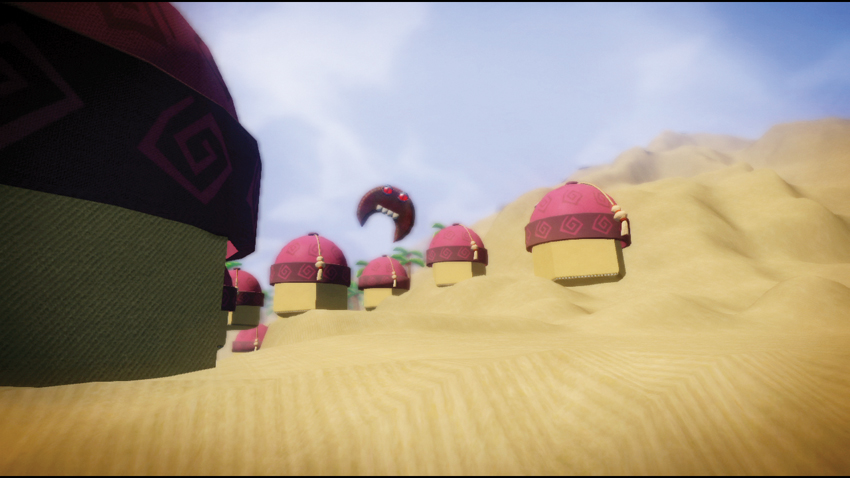
The rest of the beach is reserved for Sacka Sacka Village. First create some huts for the village. Acka Archie commissioned a Hexagon shape and glued an Oriental Hat as the roof. Place several huts all over the beach as obstacles.

Tools of the Trade
| Key Tools | Materials |
|---|---|
| Erase Road | Hexagon Shape |
| Launch Pad | Beige Cotton |
| Oriental Hat |

The Curse of the Volcano God
Acka Archie remembers what made him forget about his precious island. The Volcano God, Volcanu, appeared before the island, floating high above the crater. Haunting the villagers and ready to blow its lid.
Tools of the Trade
| Key Tools | Materials |
|---|---|
| Erase Road | Hexagon Shape |
| Launch Pad | Beige Cotton |
| Oriental Hat |

Volcanus Cometh
Have the Volcano God appear, so that you may defeat him in an honorable race level. Pick any scary looking Material and choose the Moon Shape. Apply some thickness to the body. Rotate the moon so the tips of the crescent point down to form its legs. Cap off the Volcano God’s return with a pair of Evil Eyes, and some Lower Teeth.
Volcanus has to threaten the people of the island, and he can’t do that sitting still. Use the Draw Path tool to create a path that the Volcano God follows. Draw it high above the track, but within range of Red Seeker Missiles. To have the volcano deity ride along the path, select the Path Follower Motor and attach it to a point along the path. Next, attach the Path Follower Motor’s connector to Voncanu to give him a set route over the crater. Adjust the settings to make his journey a little slower, or speed him up to make it impossible to catch him.
Violent Volcano

Now that the Volcano God is here, Acka Archie wants to figure out how to defeat the beast for good. There are several different ways to integrate the Volcano God into the race itself. The first step in establishing any boss character is to let player shoot at him. To make the volcanic creature a targetable object, attach a Weapon Target tweaker to the character. This allows Red Seeker Missiles to lock on and strike the deity.
Having the tweaker attached transforms Volcanu into a target, but to what end? To measure the amount of successful attacks against him, attach a Weapon Blast Sensor to him. With these in place, you can set up an objective, where 12 Weaponator blasts can defeat the Volcano God and allow the player to escape the island. To set the goal, open the sensor’s tweak menu and change the number of hits to 12.

With a Volcano God moving through only a section of the track, attach the Transmitter Logic to Volcanu’s Microchip and connect the Weapon Blast Sensor’s output to the Transimtter’s input. Once he has been hit 12 times the Transmitter sends a signal to the transmitter to inform them when he is defeated. Set the Transmitter to emit a “blue” colored signal, and set any Reciever Logic to that same color frequency. With a Transmitter/Weapon Blast sensor attached to Volcanus, all you need to do to activate anything is attach a Receiver logic to any input you want activated upon his defeat.
Real Hush Hush

Acka Archie suggests that an alternate goal accompanied with piles of points can entice players to defeat the floating meanace. Maintaining the utmost secrecy, Acka implores you to set up a hidden path, so Volcanu won’t get wind of the plan. Use the Terrain Sculpt tool to raise two small oval islands in the ocean to branch off the main beach road, creating an alternate bonus path. Raise the little islands just below the sea level, so they are unseen.
Select the Breadcrumb Track Edit tool and draw a breadcrumb path from the start of the beach road, through these two islands. Add a Launch Pad at the edge of each island to allow players to hop between the islands, and onward to victory.
An alternate end game has to have an alternate goal. Prop up a Checkpoint to the island at the end of the alternate path to be the new and different finish line. To transform the Checkpoint to an endpoint, attach the Checkpoint’s output to a Game Ender Tweaker. To really wow the crowd, add another Receiver to this set of logic, connecting its output to the Checkpoint’s input. Now the “end” point won’t appear until Volcanus is defeated!

Once Volcanus is defeated, the plan is to have the water level fall, revealing the hidden path. At the same time, pair of trees blocks the main road to ferry players to the alternate route.


To change the water level at the right moment, grab a Receiver and attach it to an object near the ocean. Take the Reciever’s output connection and attach it to the Water Level Tweaker. Open the Water Level Tweaker’s tweak menu and set the water level low enough for the islands to appear.
The last set of logic has to direct the players to the new end goal. To detour players to the new Checkpoint, create some special Palm Trees in the jungle area. When they are finished, they should fall onto the track to block the main path.

Grab the Palm Tree 2 object used for the jungle area. There is going to be a lot of connections, so attach a Microchip to its trunk. Attach two more Receivers to the Circuit Board and a Danger Tweaker. Connect one of the Receiver’s outputs to the Danger Tweaker’s input. Trees aren’t enough to block some players. Go to the Danger Tweaker’s tweak menu and add fire and lots of it, to deter them away. To have the tress fall down timber style, attach a hinge to the tree, and angle it at a ninety-degree angle. Finally, attach the other Reciever output to the hinge input. Clone the flaming tree to double the barrier.
Play through the level with some friends and save the Sacka Sacka Islands from Volcanic destruction.
