
How To Find Vending Machine Codes and Get Multi-Pass Access Card in Rivage
Finding some of these ID codes can be quite tricky.


After getting the contactless update to your K9 Level 2 Access Card, you can finally enter Amaan’s Bedroom and start working your way to acquiring the Multi-Pass Access Card from the Pod Bay’s vending machine.
How to get the Multi-Pass Access Card
Amaan’s Bedroom is, as all the notes from the crew members would suggest, a bit of a mess. You’ll find a few notes scattered across the floor which will be important in a while, but your first goal should be to find and enter the password to Amaan’s computer.
What is Amaan’s Favorite Soda
This shouldn’t be your first rodeo unlocking a computer in Rivage, so start by clicking on forgot password to get the hint that the password is Amaan’s favourite soda. One of the notes in the room mentions Amaan’s love for a certain soda, and if you check out his locker in the Pod Bay, you’ll find that a few empty cans of this soda are littered across the Connector room through the Lobby.
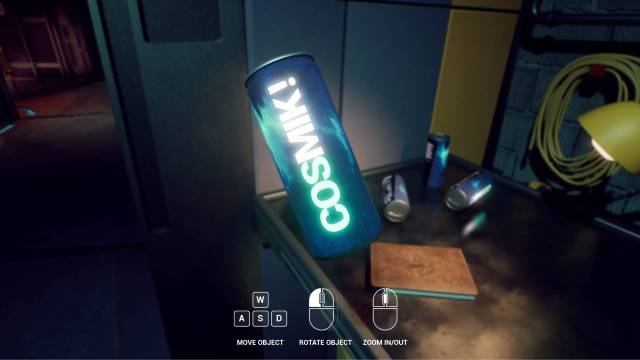
Now simply go back to Amaan’s computer and enter the password “COSMIK!”. Don’t forget the exclamation mark at the end, and you’ll get access to his computer.
How To Upgrade K9 Flashlight
After browsing Amaan’s texts and emails, you’ll find an icon on his taskbar that you haven’t seen before: the terminal. Here, you’ll enter commands that will ultimately upgrade your K9 flashlight to include a hyperviolet mode.
This is where all those notes come into play. Three notes in total are relevant to the terminal, all of which together instruct you to enter these exact commands in order:
- First command: LS
- Second command: build hyperviolet.qb
- Third command: copy flashlight.exe miranda.v
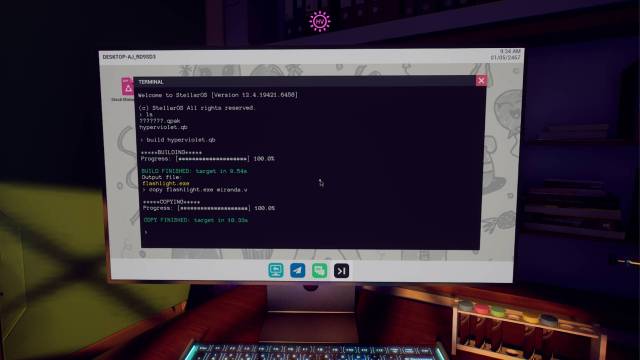
With this, your K9 flashlight will automatically update so that the second time you press it after turning it on, it will instead beam a hyperviolet light which illuminates prints and invisible texts all across the ship. This flashlight upgrade is key to getting the Multi-Pass Access Card.
How to Find Vending Machine Item Codes
The Multi-Pass Access Card is stuck inside the vending machine in the Pod Bay, which is unfortunately out of credits. In order to add credits to it, you need to first unlock the pattern touchpad to its right. You can learn this pattern by pointing your new hyperviolet flashlight at the touchscreen.
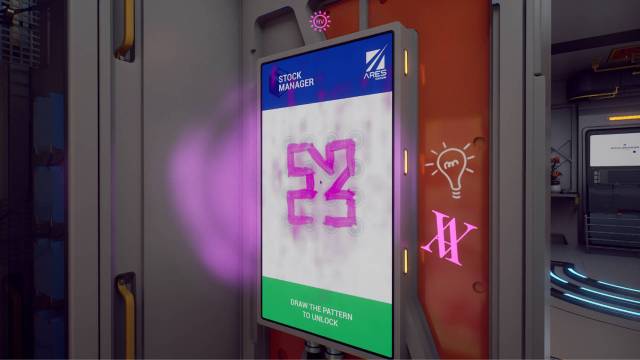
That’s only step one of getting the Multi-Pass, because now you need to press “Manage Stock” and enter specific item codes which correspond to a certain soda, chocolate bar, and bag of chips. Here’s how you can find each of these codes:
- Soda Code (CP379087): This is the simplest of the three, requiring you to go back to the empty can of COSMIK! which you found in the Connector and check the back for the code.
- Chocolate Bar Code (CP208674): This one’s pretty tricky if you don’t know where to start. It requires you to go to the vending machine in the kitchen and enter the code for bars until you find the one that has the SKU corresponding to the one listed on the touchscreen. To figure out it’s the green bar, you need to unlock the safe in Amaan’s room using his birthday.
- Bag of Chips Code (CP687575): You get the hint for this code from one of Amaan’s audio logs in his room that mentions an invisible bag of chips he stuck to the wall. Sure enough, if you point your hyperviolet flashlight at the wall opposite his computer, you’ll find an encircled bag of chips with its product code clearly mentioned.
Once you’ve successfully entered all three product codes, simply go back to the credit menu and click the + signs next to credit on each of the vending machines. Finally, enter “024” on the vending machine next to you and collect your brand new Multi-Pass Access Card.
If you’d like more help, check out our full Rivage walkthrough.


