
How to Fix the Warhammer 40K Space Marine 2 Error Code 14
Code 14, no more!


Warhammer 40K: Space Marine 2 is one of the biggest releases of 2024, with a peak player count of nearly 150K players during its early access period. It’s a demanding title, especially in terms of the CPU, but it runs pretty well on a variety of systems, especially if you turn on the upscaling technology supported by the title. However, if you keep running into a “connection lost” prompt with Error Code 14 while trying to play Warhammer 40K Space Marine 2, here is how you can fix that.
Fixing the Warhammer 40K Space Marine 2 Error Code 14
To fix the error code 14 in Warhammer 40K Space Marine 2, set your Window’s time zone and time to automatic in the settings.
For some reason, the game requires the time zone, as well as the date to be set correctly in Windows. While this is the case for most users, if your Windows settings aren’t set to handle this automatically, you’ll have to enable the option, and here is how.
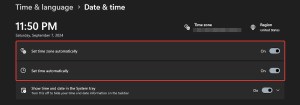
- In Windows Search, type in Date and Time, and open the result
- Here, in the Date & Time tab, make sure the first two settings are toggled on
- Set time zone automatically
- Set time automatically
After that, the error will go away, and you’ll be able to enjoy multiplayer without a problem. Multiple users have confirmed on Steam forums that this solution worked for them, and the game’s online features are likely tied to the correct date and time of the system.
If you’re just starting out as Titus, make sure to check out our best beginner tips for the early sections of Space Marine 2. With the release’s success, we hope that Focus Entertainment and Saber Interactive continue to support the title for the next months and iron out some of the issues currently in-game.


