
Assassin’s Creed Black Flag Resynced Save File Location on PC
X marks the spot.

Assassin’s Creed Black Flag Resynced is out now on PC and consoles, and it’s a faithful remake of the classic 2013 open-world title. The PC version is available on multiple storefronts, including Steam and Ubisoft Connect. If you’re looking for your local progress data, here is the save file location.
Assassin’s Creed Black Flag Resynced Save File Location
| Client | Save File Location |
|---|---|
| Steam | C:\Program Files (x86)\Ubisoft\Ubisoft Game Launcher\savegames\<UbisoftConnectID>\66088 |
| Ubisoft Connect | C:\Program Files (x86)\Ubisoft\Ubisoft Game Launcher\savegames\<UbisoftConnectID>\65043 |
| Epic Games Launcher | C:\Program Files (x86)\Ubisoft\Ubisoft Game Launcher\savegames\<UbisoftConnectID>\65043 |
| Mac | ~/Library/Containers/Assassin’s Creed Black Flag Resynced/Data/Library/Autosave Information/saves |
As with the last few major Ubisoft releases, you can find the save files for Assassin’s Creed Black Flag Resynced in the Ubisoft Game Launcher folder on Windows, regardless of your client. However, within the savegames folder, you’ll see a folder with your unique Ubisoft ID, a string of numbers and letters, followed by multiple folders with numeric IDs.
In the case of Assassin’s Creed Black Flag Resynced, the Steam version’s ID is 66088, while the folder for Ubisoft Connect and Epic Games Launcher is 65043.
Inside the folder, you’ll find a bunch of files with the save extension for autosaves, manual saves, and your options. To keep things simple, I recommend backing up the folder with the unique ID for Assassin’s Creed Black Flag Resynced, then placing it in a folder labeled accordingly for future use.
Additionally, if you’re looking for the configuration file, that’s in a different location altogether.
C:\Users\[YOUR USERNAME]\Documents\My Games\Assassin's Creed Black Flag Resynced
The file is called ACBlackFlag.ini, and it’s not hard to miss. There’s also a bin file containing your benchmark results, which developers may require if you wish to report a bug.
Does Assassin’s Creed Black Flag Resynced Have Multiple Save Slots?
Yes, you can create multiple manual save slots for Assassin’s Creed Black Flag Resynced. There are 20 manual save slots and 5 autosave slots. Additionally, your latest saved game will be automatically uploaded to the cloud.
Does Assassin’s Creed Black Flag Resynced have Cloud Saves?
Yes, technically Assassin’s Creed Black Flag Resynced does have Cloud Saves, but those are available through the Ubisoft Connect Launcher service and aren’t client-specific. Since Ubisoft Launcher is required to play the title, it will handle cloud saves regardless of what client you’re playing it on. This means it doesn’t support Steam Cloud and its cloud servers.
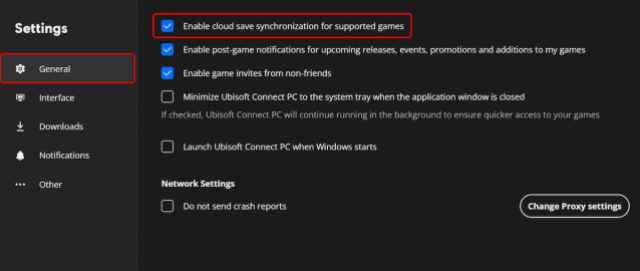
To ensure cloud saves are enabled in Ubisoft Connect, follow the steps below.
- In Ubisoft Connect, click on your profile and select Settings.
- Here, in the General tab, make sure “Enable cloud save synchronization for supported games” is checked. It’s the first option.
While it’s neat that cloud saves exist, moving files around can be a bit annoying when you’re playing on a device like the Steam Deck.
Does Assassin’s Creed Black Flag Resynced Support Cross-Progression?
Yes, Assassin’s Creed Black Flag Resynced supports automatic cross-progression between all platforms. This is possible thanks to the Ubisoft account.
Overall, like the last few major Ubisoft releases, Assassin’s Creed Black Flag Resynced’s PC port is pretty good, with plenty of settings to tweak and a largely scalable experience that many people can enjoy.


