
How To Improve Heroes of Hammerwatch 2 Steam Deck Performance
Blast giant beetles on the go!


Heroes of Hammerwatch 2 is a surprise hit of early 2025 on Steam and offers an addictive rogue-lite experience with plenty of content to dive into and meaningful progression to make. It’s also very light on the hardware and can practically run on anything.
Ideally, that would mean a flawless experience on the Steam Deck, but unfortunately, players have reported frame rate drops and slow loading times. Thankfully, this can be fixed with a small tweak, and here is how you can drastically improve the Heroes of Hammerwatch 2 performance on the Steam Deck.
Improve Heroes of Hammerwatch 2 Steam Deck Performance
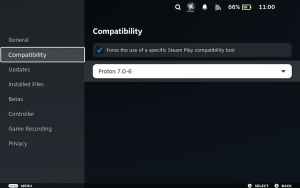
Despite the lower requirements, Heroes of Hammerwatch 2 isn’t a great experience on the Steam Deck. This is because of the default proton version selected for the title. Switching that to a different version completely fixes the problem and here is how you can do that.
- In your Steam library, select Heroes of Hammerwatch 2
- On its dedicated page, click on the cogwheel on the right
- In the pop-up window, select Properties
- Now, select the Compatability tab from the left
- From the drop-down, select “Proton 7.0-6” instead of Proton Experimental

After you’re done, start Heroes of Hammerwatch 2 and it should work as intended on the Steam Deck hardware. You might get some minor stuttering here and there, but for the most part, it’s a locked 60 FPS experience and you can expect to play for multiple hours on a full charge.
You can further increase the battery time by lowering the TDP or reducing the refresh rate externally, but it’s not necessary. Similarly, on the Steam Deck OLED version, you can enjoy an even higher frame rate thanks to its 90Hz display. It scales nicely to the Steam Deck resolution as well.
We’re hopeful that whatever this Proton conflict is will be resolved in a future Proton version, or through a game update. The Steam Deck release also didn’t have proper Steam Cloud support initially, but the developers have introduced a profiles section to make the saves transfer easier.


