
The Precinct Save File Location on PC
Cordell, investigate!


The Precinct is a fun spiritual successor to the classic GTA titles with a law enforcement twist. It’s out now on PC and consoles, and the PC port is decent, for the most part. Some technical and performance issues aside, it’s arguably the best way to enjoy it.
It’s developed on Unity, and the Steam release has a decent set of features as well, including cloud saves. However, if you want to access your local profile data, here is the save file location for The Precinct.
The Precinct Save File Location
| Client | Save File Location |
|---|---|
| Steam | C:\Users\[Windows Username]\AppData\LocalLow\Fallen Tree Games Ltd\The Precinct\SaveGame_Steam |
The game seems to save progress in two locations. You can find the saves in the SaveGame_Steam folder, and a separate The Precinct folder within the main “The Precinct” folder. It’s a bit confusing, so I recommend just copying the entire Fallen Tree Games Ltd folder, or the very first Precinct folder within it, for future use.
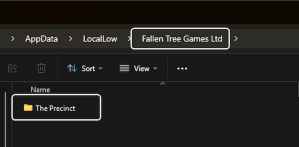
You can reach the same location by entering the following address in Windows Run or Windows Explorer.
%USERPROFILE%/AppData/LocalLow/Fallen Tree Games Ltd/The Precinct/SaveGame_Steam
The Precinct Total Save Slots
If you want to start multiple campaigns, then you’re out of luck, because there is only one campaign slot available in The Precinct.
Thankfully, you can back up your campaign save files, as I mentioned above, and start a new one if you want, without deleting your progress. I was hoping to see more save slots, but we might have to wait for a potential patch that adds them.
It does seem that the developers want you to keep playing on the same file because, after you’re done with the campaign, the open-world sandbox is available for regular shifts.
The Precinct Steam Features
The Precinct comes with support for the following Steam features:
- Steam Cloud: This automatically backs up your saves and downloads them on any other device you’re playing The Precinct on.
- Family Share: If you have purchased the title on Steam, members of your Steam family can now access it.
- Steam Trading Cards: As you play more, you’ll start receiving trading cards on Steam, which can be sold on the Steam market or converted into badges.
- Achievements: There are over 39 achievements to unlock in The Precinct.
- Steam Point Shop: You can buy different backgrounds and emoticons on the Steam Point Shop for The Precinct. Here is a link to the specific shop entry.
When you’re done looking for your save files, here is how you can unlock every gun in the game and how you can get into any vehicle.


