
How To Manually Update to Zenless Zone Zero Version 1.5
Astra Yao and Evelyn are here!


The latest update for Zenless Zone Zero is now available across all platforms including PC. The banner features two new S-Rank agents including Astra Yao and Evelyn. Despite miHoYo’s attempts to improve the update process thanks to the unified launcher, HoyoPlay, things still aren’t perfect. To minimize interaction with the launcher, here’s how you can manually update to Zenless Zone Zero version 1.5 on PC.
Manually Update to Zenless Zone Zero Version 1.5
Just like Genshin Impact, and Honkai Star Rail, the links provided in this guide are the same ones the launcher uses to communicate with miHoYo servers.
- We highly recommend using a third-party download manager for the files.
- This guide assumes that Zenless Zone Zero is currently at version 1.4 on your PC.
- Download one file at a time to avoid corruption of the zip files.
Zenless Zone Zero 1.5 Patch Files
You need the Patch file, and at least one audio file pack. Make sure to download the audio pack that matches your default Windows language.
| Patch Link | Size |
|---|---|
| Zenless Zone Zero 1.4 to 1.5 | 6.4 GB |
| Chinese Audio Pack | 147 MB |
| English Audio Pack | 85 MB |
| Japanese Audio Pack | 82 MB |
| Korean Audio Pack | 78 MB |
Step 1: Initiate the Update in the Launcher and Pause It
Run the launcher and it will automatically update to the latest version. After that, start the pre-install update or just update (depending on when you’re following this guide).

- After a few seconds (5-10) pause the update by clicking the icon.

Step 2: Exit the Launcher
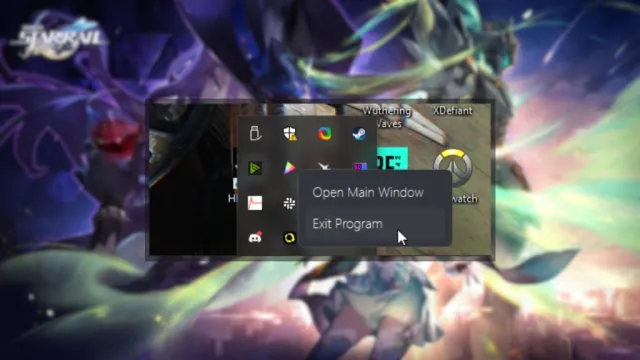
- After pausing the update, close the launcher. Make sure it isn’t running in the background.
- You can check this through the Task Manager in Windows, or the taskbar.
Step 3: Delete the Temporary Download Files
Make your way to the installation location of Zenless Zone Zero. The default location is as follows:
C:\Program Files\HoYoPlay\games\ZenlessZoneZeroGame
- In the ZenlessZoneZeroGame folder, delete the temporary zip files.
- These files will have the “ZIP_TMP” extension.
- To make things easier you can sort the folder by “date modified” to easily identify the new ones.

Step 4: Move Zip Files to Games Folder
After you’ve deleted the temporary files, copy the zip files (the patch and the audio file) and paste those into the installation location. The default is the following:
C:\Program Files\HoYoPlay\games\ZenlessZoneZeroGame
Step 5: Resume the Launcher Download
With the temporary files deleted, and the patch files moved to the main folder, we can now run the launcher again. Once launched, HoYoPlay will automatically detect the patch files and install the latest update after you click “Resume”. You can manually extract the files as well, but it shouldn’t be necessary.
You can read the complete patch notes for version 1.5 here.
After the update process is complete, there’s a very good chance that Zenless Zone Zero will download additional files in-game. Once inside though, make sure to check out our ranking for the characters in the title.


