
How To Disable Chromatic Aberration in Elden Ring Nightreign
Only for offline mode though.


Despite some early hesitation around Elden Ring: Nightreign, From Software’s latest release marks another successful release, with nearly two million sales on launch day. The game looks practically identical to Elden Ring in terms of visuals and has some similar stutters as well.
That said, if you want to get rid of some of the forced visual effects, here is how you can disable chromatic aberration in Elden Ring: Nightreign.
Disable Chromatic Aberration in Elden Ring Nightreign
Elden Ring: Nightreign has chromatic aberration enabled by default, and there is no in-game setting to disable it. If you’re playing online, there is no way to disable it for now without modding the game, so this guide is only for players who are playing the game solo without EAC and are not interested in co-op, as it uses a mod created by huutaiii, which disables chromatic aberration entirely.
With that in mind, if you’re playing solo, follow the steps below:
- Head over to the following Patreon link.
- Download the following files by clicking on them under “Attachments”
- steam_appid.txt
- RemoveChromaticAberration.7z
- NIGHTREIGN-ModLoader-v0.11.0-Release.7z
Disable EAC (Easy Anti-Cheat)
Since you are modding the game, online play will be disabled for this mod to work.
- Head over to where Elden Ring: Nightreign is installed.
- Place the steam_appid.txt in this folder (ELDEN RING NIGHTREIGN/Game).
- Now, open Steam, right-click on Elden Ring Nightreign in your library, and select Properties.
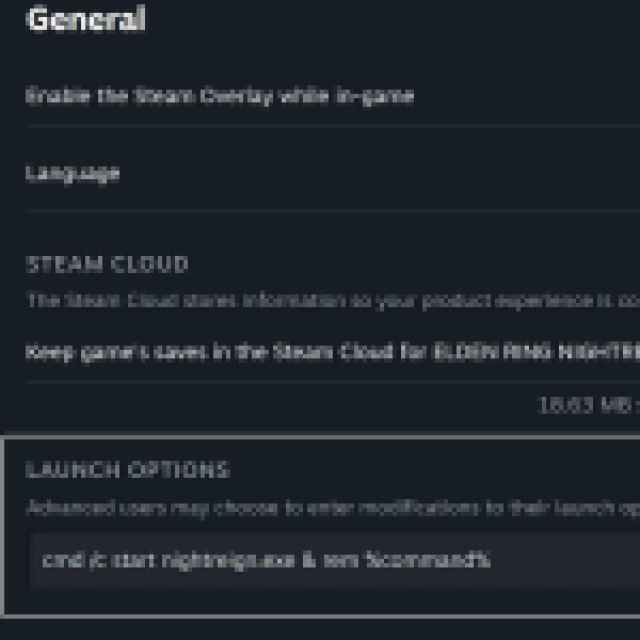
- In the General tab, add the following command under Launch Options.
cmd /c start nightreign.exe & rem %command%
- It should look like this:

Once EAC has been disabled, we can install the mod file.
Install Mod Loader
Next, need to install the mod loader.
- Extract the NIGHTREIGN-ModLoader-v0.11.0-Release.7z file into the Game folder.
Install Chromatic Aberration Mod
Finally, you can install the mod to disable chromatic aberration in Elden Ring: Nightreign.
- Extract the RemoveChromaticAberration.7z file into the Game folder.
That’s all you need to do, and the next time you launch Elden Ring: Nightreign, chromatic aberration will be disabled. As I mentioned above, this mod should only be used if you’re comfortable with playing solo and in offline mode, because the game requires EAC for online play.
All credits for the mod go to huutaiii, and you can check out their work on Patreon.
To disable the mod, simply delete the files that came with it and remove the launch command from Steam. I hope that From Software considers adding a toggle for chromatic aberration in Elden Ring: Nightreign, but considering their support for previous releases, I don’t have high hopes.


